Tools Collapsing

Does anyone know why my tools keep collapsing down. I just want the the ones I use to stay open when I'm swapping between tool tabs or re opening Capture?
-
The tool tabs are divided into a pinned area at the top and a scrollable area at the bottom. Tools in the pinned area will shut themselves to make room for others because of the limited space available for them. Tools in the scrollable area can stay open and you can scroll through them - they can go off the bottom of the screen and stay open.
You can move tools to the scrollable area by clicking the ... next to a tool name and selecting to move to scrollable area.
Ian
1 -
Thank you Ian that's very helpful. Is that a new feature or have all my other Capture versions always just had my tools in the scrollable area by default?
0 -
This feature came in with version 20 (release 13.0).
Ian
0 -

I have to use the scrollbar to move the scrollable area. Is it possible for the scrollable area to move with a two finger swipe on the scroll pad? Using MacBook Pro M1.
Thanks,
Chris
0 -
Don't know the answer but did you check and try the setting in Preferences>General
 0
0 -
Yes, but I think it depends on this setting.
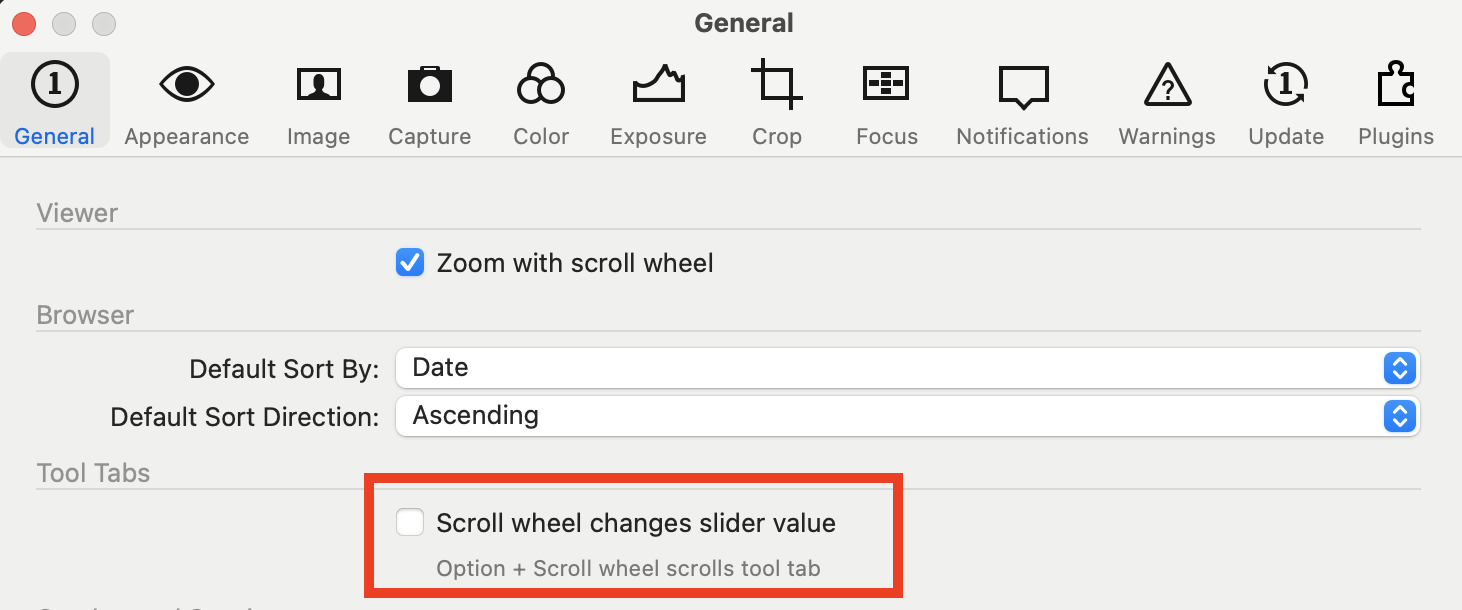
I leave this option unchecked, as shown. And then two-fingered swipe (but itself_) scrolls, whether the toolbar or other things like scrolling through the browser.
If I check it, then the two-fingered swipe changes sliders (which I don't like because it is too easy to change something by mistake) but I can still scroll the tools as described with Option+Two-fingered swipe.
Ian
0 -
Ian, thanks, this is what I want. I, too, do not like scrolling to change slider values.
0 -
BeO, thanks. This interaction didn't occur to me but now seems very logical.
0


La publicación no admite más comentarios.
Comentarios
8 comentarios