Local Adjustments - Curves RGB - Capture One 23

I cannot seem to copy the local adjustments from the Curves panel to the clipboard, Pasting onto other variants changes all the adjustments on the next image.
How can you copy local adjustments from the curves panel? is this is C1 23 bug?
-
What are you doing to copy from one image to another? Are you trying to copy in the Curves tool, or in the Layers tool?
Ian
0 -
Copying the local adjustments from the curves tool, (double arrow icon) and then pasting onto another variant. This seems to affect all adjustments in the variant rather than just the curves
0 -
Does your layer have just the curves adjustment on it, or others too? If it's just the curves, you could copy the layer to the other image, and then redraw the mask.
Ian
0 -
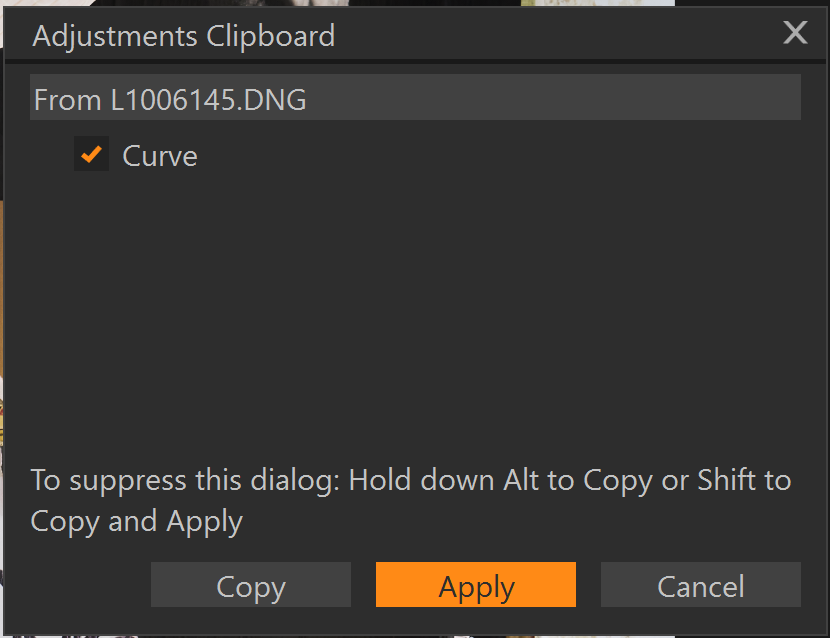
This is a screenshot of the dialog box that comes up after i select, local adjustments from the curve tool only, however when i paste adjustments to a new photo, the paste applies all adjustments.
0 -
This seemed to work for me before but now it is copying all the adjustments, Are you saying I should adjust curves on their own specific layer as a work around? I am wondering if some settings have been changed which is why i am experiencing this issue
0

La publicación no admite más comentarios.
Comentarios
5 comentarios