Counting Down!

Hello
I am working on a previously saved session that is on an external drive.
The entire session was saved independently and when I load it I drop the session onto the C1 logo on my desktop.
The session opens normally but when I highlight the five starred files to send low res to the art director C1 starts to uncheck the frames one by one. This means that I can't process all 388 needed frames needed at this stage.
I'm running the very latest C1 13.1.1.24 and the system is
Macbook Pro 13inch Late 2013
Processor 2.4 Ghz Intel Core i5
Memory 16GB
Graphics intel Iris 1536 MB
Anyone have any idea what I can do to stop this rather annoying phenomenom.
Update, C1 counted down to 177 and then stopped.
Many thanks for you time.
WW
-

If you have some form of the Auto Sync via a sidecar file operating I would suggest turning it off.
0 -
Hello SFA
Thank you for your help.
How would I go about turning that off?
Best
WW
0 -

In the preferences, Image tab, Metadata section
0 -

I am confused. You write that you are working on a previously saved session. Then you write "I drop the session onto the C1 logo on my desktop". Doesn't that trigger an import? The "unchecking one by one" is the import noticing that you've already imported these files.
Launch Capture One. From the menu look at "File -> Open Recent". Recently opened catalogs and sessions should be listed. Select the one you want to edit.
Or pick the Library tab. Under "Library" you can click and select the desired catalog or session. This is the same as using the Open Recent menu.
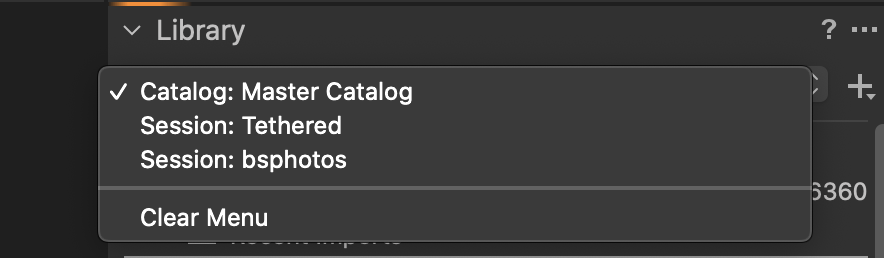
If you are trying to open a session that isn't listed open a finder window. Navigate to the session. Double click on the .cosessiondb file.
If I've got it wrong please explain in greater detail.
0
Cette publication n’accepte pas de commentaire.
Commentaires
4 commentaires