C1-22: User Collection folders all mixed up, lost group levels

Hi,
today I opened the C1 Catalog that was already upgraded to C1 22 and has been already used to make a new album with some selected pictures.
The User Collection section was completely mixed up, like some levels / groups were lost and all the containing folders / albums moved one level up.
What's going on and does anyone have a similar experience? I think the albums are still there but it's hard to bring order into this chaos.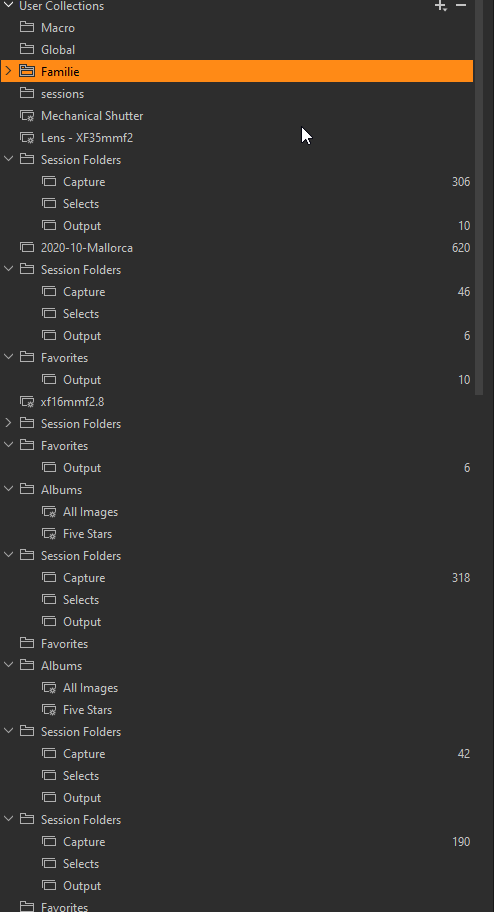
-
I used the "Verify Catalog" option to check for integrity, but everything is fine.
0 -
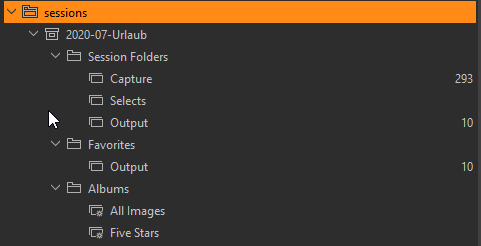
I looked in a backed up version of the catalog and it seems that all "project" levels were lost.
Below "sessions" group were many imported sessions, and each one was a named project.
All those groupings are lost and the similar named groups are now found on the top level, not below sessions.
 0
0 -
I have a similar, but probably worse issue. The dialog box to open a catalog does not work so I can't open a catalog. Not sure if this is Capture One 22 or Windows 11 issue. I've been able to open a backed-up catalog on a different computer with Windows 10 and Capture One 21.
0 -

Frank, can you open a cataolg via double clicking the .cocatalogdb file?
Maybe a thorough uninstall might help:
https://support.captureone.com/hc/en-us/articles/360002402377-How-do-I-uninstall-Capture-One-#h_01F12NY5VYERHA19G888NPKNY4Gerrit, maybe try creating a new catalog then importing a safe backup (if you have one) of the old catalog into it?
You could also try collapsing the folder tree as much as possible then right clicking down the tree and selecting Synchronize.0 -
I followed the instructions, did a clean installation of C1-22, and got a good new C1-22 installation. Clicked on open catalog, got a good dialog box, found my catalog, and clicked open. The catalog that was open when the incident occurred caused the same issue. However, I was able to close the program with task manager, reopen C1-22, and open a backup catalog. This appears to be working. I had a few new images since that backup but synchronized them back into the catalog and have only lost a few edits at this point.
0 -
@gb: I removed or moved the unsorted albums on the toplevel one by one because I did not want lo loose my edits. Everything is fine again.
I just wanted to report this problem. There might be an issue with the project folders.
0 -

Gerrit,
It would probably be worth reporting this to Capture One as a Support Case using the "Submit a request" function.
0 -
Hello Gerrit,
i can confirm your problem.
I had it a few months ago with C20Do you use nextcloud or something like nextcloud to sync your .cocatalogdb file?
0 -
No, I don't use a synced file.
0 -
@SFA: I filed a support request, thanks for the hint.
0
Cette publication n’accepte pas de commentaire.
Commentaires
10 commentaires