ColorChecker ICC profiles not showing in dropdown menus plus can't import ICC profile

Hi
I have followed the instructions both from Capture One and X-rite and I can't load or apply a newly created ICC profile. ColorChecker software saves the profile in profiles but after rebooting COP this new profile doesn't show up in the drop down menu. I navigate to the profiles in folder and deposit the profile there, reboot, and still no profile. I click on install and a pop-up immediately appears reading 'Import Profiles - No profiles were imported' Pulling my bloody hair out.
Anyone got a solution?
Many thanks
-

Hit show all in the profile drop down.
0 -

running into the same issue.
Any fix for this
Show all reveals "other", but nothing under there
0 -

To confirm, are these the instructions you followed?
https://www.youtube.com/watch?v=-zMHJtAUq90
https://fstoppers.com/software/step-step-capture-one-x-rite-colorchecker-tutorial-332479
0 -
Yep. . . I used that first video exactly
I went into the package contents to find the current profiles and those seem to be all .icm files (vs .icc) profiles which the calibrite software creates
0 -
Not sure if anything changed in the latest CaptureOne.app version vs the older CaptureOnePro versions
0 -
I haven't done this since 16.2.x. Probably time to run it again. I'll walk through it and post back later today.
0 -
Thanks Brian!
I'm currently running 16.3.3.6 for reference
0 -
Ok, so I just walked through this and it worked fine for me.
- Capture One version 16.3.3.6
- ColorChecker Camera Calibration verson 2.3.0
- macOS Sonoma 14.2.1
These are the specific steps I followed (I have this saved in Notes since I do it infrequently):
Set Color Checker ICC Profile in Capture One
- Take photo of Color Checker card
- Open in Capture One
- Set white balance using gray square on CC Card
- Set Base Characteristics > Curve > Linear Response*
- Set Base Characteristics > ICC Profile to Effects > No Color Correction*
- Export as 16-bit TIFF
- Open Color Checker software
- Align color boxes
- Click Create Profile
- Save (use default location of Profiles**)
- Close Capture One
- Re-open Capture One
- Set Base Characteristics > ICC Profile > Other > Select appropriate ColorChecker Profile*
Notes:
- *Found on the Style Tab
- **ICC Profile is saving to Library>ColorSync>Profiles
0 -
Michael, are you looking for the new ColorChecker profile under View > Proof Profile? It's an easy mistake to make. Remember, there are 2 profiles at play here. The one found under Styles > Base Characteristics > ICC Profiles color corrects data inbound from your camera. It, in essence, corrects what your camera "saw". The one found under View > Proof Profile tries to simulate on your display what you'll see on whatever output medium you choose. sRGB display, print, whatever.
And, just to complicate things, you have a 3rd ICC profile at play. You'll either have a hardware adjusted ICC profile or software adjusted ICC profile sitting between the computer and your eyes to try to correct what the monitor is displaying to some standard. This may be a factory preset or it may be from hardware or software calibration you do using a colorimeter.
It can all get very confusing.
0 -
Hi Brian,
Thank you for all of this, but I've been looking for the new ICC profile under "other".
I've repeated the steps you've laid out so many times based on that video.
I just re-did it again "just because".
I relaunched Capture One and still nothing under Other besides these:
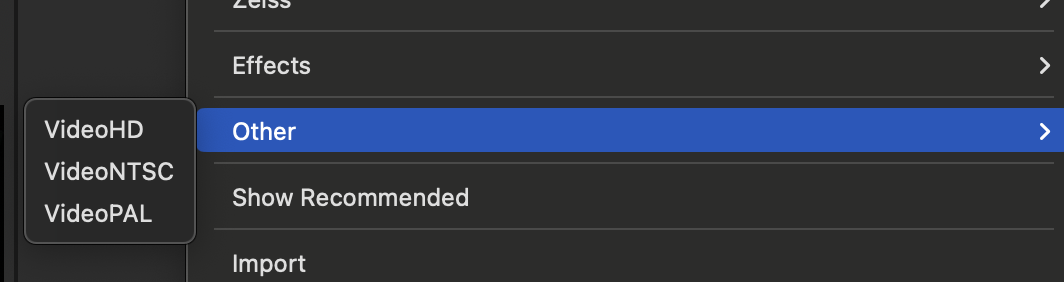
And, this is the default location for the icc profile save out of the calibration software: (I've saved it out with another name each time and not that default name)
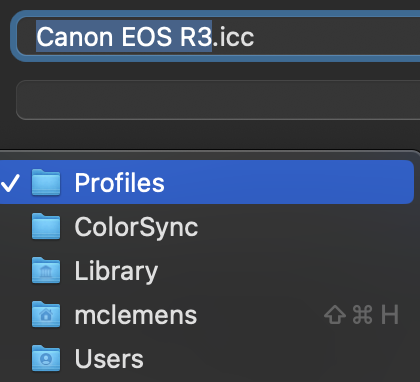 0
0 -
And, this is the version of the software I'm using for the Color Checker Calibration
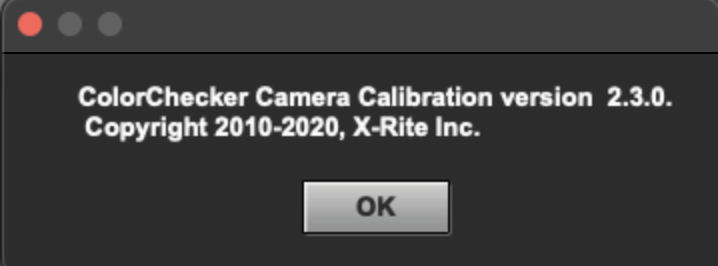 0
0 -
OK!!!! I just restarted my machine, and that FINALLY did the trick.
I was losing my mind there for a while and that was the last thing I could think of.
Not sure why relaunching Capture One wouldn't do it, but nevertheless I'm now seeing
Thank you again for all your help. . .greatly appreciated!
0 -
Weird that it took a full restart but glad you got it sorted - and that I could help. :)
0 -
Thanks again!
0 -
Why are you setting white balance in Capture One? The whole idea is that the ICC profile sets proper colors. Won't altering the file in Capture One generate a non-representative TIFF and ICC profile? I don't recall the instructions requiring setting WB in Capture One prior to creating the TIFF to send to ColorChecker to create your ICC profile.
0 -
White balance must be set before export to any color profiling software. A neutral reference is key to accurate profiles.
This discussion emphasizes Capture One's need for a native/ built-in ICC profiling tool (hint see Phocus).
0 -
Doesn't the color checker software know the accurate RGB values for each tile in the color checker? Is the profile being created for a specific scene or color (ie daylight)? You aren't changing exposure so why change the white balance.
0 -
Yep, no adjustments in C1 except for WB. Settings: Linear curve/ no color correction, export 16bit TIF with camera profile embedded. Everything you do before sending to the profiling software gets baked into the profile. Accurate in is accurate out.
0 -
See this video from Calibrite (X-Rite). They do NOT set WB on the raw file.
0 -
Interesting. In this Calibrite video they say "take a white balance" at the :38 mark. https://www.youtube.com/watch?v=-zMHJtAUq90.
So it seems that even Calibrite has a difference of opinion as to yea/nay on taking the WB. However, the video you reference dates to 4 years ago whereas the one I reference is only 9 months old. Perhaps they've upgraded their guidance?
Beyond that, I've put some thought into the right or wrong of taking that WB and, to my mind, it depends on how one uses the calibration.
Scenario 1
I take a calibration shot for a specific shoot and only for that shoot. Lighting conditions are controlled and will not change. The calibration shot will be used to not only correct colors but also to correct white balance. One must take caution to shoot on a fixed WB setting and must not correct WB in Capture One with the color temp slider. This calibration will only be accurate to this specific camera/lens/lighting setup.
Scenario 2
I take a calibration shot for a specific camera/lens combo and for a general lighting scenario. This calibration will be more general and long-lived. In this case, one must correct white balance on the imported ColorChecker image before calibration using the 18% gray square as the colors that the calibration tool interprets will only be "correct" when the 18% gray square is, in fact, 18% gray. Further, one must correct color temp in every image for which the calibration profile is used.
I think each scenario is valid with understanding of the limitations of each. However, Scenario 1 is extremely limited to very specific lighting. It would not even be valid for a full day's shoot outdoors as lighting conditions would change throughout the day - or even if lights were added or removed in a studio shoot.
Scenario 2 works always provided the lighting is roughly the same and one temp corrects each photo using a gray card or similar.
Thoughts?
0 -
I could see that. I'll have to try it too. It would be great if they were more detailed about this. I imagine you are right on both scenarios.
0 -
I'm somewhat colorblind so I enter into these conversations hesitantly. I've always relied heavily on color calibration tools and gray cards and switched to Fuji primarily on the strength of its auto-white balance. Please do let me know what you lean if you test both ways.
For the record, I think this process is a colossal and unnecessary hassle and that Capture One should automate it like Adobe did recently.
0 -
This is from the Press page of Capture One's web site.
Our Story
Born out of a passion for photography, Capture One provides photographers with the tools to collaborate with clients and creatives, achieve the highest quality photograph, and bring their visions to life. Today, Capture One offers the fastest tethered shooting in the industry, an intuitive and efficient workflow, unparalleled image quality with support for over 600 camera and lens profiles, true-to-life color processing, and precise editing and collaborative tools.
Starting out as a RAW image converter for Phase One cameras in 1994, Capture One became an independent company in 2020 after Phase One was acquired by Nordic private equity investor Axcel. With the decision to separate the software division from the camera manufacturer, Capture One could carve its own path as the definitive photography software company.
Capture One is on a journey to become the most powerful ecosystem of creative and collaborative tools with workflow freedom spanning across multiple devices, letting professional photographers work from anywhere with anyone.
0 -
Walter, did you post this to the thread you intended to?
0 -
Yes I was presenting the facts about Capture One now being independent of PhaseOne.
0 -
Cool. I didnt scan back through the whole thread.
0 -
Since this thread got some attention, did anyone ever figure out if the white balance should be taken prior to exporting the linearized tiff with no corrections?
0 -
Michael, I think it very much depends on how often you'll do this and how controlled your lighting is. If you'll use the CC before each shoot and lighting will remain constant, I believe it's perfectly reasonable to not take a WB. However, you must be consistent and not take a WB for the calibration photo or the shoot photos. The CC calibration will do it all.
However, if your lighting changes during the span of the calibration*, you must WB the calibration photo and all photos in the shoot.
*By way of example: You shoot outside and the light changes during. Or you shoot a calibration for lens/camera pairs and use that as a base calibration.
0 -
Wonderful. . thank you Brian.
0 -
Michael, a couple of things: I corrected 2 typos so maybe re-read. Also, please do keep in mind that "I think" portion. I do believe this is correct but even Calibrite offers guidance both ways.
0

投稿コメントは受け付けていません。
コメント
31件のコメント