Problem with Search Tool and Mask Copying

Hello
Since the last Build 16.2.3.32 two major things got broken, which easily adds a two figure percentage increase in time spent on a job for me. I work on a 2019 Mac Pro 16-core, 96 GB Ram, Vega II 32 GB, all NVME SSDs running Ventura 13.4.
1. Search function is buggy. Sometimes it works, most of the times it just doesn't do anything. For instance: series of images 001, 002, 003, ... 999 etc. It does not find any image when prompting a search such as 001 002 003. Always displays all of them. I've been using this tool now for a decade and assume I know how it works.
2. Copying Layers with masks (even just plain white masks) don't copy the mask in the right orientation. For instance: landscape photo layer copied onto portrait orientation photo leaves the mask in landscape, i.e. top and bottom thirds do not get the layer effects. Work around: delete mask, refill with white.
Thanks for acknowledging this! Otherwise: best Software ever! Happy camper since years...
Conrad
-
Exactly this problem!
0 -
Yes, and as you can see it is "in the works"
Issue 1 I don't understand.
0 -
Yes, thanks! I edited comment 1 for clarity. Basically, search either works or it does not work at all.
0 -
Not precise enough for me dude to understand. When you have 3 images 001, 002, 003 and search string is 001, 002, 003 then it finds them all? What would you expect instead?
0 -
Let's say I have 999 images, labeled 001-999. I search a subgroup 001 002 003 and it shows me all 999 images. It does not do the search but stays idle.
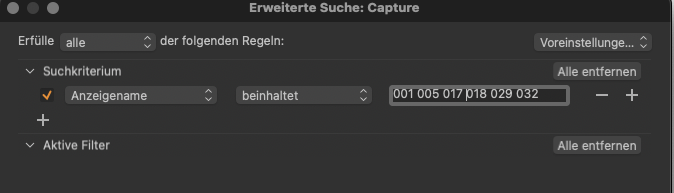
Real world example: I just searched for a client shortlist 001 005 017 018 029 032 and the catalogue presents me with images that have file names such as _DSF1935 as search result. That is through the search field top right.If I specify settings to "Displayname" (Anzeigenname) and "contains" (beinhaltet), it does not find anything:
 0
0 -
I never do multi-search in this dialog. And without specifying the field search-term 005 or something is looking in too many metadata fields and will find a lot of unwanted images.
Try the following instead:
Show all images, then menu Select>Select by > Filename
Drag them to a new album for client selects.
0 -
Thanks! But I unfortunately get the same effect in the list search. I enter my client selection, separated by space, and it shows mit about 80% if the images with file names such as _DSF0649 etc.
This is what I prompted ("Zwischenraum" is I think translates to sth like "space separation"). But I also tried separation by line etc., same result. It somehow finds many images that do not match the search criteria.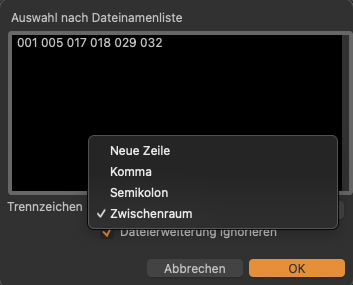 0
0 -
Maybe there is a problem with pure numerical values. Try the full file names e.g. _DSF005 _DSF017
or _DSF005.NEF _DSF017.NEF
0 -
Hi Conrad, did this work?
0 -
Hi BeO
Interesting: when prompting a search for certain, exclusively numerical values such as 001 (after I renamed the files within C1 by batch rename with a 3 digit sequence starting at 1) it displays many more files. When searching for original file names such as _DSF0649 is does find only the files that match the search term in their file name. So searching for a file 001.RAF (renamed file name) by entering 001 presents me all images, when searching for _DSF0649 (original file name) by entering _DSF0649 or 0649 identifies one file. In this case, a session was used.
Also, the error does not always occur in every session/catalog and seems somewhat random when it occurs (both to which catalog/session, and to which files within a particular catalog/session). In another session where I renamed file names in exactly the same way to a 3 digit sequence staring from 1, when searching for 001 in the search window displays 001.CR3 and 006.CR3. When I restrict search to display name, it correctly only identifies 001.CR3. Searching for 002 finds 002.CR3, searching for 003 finds 222 files of a total of 223 files in the session (along them is 003.CR3, but none of the other 221 file/display names contain the criterium 003 in the file/display name since it's a sequence from 001 to 223). When I restrict the search criteria to display name, it correctly identifies 1 file.
My guess is that the search criteria when prompting a search directly in the search field within the library panel have changed. It seems to find criteria other than the file/display name (maybe in the metadata?) that conform to the search term. When I change the search criteria from "Beliebig" (Any) to Anzeigename (Display Name) it mimics the search field behavior as it goes from finding 222 files from the search example above (003) to one file 003.CR3. Maybe that also explains why the search only fails for numerical values as those are more likely to occur in the metadata (and it is therefore only indirectly influenced by the batch renaming as I used numerical rename).
And finally, at second glance, going the route via file name list search (Select>Select by > Filename) works precisely as it selects files that conform to the search criteria in their file name.
Maybe this is intentional and not an error that using the search field in the library panel presents you with files that conform to the search term in any of the metadata values. But I think it should not be the default criteria setting. The behavior is confusing when using numerical values in the search field as you don't get the info which of the search criteria was met and that kind-of renders it useless.
I much prefer using the search field for matching my data with client selections and I frequently use numerical file names. I find it to be more intuitive than file name list search as it only displays you the found files (rather than highlighting them after file name list search which requires another step of creating an album to get to the same place).
0 -
Hi Conrad,
Maybe this is intentional and not an error that using the search field in the library panel presents you with files that conform to the search term in any of the metadata values.
I assume that too.
I much prefer using the search field for matching my data with client selections and I frequently use numerical file names. I find it to be more intuitive than file name list search as it only displays you the found files (rather than highlighting them after file name list search which requires another step of creating an album to get to the same place).
Don't you want to remember your client's choice?
0

投稿コメントは受け付けていません。
コメント
12件のコメント