Chromatic Aberration

What problem do you see this solving?
I have found chromatic aberration on one of my images although this is checked in my lens correction tool. My lens is described there as Fujifilm Generic. It is in fact the XF 100-400 mm lens, which is conspicuously absent from the lsi of Fujifilm lenses. Why is this? It isn't a new lens, I have been using it for five years.
When was the last time you were affected by this lack of functionality, or specific tool?
I haven't found chromatic aberration on any of my images before, or certainly not since I started usiong Fujifilm and Capture One at much the same time.
Are you happy to be contacted further about this suggestion or request?
Yes.
-

Hey Ian McColl, I'm moving this post to another topic since this is not a feature request.
0 -
What do you mean by "another topic"? My post was implicitly basking for this lens to be included. Or else for an explanation of why it can't be. Will someone else be answering me on this?
0 -
Hi Ian McColl - the point is that the feature request section of the forum is specifically for suggesting or requesting new features for the app.
Now to your issue - when you complain of chromatic aberration, are you judging it by looking at the image zoomed in to 100%? One of the limitations of Capture One is that corrections for things like CA don't show up properly in the preview at zoom-to-fit level.
If you are seeing it even when zoomed in to 100%,
- do the CA sliders satisfactorily correct it?
- can you share a screenshot?
There used to be a dedicated thread for requesting lens support, but I'm not sure where it has gone. Perhaps you could use the Request Support link at the top right of each forum page to request it? I am not familiar with this lens, but a bit of Googling suggests that it is thought of as being quite good on chromatic aberration. Maybe they haven't found thought it to be a lens that needs much correction, or maybe there haven't been many Capture One users who have asked for support for this lens.
Ian
0 -
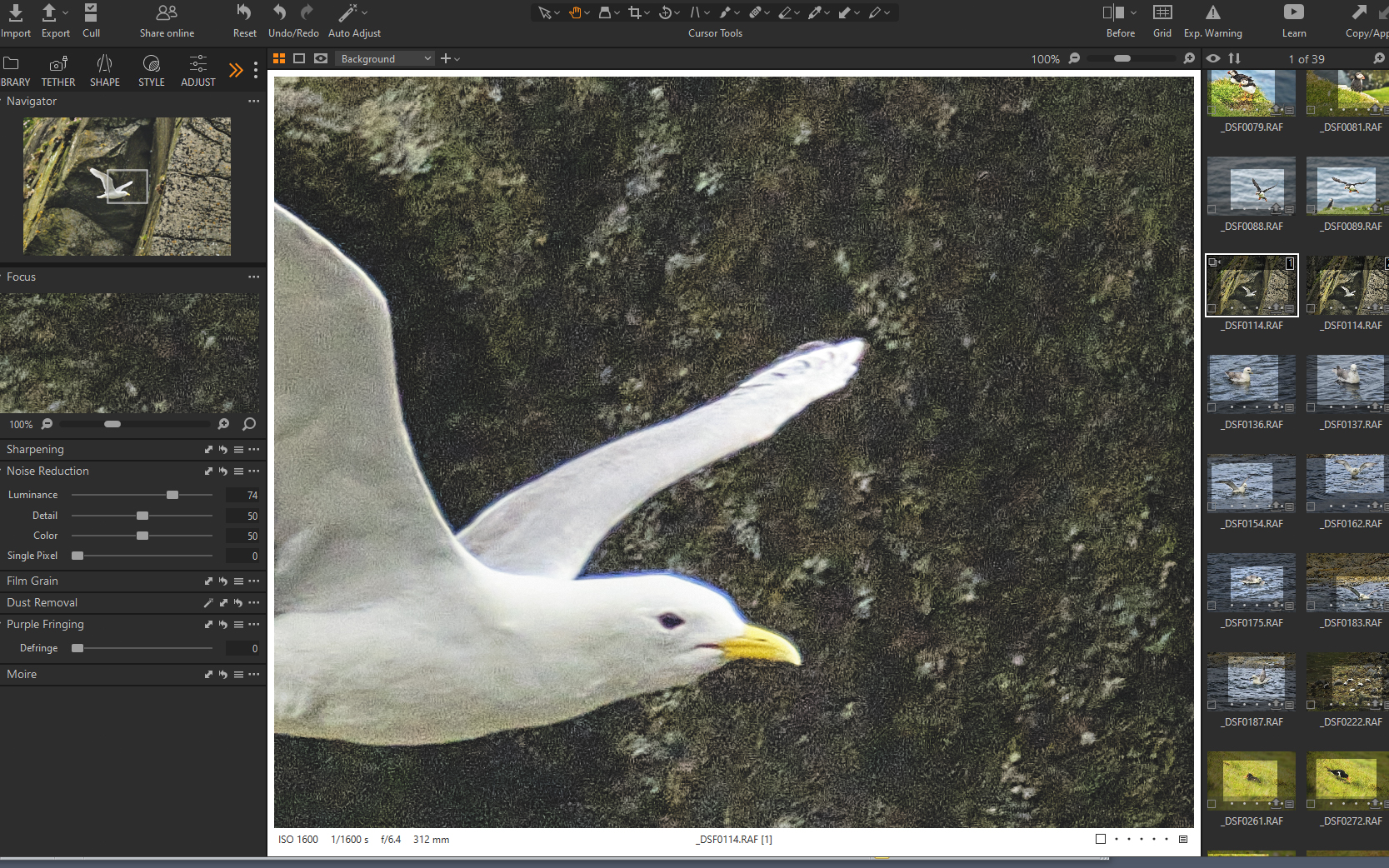
Yes at 100%. CA is checked in Shape/Lens Correction, but there are no sliders there. But the purple fringing slider in Refine (is that what you meant?) makes no difference. Here is the screenshot.at 100%.
 0
0 -
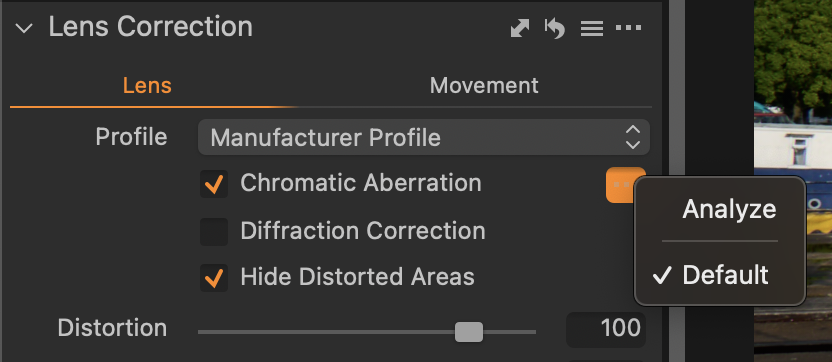
In the CA tool, have you clicked the ... to get this menu? Then choose analyze.
 0
0 -
I hadn't, but it is isn't making any difference. Sio I have now adopted a different solution. As this was the only blue colour in the entire image I have used the colour editor to darken and desaturate it. This has been given a partial improvement. I have then darkened it further in a layer with the exposure slider and also used the Kelvin slider to add warmth and make the colour tone consistent with the surrounding rockface. I have now also reduced the noise in the background and have applied structure to sharpen the eye and the beak and I reckon this is as good as I will get. The image is actually not so much about the bird itself as the structure of the rockface behind it. The bird is in the middle of a dark area surrounded by blocks in shades of grey and gold, with even a tiny bit of green growing out from a crack, but obviously I didn't want that blue fringe to be a distraction.and, whatever had in fact caused it, I assumed that it was chromatic aberration which should have been automatically eliminated.
0

投稿コメントは受け付けていません。
コメント
6件のコメント