Bad color reproduction for Canon 90D and Canon M6 MkII

What problem do you see this solving?
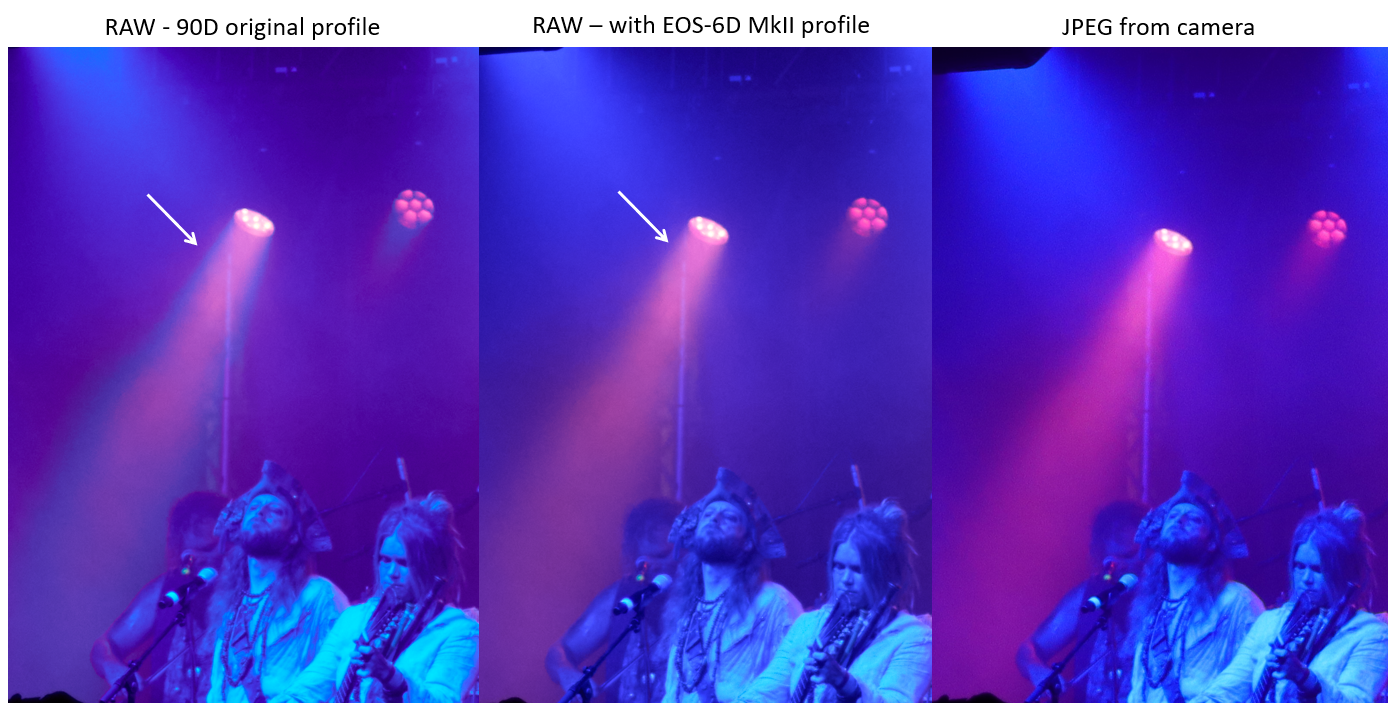
The colours generated from the raw files of the Canon 90D and M6 Mk II, that share the same sensor from Canon, are really not great, with breaks in gradients, especially from highly saturated areas (like coloured light spots) and reddish oranges. Examples shown here :
When was the last time you were affected by this lack of functionality, or specific tool?
Since the day I had the 90D, so 3 years ago.
Are you using any workarounds or other solutions to achieve your goals in Capture One?
More or less functioning workaround : use the colour profile from another canon camera, like the EOS 6D MkII. Not the same sensor but it completely resolve the problem. Unfortunately, it might also bring some new ones as the colours profile is not made for this application.
Are you happy to be contacted further about this suggestion or request?
Yes
-

hey Etienne Vigoureux, thanks for posting.
you can try to tweak the colors and save as an icc, which can later be used as default for the selected camera model:
- Saving a color scheme as an ICC profile
- Saving new default settings in the Base Characteristics panel
moving this post to another topic as this is not really a feature request.
consider writing to support if you want to let our devs know that you think the colors are incorrect.1 -
Thanks Denis Huk for the tips and moving the post. I suppose it might be relevant for the devs to know, I'll write to support then.
0
投稿コメントは受け付けていません。
コメント
2件のコメント