What happens to trashed images

I am new to Capture one and I have not been able to find a clear response to my question in any of the tutorials or FAQs.
When I import images to Capture One am I moving the original files? Or do the original files remain on in my source location and Capture One just moves copies of the original images? If the original images are being physically moved, once I have completed my editing on Capture One, if I have moved any images into the Session Trash, will those images be permanently deleted if I empty the Session Trash? If so, if I decided I wanted to keep those original images, would I need to move them out of Session Trash and back to my original source location instead of emptying the Trash folder?
Here is why I ask. All of my original files are currently stored on a hard drive connected to my Windows desktop and I would like to keep all of my originals in that source location. I did a test session recently and following that I emptied the Session Trash thinking my originals were still safe in my source. Unfortunately that was not the case and my images were deleted. Luckily I was able to retore them from a backup.
Thanks.
-
Welcome Mike.
Let me ask one thing: Even if someone gave you answers you all your questions, which could be excessive because there are a lot of options in C1, would you rely on the assumption that there is no error and misunderstanding?
My point is, before running the risk to lose my valuable assets, the originals, I would copy a set of images and play around with a test session, test catalog, different options in the import dialog, session as a browser in the system folders, moving images from one folder to another (hint1: do this within C1) in parallel with reading manual, FAQs, and watching videos.
Hint2: enable all warnings in the preferences and don't silence them, they are gold especially for C1 beginners.Cheers
BeO
1 -
There's nothing to be improved yet, so please can you move your questions to the appropriate section of the community?
0 -

moving this to another topic as this is not a feature request
1 -
If you are working in a session (not a catalog - see below for catalogs, which work a bit differently) then
- if you want to keep the images in an existing location on your system, there is no need to import them to the session - just navigate to the folder where the images are and start editing. You might like to add the folder as a session favourite, for ease of navigating to it next time.
- if you move images to the session trash, they are physically moved from their current location to your trash folder. And if you empty the session trash, those images will be permanently deleted from your computer. (As you discovered, you may be able to retrieve them from a backup if that was unintentional.)
However, if you want to work with images in an existing location, instead if importing them into the ready-made folders that Capture One creates for sessions, you may be better off working in a catalog. In that method, you import the images to the catalog which gives you three choices
- You can leave them in their existing location - this simply indexes the images in the catalog database and creates references to where they are (so the are "referenced images"). (Note that this method is not suitable if the images are in a memory card, because as soon as you remove the card from the reader, they are not longer accessible.) To do this choose Add to catalog in the import dialog, and notice that it says "your files will stay where they are".
- You can copy them to another location on your computer - perhaps somewhere in your pictures folder. They are still referenced images. This is a good way of dealing with images on a memory card, but it's not such a good way of dealing with images already on your system, because you are doubling up the storage space used for the images - you have both the copy in the original location and the copy in the new location you choose. To do this choose Add to catalog, but choose the option that says "copy to folder" and choose a suitable folder.
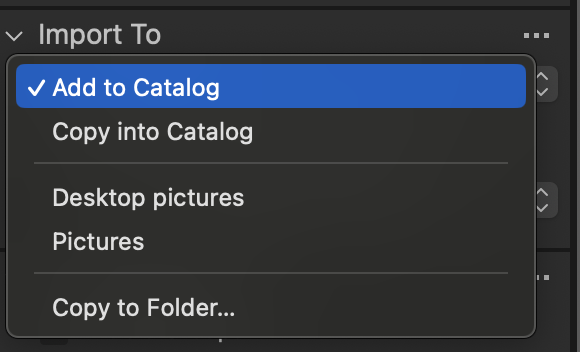
- You can choose instead to have the files stored inside the catalog structure. This makes the catalog very portable, but it uses extra storage because again you have two copies of the image files, in the original location, and inside the catalog structure. To do this, choose Copy into catalog, instead of Add to catalog.
It seems to me that what would suit what you are doing is option 1 above. In a catalog, if you put images into the catalog trash, it doesn't move them physically, it just indexes them as being in trash. If you empty the catalog trash, you then get two choices. It asks you whether you just want to remove them from the catalog, or to also delete them from disk. It sounds as though just removing them from the catalog would correspond to what you expected might happen.
Hope that helps. If you want to get some tutorials on how to do all this, try the resource hub (found from the Help menu inside Capture One) or at support.captureone.com then the Learning Hub button. Or browse what's available on the Capture One Youtube channel.
Ian
0 -
Thank you, Ian. Very helpful.
0


投稿コメントは受け付けていません。
コメント
5件のコメント