Capture One 16.6.0: Why Exported Images Appear in Smart Albums

Starting with Capture One 16.6.0, all images within a session—including those in Capture, Selects, and Output folders—are included in Smart Albums like “All Images.” This means exported files may now appear alongside your original images, depending on where they’re saved.
If this isn’t the behavior you want, there are two ways to customize how Smart Albums behave:
-
Add search criteria to your Smart Album.
For example, exclude certain file types (like JPEGs) to prevent exported versions from appearing. You can refine this based on the file formats you export.
-
Disable Session Folders in Preferences.
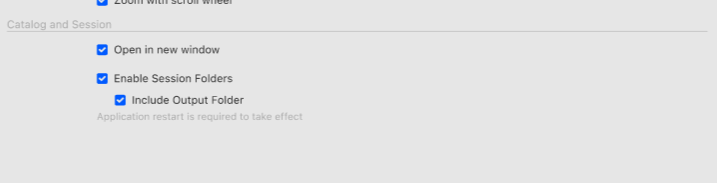
Go to Preferences > General and deselect “Include Session Folders.” This removes folders like Output from Smart Album searches entirely.
We’re also exploring ways to give you more flexibility in how Smart Albums work in future updates.
-
正式なコメント

We’ve investigated and implemented a resolution to ensure exported images behave as expected in Smart Albums.
Resolution
We will now hide the CaptureOne folder when the export target is any nested folder of the session’s output folder.Important Notes
-
If the output folder is later changed, the original folder’s CaptureOne settings folder will not be unhidden.
-
The preference “Include Output Folder” determines whether the output folder is part of the session hierarchy.
Behavior Overview
-
When starting Capture One with “Include Output Folder” enabled
-
The output folder and all its children appear in the session hierarchy.
-
All images inside those folders appear in All Images.
-
-
When disabling “Include Output Folder”
-
A dialog will prompt to restart Capture One.
-
After restart:
-
The output folder is no longer in the session hierarchy.
-
It appears under Shortcuts.
-
Images in the output folder still appear in All Images.
-
Images in any child folders do not appear in All Images.
-
-
Note: CaptureOne folders are still created in all folders.
-
-
When creating a new session with “Include Output Folder” disabled
-
The output folder is not part of the hierarchy.
-
Its children do not generate CaptureOne folders.
-
-
When disabling “Enable Session Folders”
-
The “Include Output Folder” option is greyed out but retains its previous state.
-
-
投稿コメントは受け付けていません。
コメント
1件のコメント