Too much white space in forum posts?

In general I think the design criteria for the new support pages leaves too much white space and too few lines of useful text based information.
I would prefer to see more posts listed in a single screen that can be seen presently.
How do other feel about that?
Whilst the uptake on the new forum seems to be taking a while it's not a major issue but if it gets busy it could become an annoyance.
In theory the automatic search for potentially related posts (or support documents?) presented according the text of the title offers some merit helping people finding answers to possible questions or similar posts.
Whether such features really work is less clear. (Especially in partly technical environment.)
My title for this post produced the following suggestions:
- Raw Conversion - Color Space Issues
- Embedded color profile for L.Type prints
- Import image arranged by date of shot.
- C1 image rendering = Best order to use adjustment tools?
I have not clicked the links.
Perhaps it all looks more suitable on portable devices?
Grant
-

I agree. My mobile experience is better than the old form (which basically didn't have one) but even there there is a lot of white space. The desktop experience certainly has a lot. I also don't like the light grey font.
I might have to look at creating a Stylish entry for the forum: https://userstyles.org/ :) My preference would be for some tweaks by the admins.
0 -

I agree with you both. There were things I didn't like too much in the previous forum but, as every other forum, it had a structure. Everything was organized. This forum looks like a sea where everything stays afloat and there isn't any kind of division to lead our attention. The font is too big, the white overwhelming. My global feeling is this is a dispersive page.
0 -

Be kind, some web-duhsigner spent a lot of time on this. Luckily, Greasemonkey is still around :-)
0 -

Light blue on white is not very readable.
The loss of real estate is also obvious.1 -
Down the road a few days and I have also now taken a look at the forum on my smart phone.
On the smaller screen the white space is not quite so excessive in appearance and to some extent is a welcome alternative to a very intense block of small text, offering options for swiping and scrolling with reduce chances of inadvertently selecting text and going to edit mode. (For example.)
Presumably the plain appearance and mainly white is also a benefit for connected data traffic and thus performance.
If there are compromises to be made in order to most easily support as many browsers and screen handling options as possible with least effort then this compromise seems reasonable assuming that there is indeed significant demand for access via smart phone.
That said, if there are some options for fine tuning they would be worth discussing. For example the Title font is somewhat larger than it needs to be when displayed on a phone screen! Or at least it is on my screen.
Grant
1 -

Got to agree with you, far to much bare white space. :-(
Dave
0 -

Way too much white.
Goodness...my retina was basically seared when I refreshed the tab with the previous forum to this new one. Have to wear sunglasses at night.
Where is dark mode? Black edge bars?
1 -
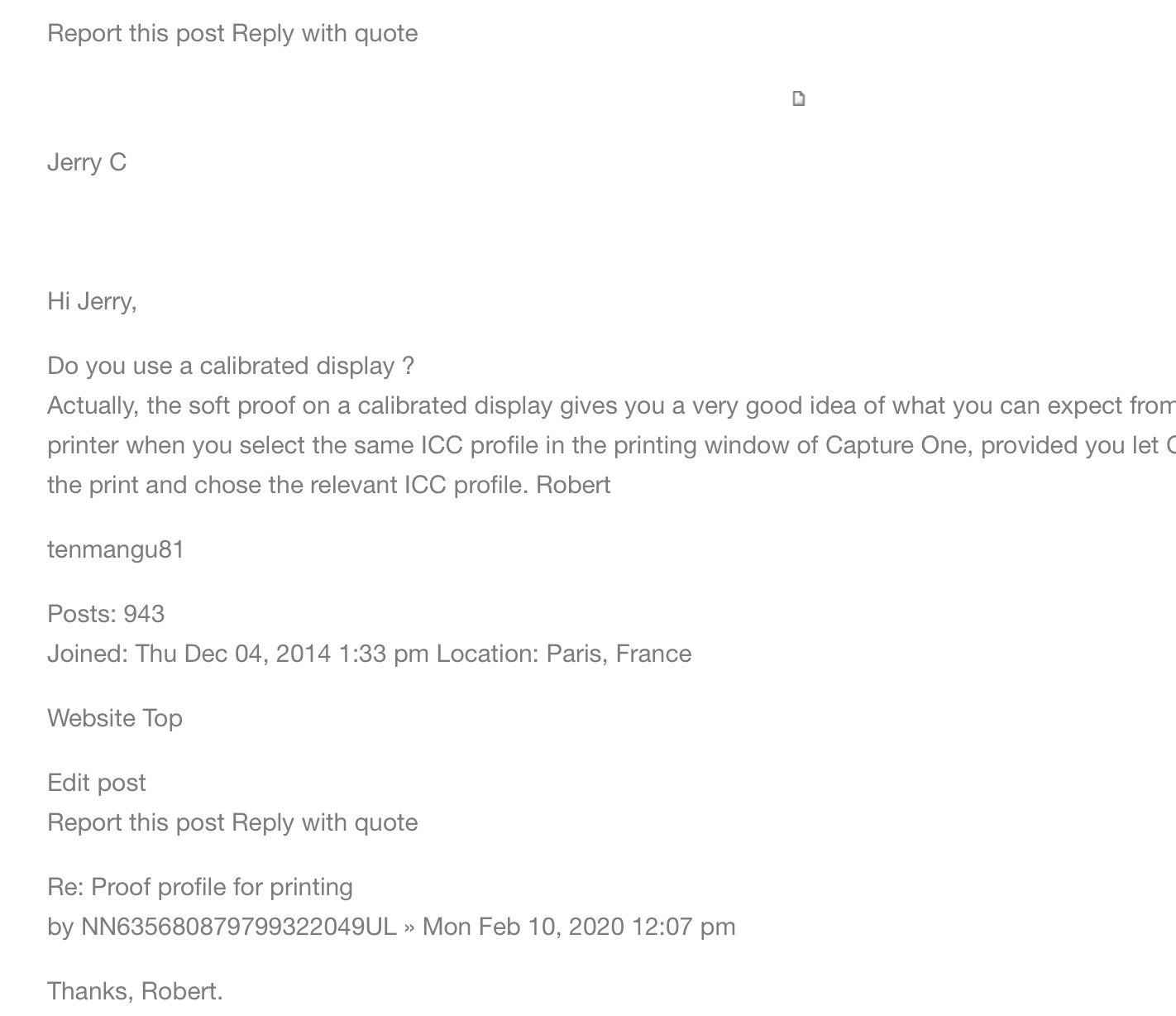
I find the new layout very, very difficult to read. Too much space betweenn lines, everything is almost at the same level, grey or blue characters on white background, and, in addition, comments, user name, joining date, location, website, etc... are all mixed up !! See below, for instance:
 1
1
投稿コメントは受け付けていません。
コメント
8件のコメント