COPY & PASTE DOES NOT WORK PROPERLY IN CAPTURE ONE 20

We are having an issue with copy & paste feature in Capture 20 – there are no issues in Capture 12 with copy and paste.
Sorry for the multiple use of the word ADJUSTMENT but the situation is:
Introduce a series of images into Capture One with any adjustment on it. This can be via tethered or imported with a style from a card.
Make a further adjustment to one of the images that already had an adjustment on, (adjust one of the settings that had already been adjusted, ie if brightness was 5 change it to 15).
Copy that new adjustment whether locally via the clipboard or globally with the arrow keys.
Paste it to another one, (or multiple images), of the introduced images in the same series.
The new adjustment will not have copied to the image / images.
To make it further complicated if there was no adjustment initially with the introduced images and you make a new adjustment, (ie. If saturation was 0 and you change it 10), then guess what, that DOES copy and paste to your introduced images. This setting can then be changed again and again multiple times and copy and paste will work.
TO SUMMARISE, IF AN IMAGE HAS BEEN IMPORTED OR TETHERED INTO CAPTURE ONE 20 WITH ANY ADJUSTMENT THEN IF YOU MAKE FURTHER ADJUSTMENT TO A SETTING THAT HAS BEEN ADJUSTED THEN IT WILL NOT COPY THE NEW ADJUSTMENT.
IF THE IMAGE HAS A SETTING WITH NO ADJUSTMENT THEN ANY NEW ADJUSTMENT TO THAT SETTING WILL COPY AND PASTE TO ANOTHER IMAGE AS PER NORMAL IN CAPTURE ONE 12.
-
I tried to reproduce with v20.0.2 Windows version with no success.
Can you reliably reproduce this behavior?
Can you check the Adjustment tool when copying to see more clearly which adjustments are checked?
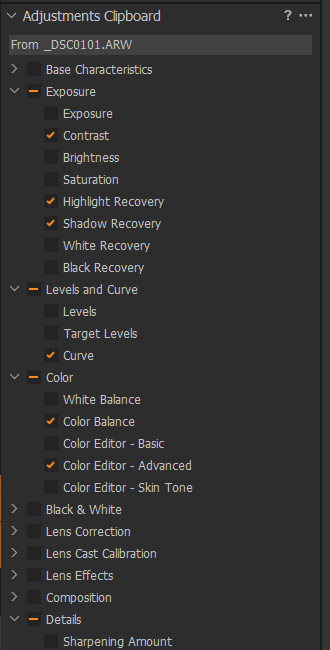
How is the Adjustment clipboard configured?:
 0
0 -
Many thanks for your reply,
This happens every time without exception.Auto select is ticked.When you open the adjustment clipboard to see what is ticked then it is all correct for what adjustments have been made, however, like I have said if the file was introduced into Capture One with a adjustment on any further adjustment is not copied, (the adjustment clipboard has the appropriate tick). If the file has no adjustment on then copy and paste works as normal.Cheers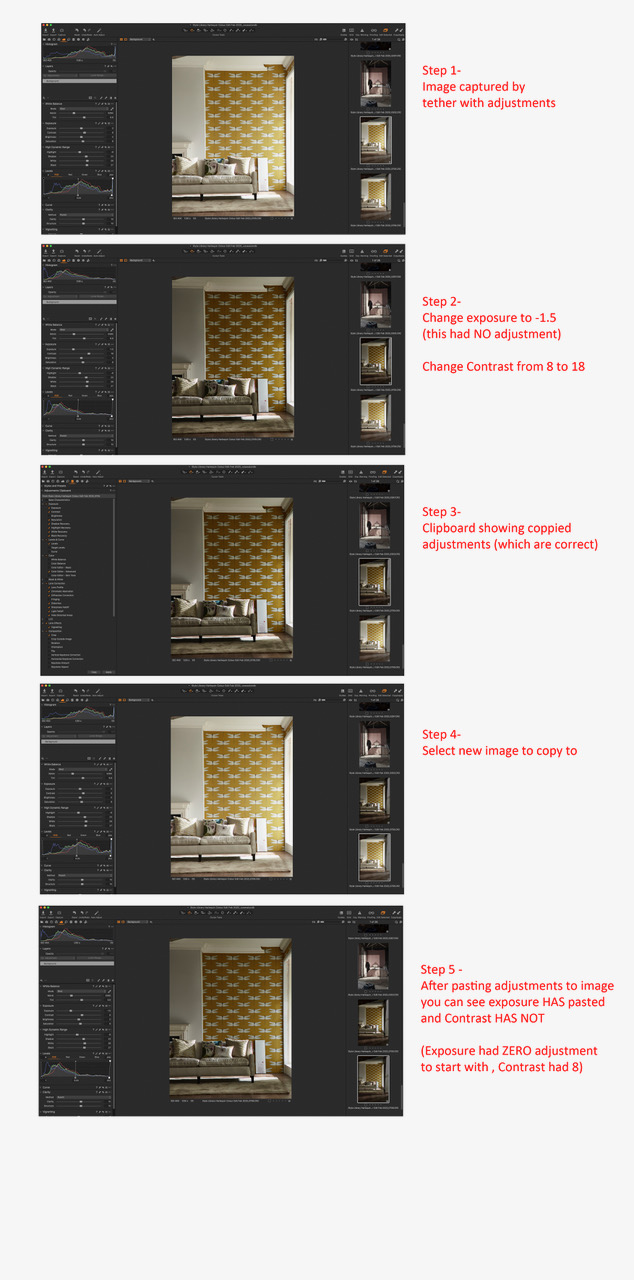 0
0 -

Andy,
Have you used a Style or Preset at any point earlier in the process? Especially in relation to setting the Contrast?
Grant
0 -
Hi Grant,
Yes our "own" preset is applied to the image when is captured via the tether lead. Any further adjustment to settings after that cannot be copied and pasted to other images. If there is no initial adjustment to a setting when the image is captured or imported then any adjustment to any of the settings will copy and paste as normal.
Cheers
Andy
0 -
Andy,
This came up a few weeks ago on another thread but that was specifically related to the use of Layers.
I suspect that what is happening is that the Style values are taking precedence over other adjustments where the Style sets its own value AND is being copied and applied.
Now the question is - is that what should happen.
And if not, as in your case, how should the user be expected to tell C1 that the values on the style (which of course may have adjustments for many tools) should or should not be applied for this particular image. (Or worse, per image in a batch run?)
I think it might be tricky (and time consuming) to to work with some sort of "extended check list" for a single image.
In a batch process of several hundred images I'm not sure people would know which settings (assuming there were some process options available) to set. Ask 1000 photographers how they wish to deal with "flexibility" and you'll likely get 1000 answers, all different.
There are times when offering new and extended functionality sounds like a good idea but ends up being a lot less "good" and a lot more difficult than originally envisaged.
I once observed a software house take on what they later told me was expected to be about a 6 day development to add some functionality for extracting the text (only) content of PDF files from PDF files and making it useful data. Add another 6 days for supporting user beta testing and that would be it other than keeping it up to date if anything advanced over the years.
6 years later the development was still being "modified" to treat with rogue files that clients kept producing (despite 'standards') and eventually they found a company who had gone down the same route as their primary business and could offer a "build-in" option that they could easily plug in to their own development. They grabbed the opportunity since the continuing support effort for the errant files was far removed form their core business needs and the functionality was more widely in use in their marketplace and thus no longer a very useful USP.
The sort of subject we are discussing here very much reminds me of that development. (And a few others of a similar nature.)
What would be your preferences?
Grant
0 -

Andy,
I have been struggling with this exact issue for days, and I think I figured it out.
This is the culprit:
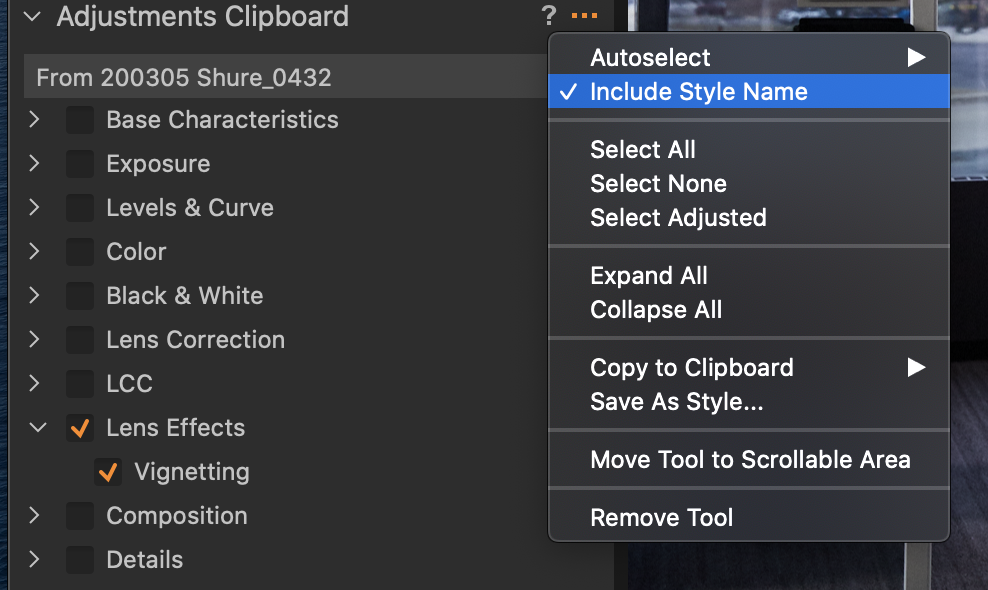
You need to uncheck "Include Style Name" in the Adjustments Clipboard. This is in the Action drop down menu, where you click the three dots on the right.
I think it is checked ON by default, which now means that your adjustments are copied as a Style. When you want to override that style by say, increasing contrast, it disallows adjustments to any field that was part of the original style. This seems to be true even if you've made adjustments to a single image. You cannot copy over the adjustments until you disable the Style.
I can understand why they would like to maintain the functionality of Styles when copied. But I'm guessing that for most users it is more important to be able to quickly copy and paste.
Again, uncheck "Include Style Name". Hope that works for you.
- jay
0 -
I suspect you are right Jay.
Just wondering if there are any other nuances about usage that would be good to discover.
What do you think? m
Grant
0 -
Grant -
Hmmm...
Well first of all, why would you default to a new setting that disables a common action by most, or at least many, current users? We all copy and paste settings and expect it to just work. You already have the Adjustments Clipboard where you can select/deselect fields. You can separately copy and paste Styles. So why make a copy/paste of global settings (or individual setting, such as only vignette) a STYLE copy? I'm not copying the style, I'm copying this particular adjustment(s) to this image right here. If I want to copy the style, then I'll do that elsewhere.
What am I missing?
This issue caused me significant grief on my last client shoot and it was too deeply buried to troubleshoot at the time.
- jay
0 -
Jay,
I can't really answer that.
I think there were 2 issues bouncing around that were slightly linked and made more complex by layers and the ability to apply presets and styles within a layer and then copy and paste elsewhere. All, apparently, influenced by user demands.
The two aspect were
Layers, copied and pasted, were replacing whatever layers had been applied before. People were asking for that to be changed to adding the layers rather than replacing so that they had control over the results with all layers still in place.
Sadly that then broke the processes for others whose workflow REQUIRED the layer replacement if it was to be successful as implemented.
Some options might have been useful although at the risk of making the choices complex and difficult for a number of users to fully understand and exploit them.
I suspect the second point was that when people applied a Style they expected it to be maintained and applied no matter what - even if they ended up, knowingly or unknowingly, undertaking a batch "cut and paste" that for some or all of the images completely erased all traces of the original "Style".
With the revised process and the additive layer situation the potential multiple deployment of multiple "Styles" on the Background and all layers (now additive remember thus potentially many more presets and styles in play - or overwrites for them) just makes the entire process far more difficult to comprehend as far as end result "rules" are concerned.
Adjusting the clipboard setting for single image ought be be fine - a few of extra key strokes for a lot more control is not a bad trade and one can probably find an improved process. But batch processing a few hundred or thousand image when working against a tight schedule .. not so easy to be sure everything is going to work out as expected and possibly not so easy to fully appreciate, in some situations, exactly what effect the late mass edit will have on every one of the images selected.
In a very controlled shooting situation I could see that one might well be able to apply consistent edits across large batches of images. In other situations mass application of Styles (for edit purposes rather than Metadata maintenance) may not be widely practised because the situation is in constant flux and at best only quite small number of images will successfully accept work with a significant Style without any further tweaking.
I don't think there is a "one size fits all" solution to these perceived needs. Nor do I think the possible additional enhancements required to satisfy all (maybe) of the users are likely to be trivial or enthusiastically received. That would be too much to hope for.
If there is no totally satisfactory and simple answer then we might as well address the question of how to eat the entire elephant and come up with a consolidated shopping list of tools that will allow for the needs of all diners. Then see if the chefs can deliver, should they choose to accept the challenge.
Just my personal opinion of course.
Grant
0 -
So, the solution for Andy is this?:
Shoot tethered without Style.
Choose a master image, apply style, apply further adjustments.
Without "copy style name" ticked, copy and apply adjustments to target images.
Or, if the style is relevant while shooting, shoot tethered with style, and before copying the adjustments, reset the target images.
?
Regards
0 -
Thanks everyone for your comments.
Jay you're a star. That works and its perfect for me and my workflow.
I just went back to Capture One 12 to see if the "Include Style Name" is checked in the drop down menu - and it is.
So for whatever reason the Capture One folks changed the copy and paste facility for 20 - anyway there is a solution.
Cheers
Andy
0 -
Andy, glad that worked. I thought surely other users are struggling with this issue... so I opened the forum and BAM. Yours was the first post at the top.
Capture One 20 still feels buggy and hiccupy on my brand new Macbook, so I'm not sure what gives. Catalina issues still? But at least now I can copy/paste.
0 -

This was driving me CRAZY!!!! Thank you all for sharing this information:) Problems solved!!!!
0

投稿コメントは受け付けていません。
コメント
13件のコメント