Renaming and Relocating Catalogs

Hi all!
Does anyone know how to A) Rename an existing catalog and B) move that catalog. I am currently transferring my lightroom and aperture catalogues and I want to make sure I keep them separate from a new catalog for all future work. I had already created two catalogues but I want to clarify the names better and relocate them for additional clarity.
Any help anyone can lend would be appreciated. I"m sure it's simple...when you know how.
Thanks
Seth
-
A) Renaming is as simple as renaming the catalog file:
yourcatalogname.cocatalogdb
Because there are folders in parallel to the catalog file:
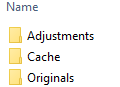
you would need to store both catalogs in different folders.
B) Move the catalog file and the 3 folders above (or the parent folder in which these reside) to your destination, so that the catalog and the 3 folders keep their relative location to each other.
If you have your raw files in the Originals folder ("managed" catalog), then they move too.
If you have a "referenced" catalog (the raw files are located somewhere else/during import you have specified to keep the raw files in their "current" location), then you do not have to do any special neither.
Just avoid moving the raw files with Finder, as this invalidates the references to them in the catalog. There is a way to do so but that is another topic.
I am on Windows but I think it is the same on Mac.
regards
0 -
Thanks for the quick response BeO.
So does this mean that I can change the catalog name and move the catalog from within finder(I am on a mac)? I do have the raw images on a separate hard drive and I do know that you can only move them from within C1P. I"m still a bit fuzzy on where I have to be working from and if it's within C1P I can't figure out how.
thanks again.
0 -
Hi Walter,
I actually have seen your channel and you migrating aperture libraries was helpful(and I even subscribed). I just need that tiny bit of clarification about where I rename the catalog. Can it be done in Finder ('m on a mac) or does it somehow have to be done through capture one.
thnx
0 -
Ah, the package is a difference compared to Windows. Good that you jumped in, Walter.
0 -
Bingo! Thanks to both of you.
I must say, transitioning to CapOne and settting up on external drives has proven to be more troublesome than I anticipated. Your help is greatly appreciated.
Cheers
0 -

Thank you Walter,
Had relocated and renamed the catalog successfully, but could not figure out the second part (backing up with the same same). Brilliant!
Very much appreciated!
--Jeff SInger0

投稿コメントは受け付けていません。
コメント
6件のコメント