Window viewer settings ?s need to remove

New user here just running the trial version so first-time using it.
Been testing and editing all day playing with it.
I have changed around my workspace to what I wanted.
I used the menu item Window - Viewer and it let me move the new large image window to the place I want but in the background, it is still showing the other version of the window and I do not see any way to get rid of the other window on the back.
How can I remove that other image area in the background here is a screenshot showing the setup I am using thanks?
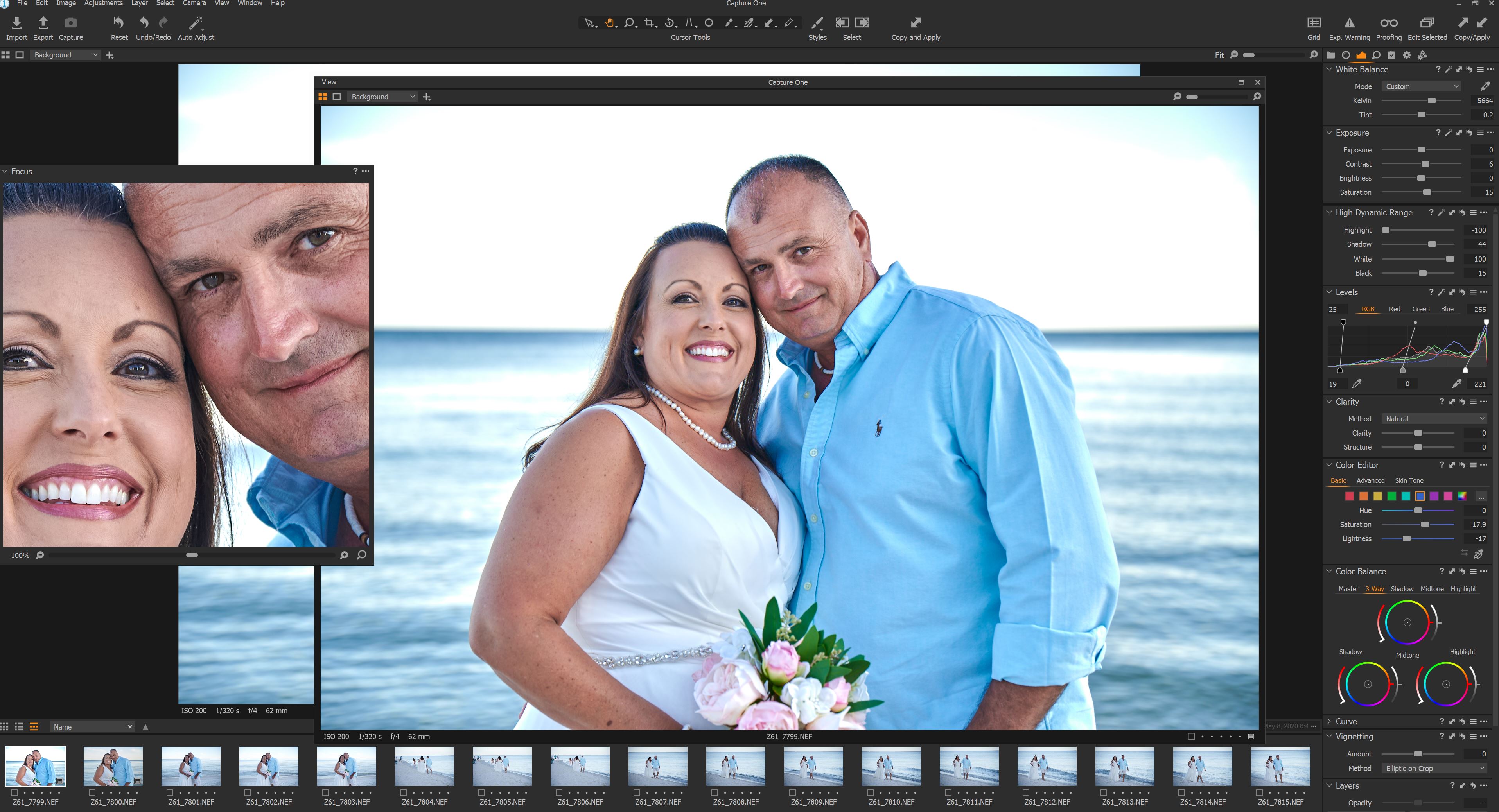
-

The additional Viewer is really intended for use on a separate Monitor (for a Studio shoot for example) or as a quick way to get a screen filling low clutter/no clutter option on a single monitor. It tends to open in smaller than screen size so that it is ready to be moved to a separate screen via drag and drop. However you can expand it to fill the screen should you wish to.
The traditional single screen workspace of Browser, Viewer and Tools will still exist.
However you can use the View menu (or the related keyboard shortcuts) to hide the regular Viewer (or the Browser) should you wish to.
If you hide the Viewer the Browser will fill the space and vice versa.
HTH.
Grant
0
投稿コメントは受け付けていません。
コメント
1件のコメント