How to Stop creating CaptureOne Folder

Hi,
Capture One 20 keeps on creating a folder named CaptureOne (which has a settings folder inside) in every folder of images I edit with C1. How do I stop C1 from creating folder. Thanks.
-
You are browsing your file system with the lib tool in a session, right? Stop doing this is the only way I know of. It is the principle of sessions to create these folders to store image adjustments.
0 -
You can navigate in the lib tool, e.g. expanding a parent folder to see the subfolders, but clicking on a folder creates this structure.
1 -

The only way to totally avoid said folders is to stop using C1 sessions :-)
As a C1 Session user myself, I accept that C1 needs persistent storage area for houskeeping. That storage area must probably follow each image folder for sessions to work as designed.
0 -
Hi I am not using sessions and this problem did not happen until I upgraded to the latest version. Previous version was released March 26. I have been using Capture One since v3. I tag selects in Photomechanic 6 and then send to Capture One. I remember this happening years ago and there was some way to turn if off. Can't find it in all the preference or menus.
0 -
> I am not using sessions
OK, then PM/C1 works differently on your system than the combo does on my Windows 10 system with the most recent PM+ and C1 20. I did the following to see if my own system behaves the way I am used to:
I copied a handful of raw files to a brand new "testfolder". I then created a brand new empty "testcatalog" in C1, restarted C1 just to make sure it had no session stuff open and closed C1 again. I started PM and opened "testfolder" as a contact sheet, right clicked on one of the images and selected Edit with C1. C1 launched in catalog mode with the empty "testcatalog" and prompted me to import the image. After doing so, I repeated the procedure with more images. Same thing, it made no difference if PM Edit with launced C1 or if C1 was already running. Most important: a CaptureOne folder did NOT appear in the image folder.
Next I switchhed C1 from the "testcatalog" to session mode by opening one of my existing sessions. Restarted C1 to verify that it was in session mode, and closed C1 yet again. Again, PM Edit with relaunched C1 in session mode. The session never "saw " the testfolder before. As expected, the C1 browser just showed the testfolder's image thumbnails as if they always were in that session, and C1 created the CaptureOne folder in testfolder.
0 -
Hi,
Just want to make it clear I AM NOT USING SESSIONS.
Capture One is creating a folder entitled Capture One and a subfolder "Settings131" which is always empty.
0 -
When does C1 create these folders? 20.0.2 catalogs don't do this on my computer. Which version do you use?
But it creates the following structure if I am using a session:
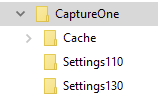
and it holds .cos (capture one settings) files for edited images.
0 -
I think the numbers are obviously the build number for images edited with the respective "Engine" in base characteristics. Having Settings131, you use 13.1 (the latest upgrade, as you said). I upgraded from v11 to v20.0 (=13.0). But I also have some Settings131 folders from the beta testing, using a session.
I've only seen this when using sessions.
So, my assumption is you have used a session at least once in the recent past and selected the folder in the library tool.
If it still creates such folders and you are using catalogs only, as you say, then my assumption is wrong, and something else happens for which I do not have an explanation.
0 -
I deleted the CaptureOne folder in the folder of images, created a new catalog, and C1 latest version created Capture One folder when I imported photos into Capture One. Must be a bug. Did not happen in previous release.
0 -

This is probably information available on another thread but seemingly not in this one.
Is this Windows or Mac you are using?
I run Windows 7 and get the same result as OddS - importing to a Catalogue does not create a Capture One folder nor any "Settings" folders. I does create a number of other folders and files depending on the import instructions used.
A session, whether you know you are using one or not, certainly would.
I am ready to believe that the world of Macs might be different but have no way to test that idea.
0 -
"A session, whether you know you are using one or not, certainly would."
Can you read?
I HAVE STATED I AM NOT USING A SESSION TWICE.
I WILL REPEAT IT IN CASE THIRD TIMES THE CHARM: I AM NOT USING SESSIONS!
Please, everybody don't bother replying if you are going to say sessions only causes this.
ONCE AGAIN, SLOWLY THIS TIME,
I AM NOT USING SESSIONS!
I have also been using C1 since V3.
Thank you.
0 -

I just notice this also. It happening to me whenever I import a photo into an album. I tested new albums & albums made before update happens to both. As soon as I import a photo into any album the (CaptureOne - Settings 131) folders are put into the folder where photos are stored. I'm on a Mac, photos are stored on an external drive. This is happening in Catalog - NOT SESSIONS. My folder structure in C1 is Catalog - Project - Group - Album. Never did this before update.
0

投稿コメントは受け付けていません。
コメント
12件のコメント