Full Size jpg export results in reduced colors

I'm experiencing an issue where my full size sRGB jpg exports are processing with some reduced/de-saturated colors (specifically blues and reds). This only seems to be happening when exporting full size jpg files - when I export into smaller sized formats, the images appear to retain full color.
Does anyone have any suggestions for a fix?
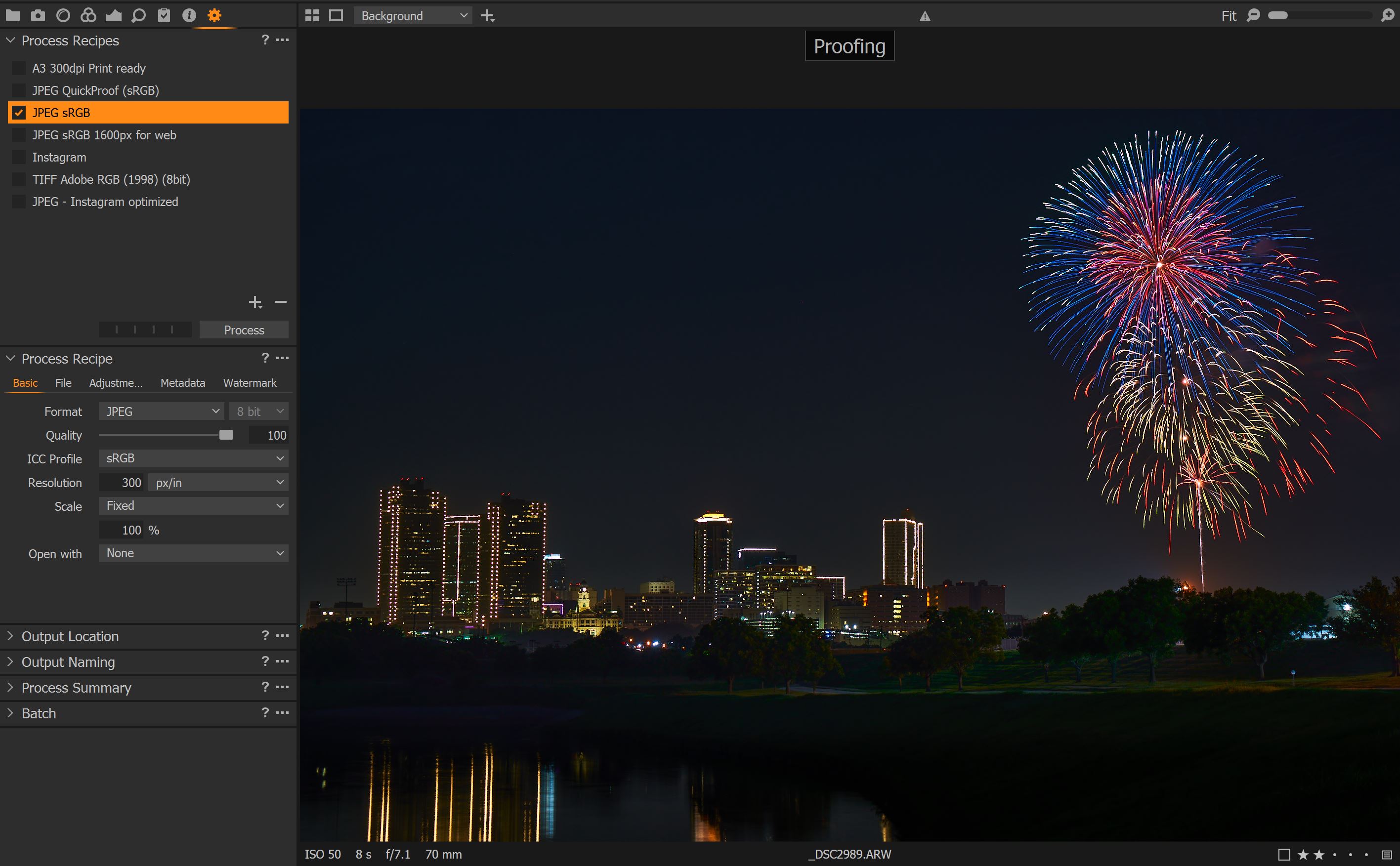
Here is an example of my full size jpg process recipe in proof mode with my desired photo output:
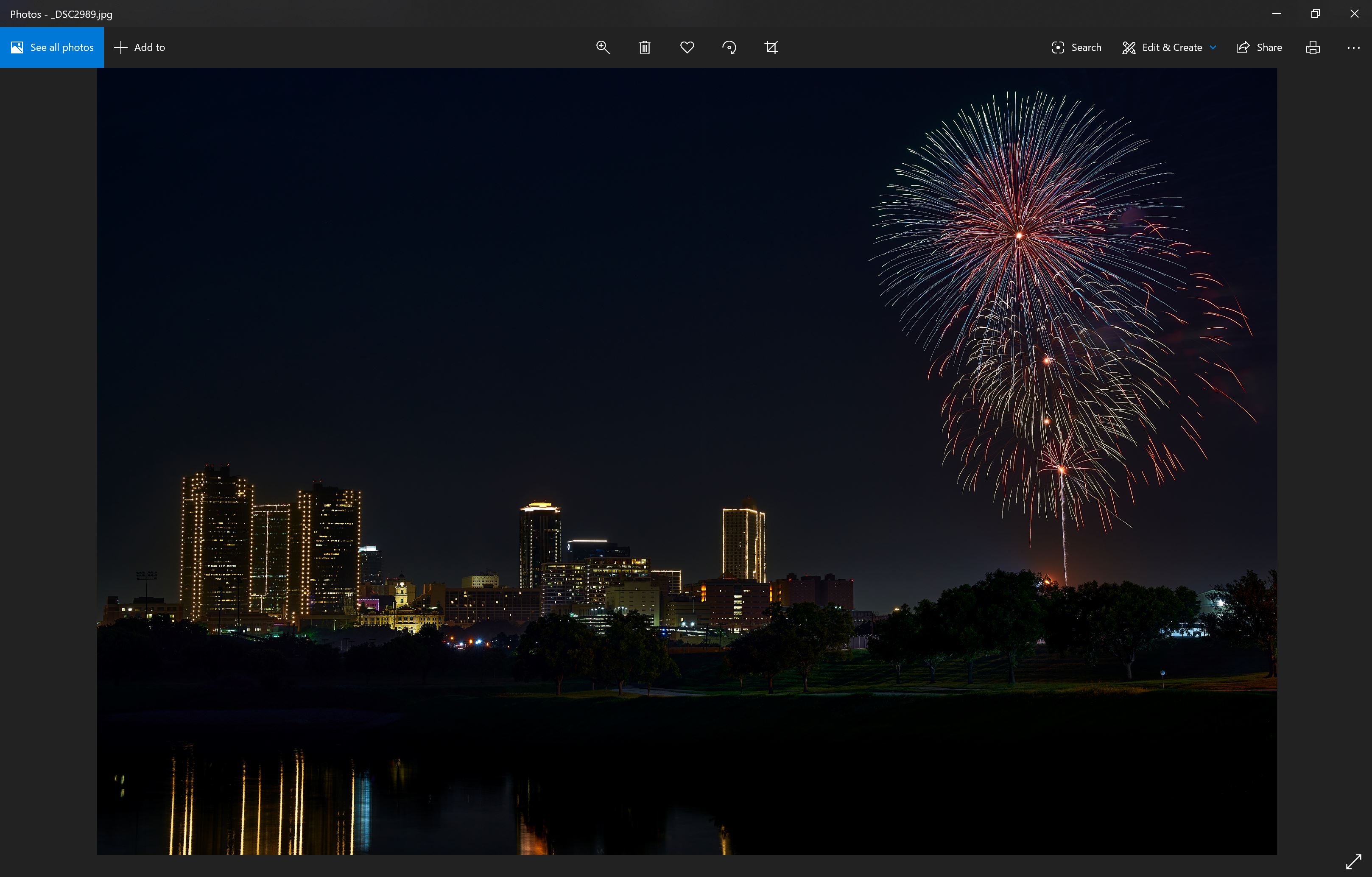
And this is how the photo gets outputted:
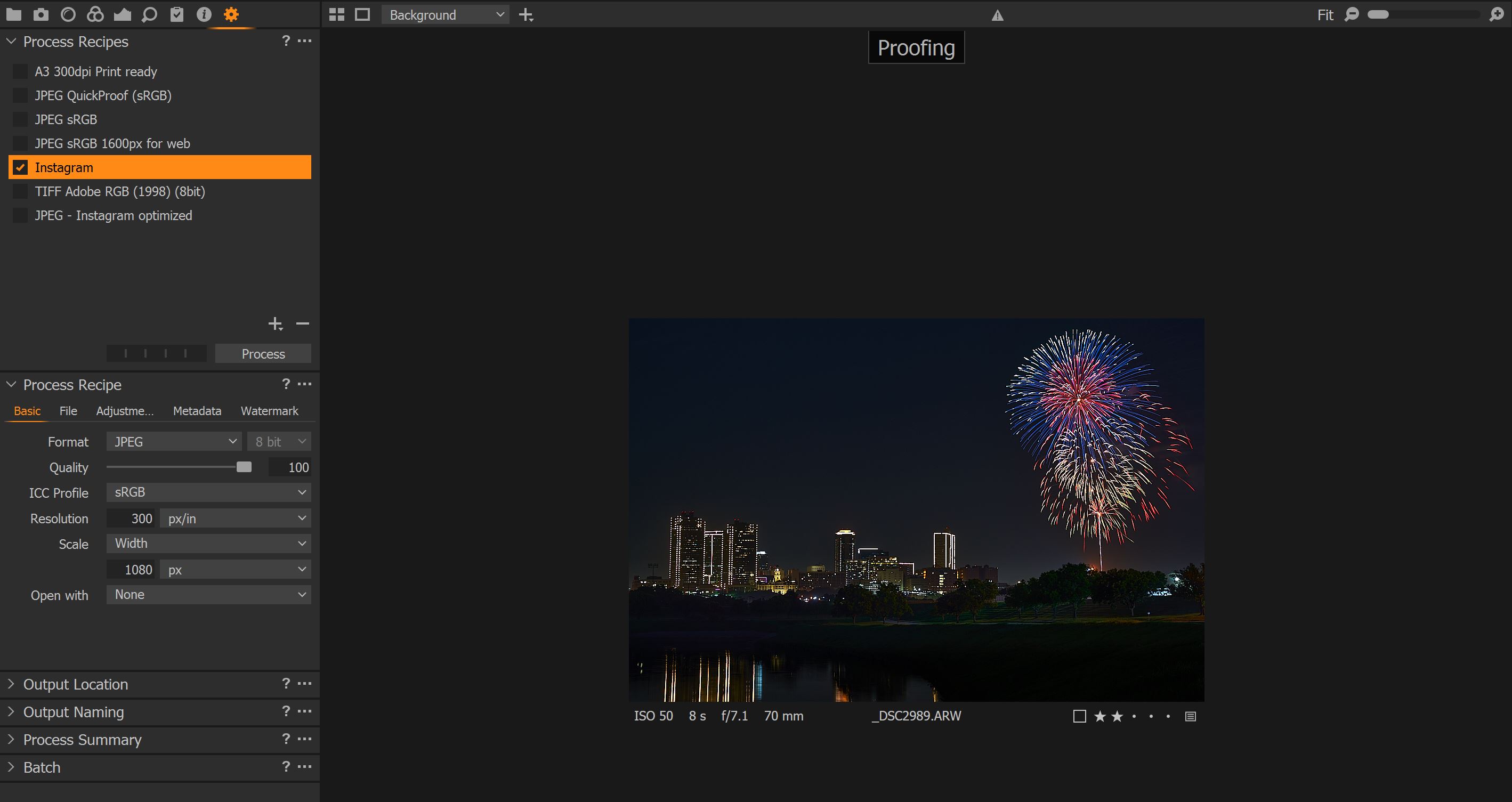
For reference, this is my reduced jpg recipe:
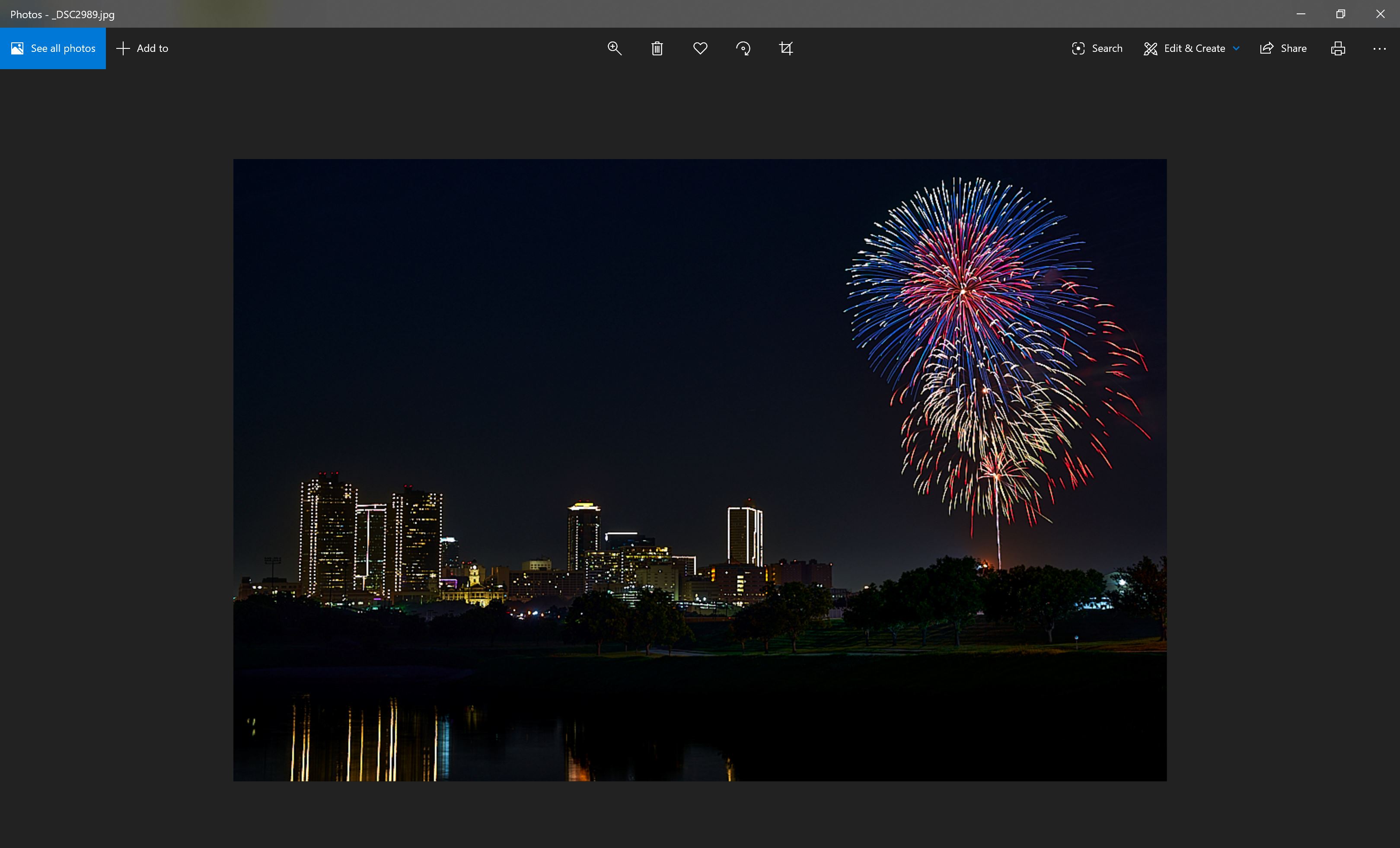
And this is the resulting file:
-

I have not seen this behaviour, although sRGB does not seem to be in my list of ICC profiles. I have sRGB IEC61966-2.1 (maybe these are the same profile, not sure). Have you tried a different ICC profile to see if there is a difference in output? If not try Adobe RGB and see if the problem persists.
0 -

Well, one observation is that your 1080 pixel wide image will have been reduced in order to be just 1080 pixels wide and I would guess that the original file was somewhat wider than that so a lot of pixel will have has to be discarded.
The same can be observed to a different degree in your first pairing of images. The screen display area, unless you have a vary high resolution screen, will likely be significantly compressed and data discarded in order to get it to fit.Thus can have some notable effects on some colours - less notable on others even if still changed by eliminating some of the more subtle changes caused by compression.
How do they compare if you view both at 100%?
There could well be other factors but when you have some relatively narrow bands of colour to start with reducing the data available by a large amount might make the resulting subtleties so small as to be imperceptible to the human eye at that size.
You could try taking you full size output file and exporting that at the 1080 pixel wide point to see if that has any similar effect. However the process, if starting form a different file type, may not be entirely the same.
0 -
Another suggestion is try viewing in another viewer (other than C1) just to make sure that it is not related to the way C1 draws its previews. Assuming that C1 religiously sticks to its preview image size settings then the Instagram output is likely to be upscaled when C1 draws the preview, whereas a full size image would be downscaled (depending on your settings).
Viewing in a different app like Windows Photo or whatever the Mac equivalent is would at minimum rule this out.
0 -
Mark, thank you for your response.
I've attempted full size exports in each of sRGB, sRGB IEC61966-2.1, and Adobe RGB profiles - unfortunately all three exports have resulted in virtually identical images with reduced colors in the firework explosion.
All three also produce images with proper color when exporting using the reduced jpg process recipe, so it appears that my issue persists no matter which of the profiles I use.
*Edit*
To your second suggestion - the second image I posted, showing the resulting full size jpg output is from windows photo viewer. Moreover, I have found that when I send the developed raw file from Capture One to a different photo editor (Affinity Photo in my case) and then export the photo from there, the full color output is maintained which suggests that the issue is somehow isolated to how Capture One is exporting the images.
0 -
SFA, thank you for your response.
To clarify, I do not have a problem with how the 1080 wide image was outputted, my concern is with the full size jpg. Thus far I have viewed my full size image exports on 3 different displays of varying resolutions and all of them show the full size image outputted from Capture One with less color than the smaller sized jpg. I have read that what you see in the proofing view should be what you get on export, but that doesn't seem to be occurring here.
I've now taken the developed raw file and have exported it from Affinity Photo, Lightroom, and Photoshop and each program has exported a full size jpg that retains all of the color. At the moment, I can't seem to get Capture One to do the same.
0 -
Don't know where sRGB is on your system coming from (which app installed it on your computer), I would use sRGB IEC61966-2.1 until you figured out the root cause for your issue.
" I have read that what you see in the proofing view"
Yes, if the Proofing glasses is switched on (as you have) or the main menu View>Proof Profile>Selected recipe is selected.
Maybe restart C1.
(In order to check your issue, I couldn't see any difference in a oversaturated red image between AdobeRGB and sRGB IEC61966-2.1, then I noticed my monitor profile was set to an sRGB, and switching the monitor to an Adobe RGB profile did not help either. Usually C1 does recognize the switch, even with out restart. But then I restarted C1 and then the colors are different in the C1 viewer when switching process recipes.)0 -
Zach,
I have some fireworks pictures in my archive, I will fire up C1 and see if I can get similar results with similar process recipes.
Addendum: I have just tried a few process recipes, with the same settings as yours, and I cannot make C1 do the same thing, i.e. both the reduced size 'Instagram' version and the full size JPEG appear to me to have the same saturation.
It's a pity that this forum does not allow attachment of files as I would have been willing to try your process recipes directly, they are stored in \users\<user name>\AppData\Local\CaptureOne\Recipes120\ on a Windows system, not sure where they are stored on a Mac.
Note it is a rubbish picture but it had some colour...
The left picture is the 'Instagram' sized version
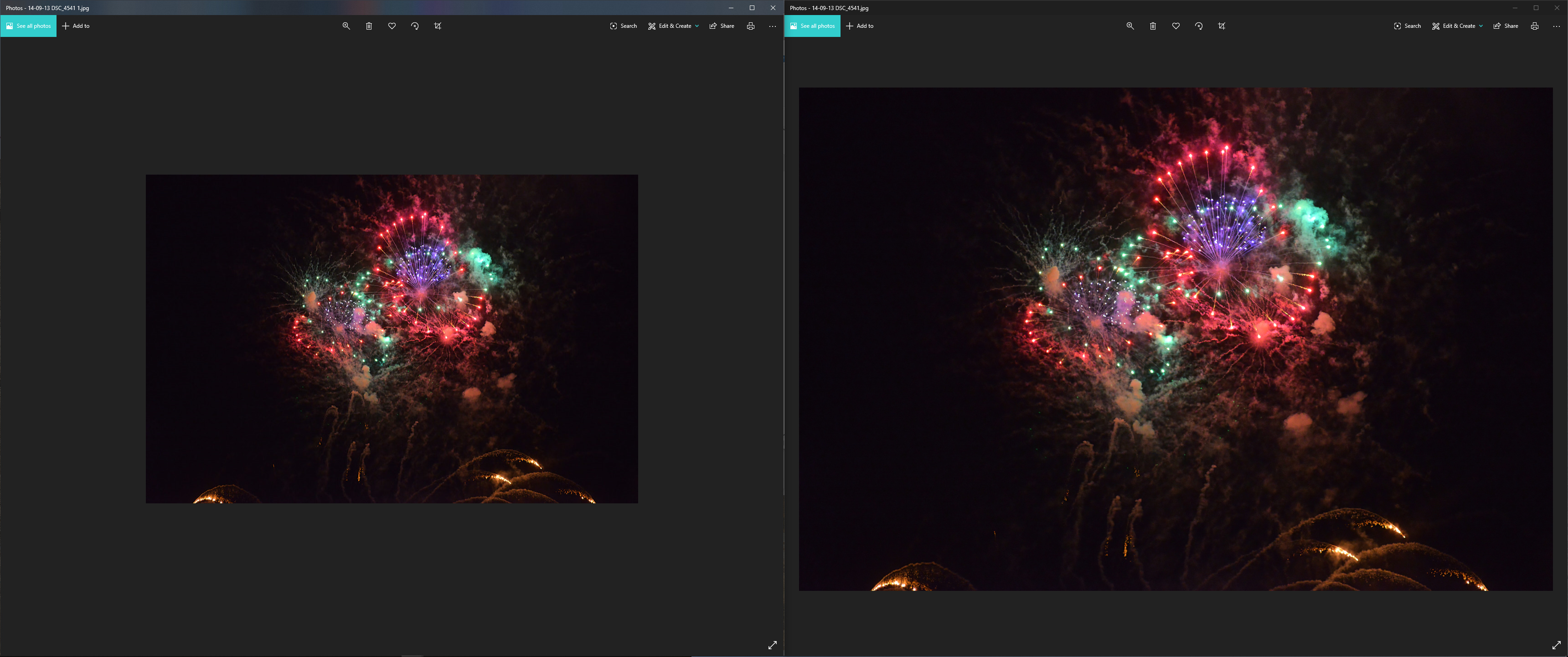 0
0 -
Thank you Mark, I appreciate it - I'm curious to see your results.
1 -
A different type of picture but it has a good spectrum of colours. I dropped a few RGB Readouts on the picture. There is some minor variation but both seem to have the same colours.
This was an export from an unedited RAW.
The left image is the full size jpeg.
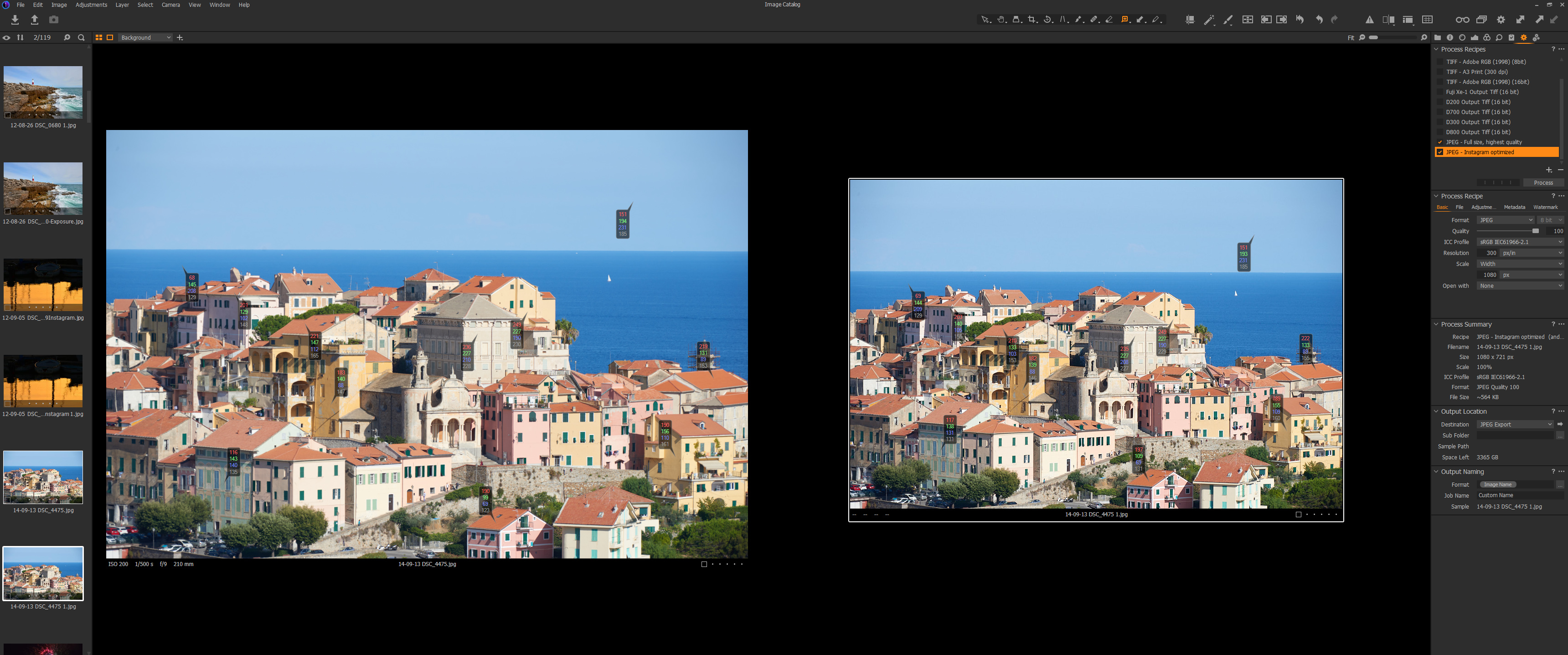 0
0 -

Hi Mark
You say the output looks wrong in Windows Photo Viewer. Windows photo viewer is not colour managed and is not really a good choice as a viewer. The free Faststone Image viewer allows you to see the image colour managed if you enable the settings under the CMS menu in options.
https://faststone.org/FSViewerDetail.htm
As someone else has pointed out the colour profile called sRGB does not exist on my Windows machine either which is strange? Is this a profile you have downloaded or has another application put it on your system?
Very important question when we are talking about colour management. Is your monitor wide gamut?
Ian
0 -
Hi Ian,
There must of been a misunderstanding, I was suggesting to Zach that he uses another viewer just to make sure that what he was seeing was not related to the way C1 generates previews, Windows Photo was used as an example (or that was the intent at least :) ). Zach said that he had already tried this. An Interesting and good point about Windows Photo Viewer not being colour manged though, I will check out Faststone.
Also note that I don't have the problem it is Zach, he seems to be getting differences in colour output between different process recipes.
As for the colour profile sRGB it does exist on my system in various locations (a Windows Explorer search reviled). Some of my editing apps use the colour profiles stored under \windows\system32\spool\drivers\color\. It looks like C1 gets its profiles under the C1 installation directory, on my system it is \program files\Phase One\Capture One\Color Profiles\ and under the Common folder there is a sRGB. Looking at C1 it looks like the sRGB IEC61966-2.1 is coming from my camera as it states 'From File' next to it when I look the Base Characteristic tool, maybe this is the sRGB profile that Nikon embeds in the file. It's all quite confusing. I know it is possible to change the ICC profile through the Base Characteristics tool and this tool certainly appears to point at the profiles in the C1 directory.
It must be noted that I am not a colour profile expert and I don't really know what C1 does with colour profiles, the above is only my observations.
I am not sure this helps Zach with his issue, but an interesting sidebar.
0 -
Mark, thank you for taking the time to post your results.
I'm still experiencing the desaturation issue with my full size jpg exports, but at least I have a workaround for the time being by exporting through alternative editing software.
I'll continue to experiment with/tweak different settings to see if I can further isolate the issue.
Best,
0

投稿コメントは受け付けていません。
コメント
12件のコメント