Wrong colors in preview

Hello. When you create previews from raw files, the color changes. I have reset and deleted all files, but the problem does not disappear. Capture One 20 13.1 , Fuji xt2
I don’t know what to do. Please help me
-

Hi Nicolas,
What do you mean by "preview" ? If it is the main window where your image is displayed and ready to be processed, I can't understand how you can say that your preview is different from your RAW file, as the preview is just the RAW file as read by Capture One. No intermediate step in between. Could you please give more details ?
0 -
Hi, Robert
So I select the file folder in session mode and C1 begins to create a preview, but with different color and expo. But all preferences by default. And all my files in the preview become darker and with another color profile.
 0
0 -
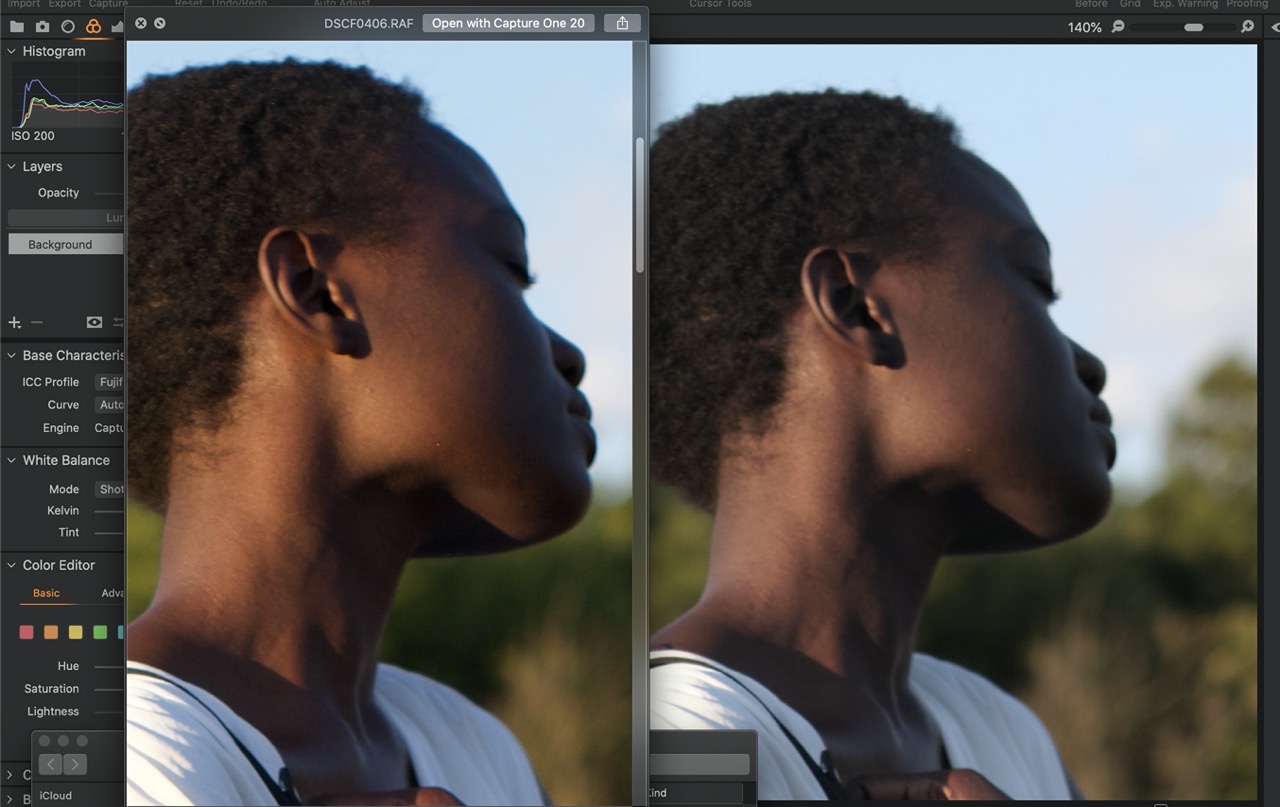 0
0 -
OK Nicolas, I understand now what you mean by "preview". When you click on an image and press the space bar in MacOS, you indeed obtain a sort of "preview", and this what you try to compare the Capture One window with. It is absolutely normal that you obtain two different renderings, as the demosaisizing (development) engines are different in Capture One and in MacOS. I wouldn't trust that much the development engine of MacOS, and would greatly prefer the result obtained with Capture One, which controls the colours far better.
0 -
There’s never been a problem before, only after update) And I try do the same in lightroom/camera RAW and and all is well
0 -
What you see in Capture One will be a preview generated from the raw file with a default set of base characteristics applied. This is on the basis that you can't actually see a raw image - it is just a digital file made up of ones and zeroes. So Capture One applies some things to it, such as a base amount of sharpening, contrast, etc, to give you a starting point from which you can adjust those and other attributes both up and down. By default, you usually get the "film standard" base characteristics (it will probably say "auto" in the base characteristics tool). You have other choices such as linear response, film extra shadow, film high contrast etc, and sometimes more depending on the camera model. Some people swear by the Linear response option, though I only use it occasionally where I am not managing to get the result I want.
The trouble with Linear Response, it seems to me, is that the response of the human eye is not linear, and neither is the response of film. So the image never starts off looking about right, and you will always need to do quite a lot to it to get the look you want. Whereas with Film Standard, you often get something that looks pretty good out of the box (although I almost always want to make some adjustments, but from a starting point that to me looks more pleasing).
Other software does similar things - for instance in Lightroom there are several "profiles" that can be applied as a starting point.
Also, I see that this is an .RAF file, from a Fuji camera. Are you sure that Capture One is not using a simulation of a film simulation applied in camera, which it can do now with Fuji files?
The rendition of the raw file by MacOS, when you use Quick View will always look very flat and desaturated. But that is no more what the raw file "really looks like" than is Capture One's starting point. (I don't have a Fuji, so I can't test this, but I assume that Quick View wouldn't reflect any film simulation used in camera.)
Ian
1 -

Is the Mac viewer actually interpreting from RAW or simply showing the embedded jpg preview file from the RAW file?
A quick comment on Ian's "Linear" observations ... completely correct and if one likes the results of the standard options for the Base Characteristics curve that's absolutely fine and great results are available.
The thing is that IF you might need some greater recovery of highlights or shadows (for example) or a rebalancing of colours there may be some additional data available in the file that is less possible to use after an initial curve has been set. I'm thinking of extremes here but with my (older) cameras and the sort of outdoor subject matter I most often take the effects of the standard curve offerings can result in my options being slightly constrained during later editing. So it's easier, in my situation, to simply set most mages to Linear and process from there as I will most likely be be making adjustments that will undo the applied curve anyway.
But needs, subject matter and per camera results can be very different in that respect so it is all down to what works for the individual.
HTH.
2 -
I completely agree with Grant (SFA). I use a customised camera ICC profile with a linear curve, which gives me larger possibilities when processing, more specifically in highlights and shadows, but not only.
1 -
Thanks to all. As it turns out in RAF. file included information about film simulation from Fuji. So I set by default ICC profile "Linear" and then I tune the photo as I want
0 -
Nicolas,
I had wondered whether Ian's suggestion might be part of the problem.
I think Fuji users in particular would benefit from seeing the name of the Curve actually applied rather than "Auto".
In regular use with cameras that do not have built in film simulation curves "Auto" usually means "Film Standard" which is a curve developed by Capture One to make a RAW file look like something that might have been made with a typical type of "film" from pre-digital days. With only 3 pre-defined "curves" available anyway it was easy to understand what what happening. (Once one understood the basics of the way it was intended to work ...)
Now with the used of a large number of presets identified from within the camera (for supported Fuji bodies) there is greater potential for confusion.
In my opinion it might be a good time to enhance the Base Characteristics tool to identify both the mode of use (Auto, From Camera(?)) and the actual curve applied. It would save confusion.
However, I'm not a Fuji owner so I cannot be sure whether my suggestion has real merit.
If people think it has then I would encourage them to "Submit a request" suggesting the enhancement.
Grant
0 -
Robert,
Delighted to find another "Linear " enthusiast. I thoroughly agree with your observation.
There are many times when I have plenty of images from a shoot that look fine with the Auto curve. In fact the great look by default was one of the very first things that brought me in to the C1 world.
However once I had stumbled across the Linear based approach (via a C1 Blog post a few years and versions ago) and tried it for a few of the more challenging images I had to process at the time It just became normal to use it for everything rather than pick and choose an approach image by image.
More modern cameras than the ones I have might have me re-thinking that approach. That said, so far, when I have checked with downloaded sample files, my impression is that there are still some benefits possible from working up from a linear base.
However, if one bought Fuji, for example, because one was attracted to the Film Simulations and wanted to set them in camera, the majority of shots would, presumably, be entirely fine for one's purpose using the default film simulation. Thus a "Linear" based workflow would make little sense as a default workflow approach but might be useful from time to time for experimental purposes.
All of which serves to illustrate the ways that C1 can be tailored to suit individual needs or preferences.
Grant
0

投稿コメントは受け付けていません。
コメント
11件のコメント