Crop behavior, display with lens correction enabled

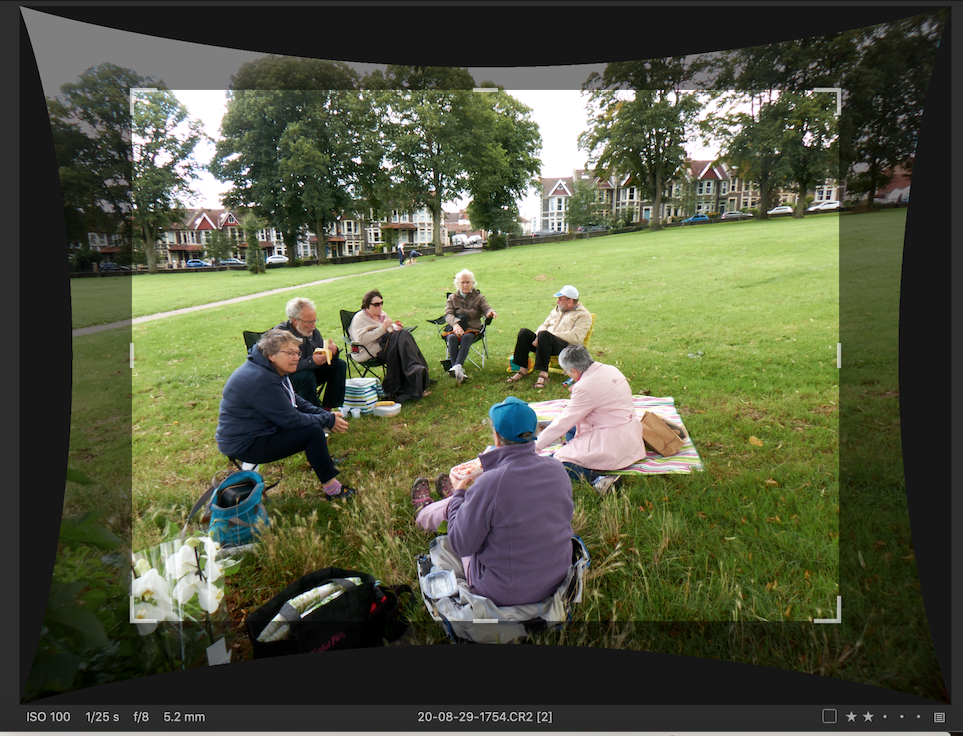
It's pretty ridiculous, the way C1 handles cropping when lens correction is (by default) enabled. Every photo has different visual dimensions and proportions, even though the pixel dimensions are identical. And the Thumbnail is the only way to see how much photos have been cropped without clicking the crop tool in the Viewer. There definitely should be an option to correct distortion without cropping by default. Without such an option it feels like driving blind. And there must be a visualization in the Viewer showing crop marks without needing to select the crop tool. After all, the crop tool wasn't used to make the crop – it was done by the lens correction panel!
-

What camera? Lens correction for my Leica Q, for example, is built in. It uses extra pixels which are there for lens correction and are not intended to be part of the image. The "crop" that capture one shows is the same as a jpeg image the camera would produce. The difference between Capture One and Lightroom, for example, is that Lightroom will never show me those extra pixel.
1 -
Canon 6D, RAW, no built in correction.
0 -

....this problem is as old as c1 . the newer profiles called manufacturer profiles are better in this regard.
https://www.youtube.com/watch?v=aFWfPU9c4n8&feature=youtu.be
1 -
There definitely should be an option to correct distortion without cropping by default.
The trouble is that sometimes it would end up like this. An extreme example from a compact camera, but still, there must inevitably be some pixels that end up outside a rectilinear frame if distortion is corrected. And this is giving me output of 4000x3000 which is the nominal resolution of the camera (a Canon S110 compact). I think, like Marco with his Leica, more pixels than 4000x3000 are captured so that a 4000x3000 corrected image can be produced. (Of course, at times if the distortion doesn't matter too much to me, I can squeeze a bit more of a wide angle out of it as a result.)
Ian
 0
0 -
That’s indeed an extreme example. I’ve got Canon L lenses that get corrected for pin cushioning and lose the same amount of area during cropping as your point and shoot. That’s not right. I correct the crop and see no distortion around the edges. It’s lazy programming. There should be an option to squeeze that extra real estate out by default no need to crop tighter than the apogee of those distortion curves
I’ll give the manufacturer profiles a try. Looks good.
I think the points I made in the OP still stand. This needs attention. I went years without even realizing why my imports all had a crop applied.
0 -
as you can see in my sample the crop is far larger than necessary but there is simply no obvious technical reason so I really wonder why they do this ?
0 -
It is so extreme [edited to add: in my example, not CSP's] because of the short focal length, of course (5.2mm, as you can see). How much is "lost" round the edges varies according to the degree of zoom used. Nevertheless what I am getting is 4000x3000 pixels, which is what the camera is supposed to deliver.
Ian
0 -
rob, this comes up once in a while and get ignored as all the other issue.
1 -
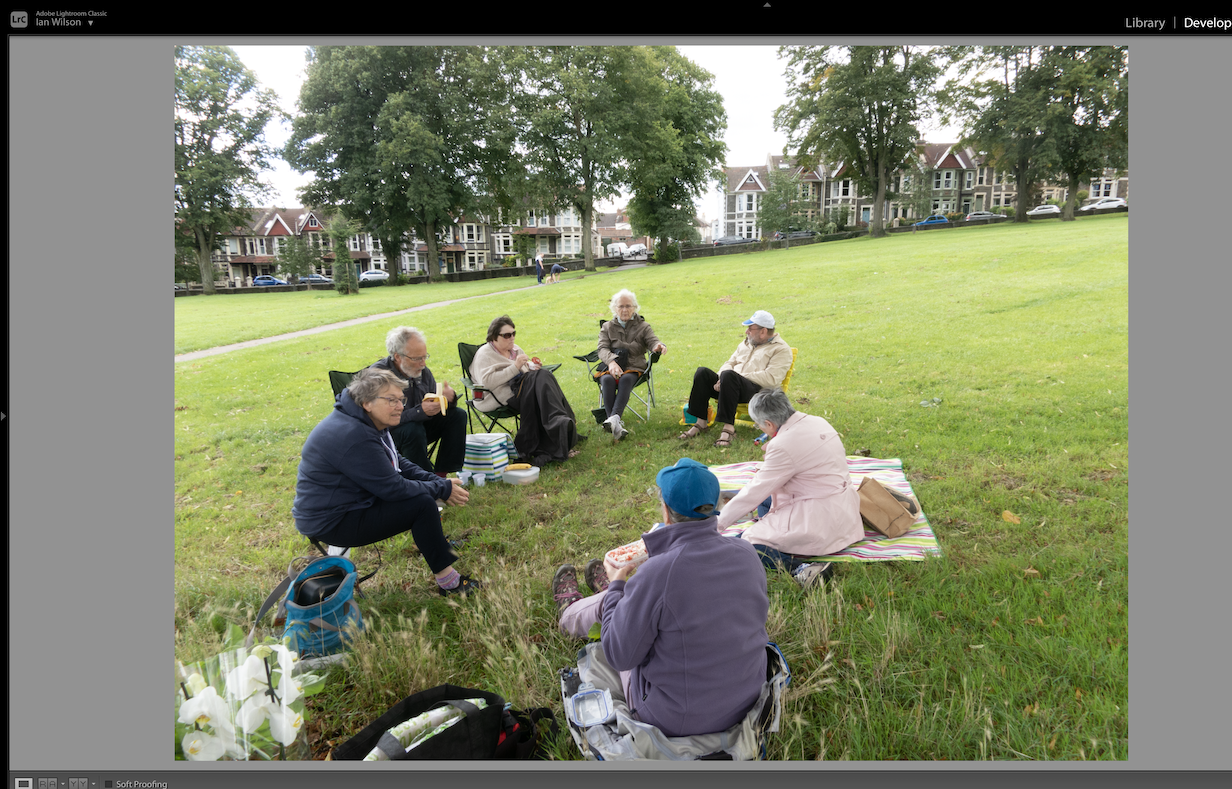
It's not just Capture One, I think. As an experiment I opened the same image with Lightroom (with which I am no expert, I hasten to add). It seems to give me a fairly similar result to what Capture One provides (see screenshot) but as far as I can see there is no access to the bits that Lightroom has decided to crop away. It stops well short of the concave edges you can see in the Capture One screenshot, so in Capture One I appear to be better off in that I could if I wanted to recover rather more of the "extra" pixels than I could in Lightroom. (At least in what it shows by default. If there is a way of getting them back in Lightroom, I don't know it.)
Ian
 1
1 -
Ian, the major difference is that the crop adobe software applies is very similar to the manufacturer profile in c1. so there is not really a need to get anything back as with c1 profiles. but as you came up with adobe, the crop issues is not the only area c1 lens profiles are inferior to the adobe counterpart the others are vignetting and ca.
0 -
what is even more suspicious is that the output file has the same pixel dimension whether the manufacturer or c1 profile is used but this is impossible so a kind of scaling is applied.
1 -
That’s what bothers me. This is a raw editor, and immediately upon import, by default, scaling is applied. I seriously didn’t notice this for years, assuming I was exporting 100% tifs when really it was already upscaled, even when “never upscale” is selected.
0 -

@Ian Wilson
Ian, I have an S90 on which I compared the results of the camera generated jpg and what C1 (an others) did with the RAW file in terms of lens correction. I only tried it because for a couple of images I thought I was missing a useful part of the side of an image. I was - the jpg has a little more but only about 10 pixels at a fairly wide angle. Quite distorted pixels at that but no big deal for those images. Using a commercial print house would probably have lost them anyway.
Once the zoom was set to around the 50mm equivalent or higher there was no discernable difference.
The problem is that to maintain a specific ratio the distortion on the long side becomes more critical than the distortion on the short side. There is more room for assessment tolerance across the width than across the height.
Developers may come to different conclusion about what is or is not acceptable. But the differences will not be much.
More general comments in terms of "image dimensions".
In the digital world, most notably from the time around when Micro4/3 appeared, lens designs were adopted that required software to deliver anything close to a ratio driven concept with which people were somewhat familiar. No point in having a tiny camera and huge lens and trying to sell it as a "pocket" solution. (Same goes for the S90 I mentioned above.) It's the only way to keep the price and performance specs it an acceptable level - that's another factor.
The "Number of pixels" is therefore always the result of some manipulation. (Also for some other reasons but that's going well beyond the point of this discussion.)
As for the number of pixels reported ... how big are the sensors in real terms? How many of the pixels are really usable?
If a RAW convertor (i.e. the camera's jpg output including corrections.) is always a fixed size when using a zoom lens (in particular) and after whatever in camera lens correction are applied you can be fairly certain that many, if not all, of those images are "manipulated" in some way. Such processing is entirely expected in the digital processing world. If it doesn't happen in camera it will happen in some other software later.
If a particular application always deliver the "perfect" pixel dimensions for every file for a specific camera, complete with lens corrections, you surely know that that it has been processed to achieve that result.
C1, using the C1 lens profiles, may give a very slightly different result where the decision about which pixels are perhaps best excluded from the optimal quality area for the crop may produce a different result. However at least one can override that suggestion if one wishes to do so. Or even change the adjustments applied if that would help the image in some other artistic way.
However this may be something that is camera specific. Or perhaps manufacturer specific depending on whatever agreements C1 has with those camera manufacturers who have C1 version specific arrangements in place.
Or perhaps they simply quietly introduced it at some point because people moaned about "losing pixels" from original files even though they will eventually compress those files and manipulate them for different screen or "paper" sizes. May as well do what the other do I suppose ... it makes little difference to the majority. (CH may be an exception to that observation.)
For what it is worth, in my opinion C1's scaling on output (up to 250%) gives rather good results. Presumably whatever they may need to do internally during Raw conversion production with added lens correction will be of equal quality.
0 -
The main three problems here are1. it is inconsistent lens / profile / camera /2. It is not easy recognisable by the user3. there is no justified reason to crop more than necessarySo the question is is this really how a professional labeled software should behave ? for me the answer is a clear no, it is arguable what real impact this may have but it should at least be transparent to the user. this is just another example that proprietary solutions often have a real disadvantage for the userand not only because c1 is very slow in adding new lens profiles.1

投稿コメントは受け付けていません。
コメント
14件のコメント