Capture One Cataloge

Hi there.
I am looking for some old photos I didn´t process. I imported new photos into the cataloge and it tells me I only have around 200 photos in the cataloge, however, the Capture One Cataloge file size is 37 GB.
Is it that capture one files are huge, or does my photo lay somewhere in the software I haven´t found out where.
-Steinsland
-

Have you checked the catalog Trash folder?
0 -
Didnt know there was a trash folder, can you tell me where to find it.
-Steinsland
0 -
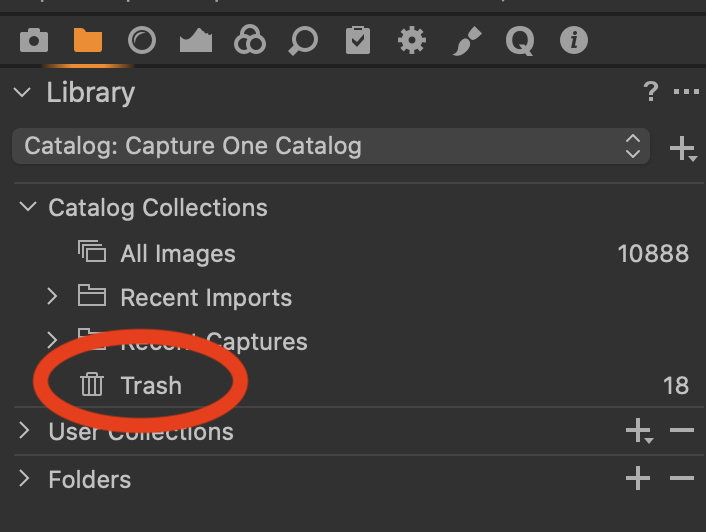 0
0 -
I have expanded every folder, no trash can there. Also the empty trashcan button is greyed out under File meny.
0 -
Can't say I've ever seen that before. Hopefully one of the more long term users here can point you in the right direction.
0 -
Well, thanks for the help anyway.
Take care.
1 -

Hi Casper,
What is the pixel size and the colour space of your photos ? Capture One can't process images less than 512 px dimension, and can't process either images in gray scale. But, anyway, the software should have imported them, I think, even if it can't process them.
0 -
sRGB, 3872×2592
0 -

What are the files types for the old photos?
Do have any filters in use that might restrict he view of the contents of the catalogue because the filter is in place?
Albums and smart albums can have such an effect.
With of catalog of the size you mention I assume that most or all lof the image files it has been told about reside within the catalog as "Managed" files rather than somewhere else in your system and connected to as "Referenced" files?
If not we should consider that as something to be analysed.
0 -
All files are RAW, and I dont import with filters, only to apply them individually after import. But there is a lot of them I don't even bother doing anything with.
0
投稿コメントは受け付けていません。
コメント
10件のコメント