copy all adjustmens from primary variant including rating

When i copy all adjustmens from primary variant unfortunately the rating (*, **..) is never included
is there a way to make it happen ?
Thanks
-

Salut Philippe,
utilise la double flèche pour sélectionner lesquels des
différents paramètres seront à inclure et à appliquer.
Ouvrir l'image dans un nouvel onglet pour agrandir.
use the double arrow to select which of the different
parameters shall be copied and applied. Open in a
new tab to view larger.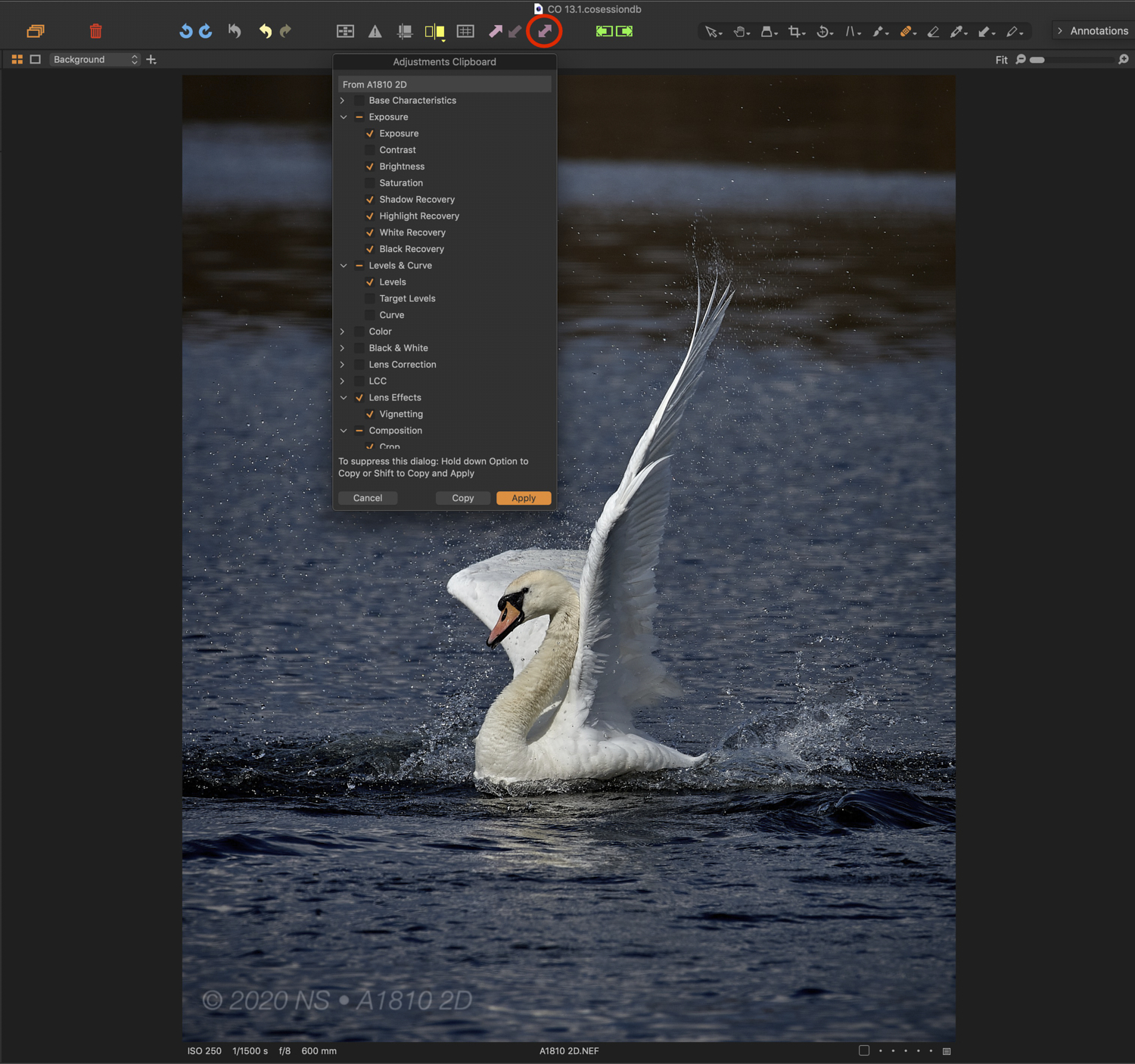 1
1 -

Philippe,
Are you using this to copy from one image to another or to create another Variant edit for the same image?
0 -
Once an image went through your tweakings, you copy all selected
adjustments in the adjustments clipboard and apply them to… what
ever you want. Simple and easy.
I created my own basic selection that I apply to other pictures shot
in the same conditions or their variants.0 -
Metadata may not always be a useful automatic copy and there are other way of dealing with bulk updates.
However Cloning another variant edit of the same image does exactly that - creates a complete copy of the edit instructions.
Alternatively a "New" variant of an existing image contains no existing edits and will be presented as imported without any metadata unless the IPTC field is available in camera and has been populated from there.
For the Adjustments Clipboard there are basic settings that can be used to copy all or none and other user tunable options. However my personal opinion is that mass metadata values are best set using tools other than Copy and Paste most of the time.
I fully understand that others may disagree and may have a workflow that can make great use of the full set of fields available via the Clipboard but for many I suspect that would not be ideal.
0 -
Nikon Shooter Hi,
Your solution works very well and i have to check the Meta Data and then the Rating after that the apply takes into account the rating as an element to be applied. GreatUnfortunately in the case of another set of images with a different et of edit. This tool do not have any memory and i have to do again the check the Meta Data and then the Rating
Thanks again for the solution it works and maybe CO20 product team should think to have a little memory option in a coming version for the rating only.
0 -
Sfa,
Once an image went through my tweakings, i copy all selected
adjustments in the adjustments clipboard and apply them to… what
ever you want. Simple and easy.The solution proposed by Nikon Shooter enable me to add the rating also as part of the edit process and no other metadata.
The rating could be included in the Tool Tab in order to be selected as the other edits.
Thanks for your feedback0 -
Indeed but there is a generic selection option that might also work for you if your use of metadata (at the time that you wish to copy the rating value) is minimal (i.e. you only have the typical values set - rating and perhaps copyright for example) and you are sure that the value for the image you are copying from should apply to all of those you are copying to.
There may be some situations when you want all of the adjustments but not the metadata or all of the metadata settings but not the adjustments.
If so using the copy and and adjust for only the Metadata tool would be the most effective option.
0
投稿コメントは受け付けていません。
コメント
7件のコメント