Plug-ins

I have just upgraded from Capture One Sony to Pro for the extra functionality, but alas the plugin situation has been downgraded. In previous versions of Capture One one could add Nik Color Efex Pro as an allowed application in the plugin panel in Preferences but this option no longer exists. 'Get more plugins' takes one to a webpage.Of course one can navigate (with many clicks) to this plugin each time from 'Edit with', but one could do it with one click before. *Please* restore the functionality of being able to specify allowed applications in the plugin panel in Preferences.
-

This is a very old issue. For whatever reason C1 does not provide any documentation on how to add plugins. I guess they are embarrassed at the clunkiness :-)
In file manager right click a jpg image and select "Open With". In the dialogue box navigate to the program you want to use as a plugin. Choose the .exe file In this case Color Efex Pro 4.exe
On my computer the path is:
C:\Program Files\DxO\Nik Collection\Color Efex Pro 4\Color Efex Pro 4 (64-Bit)
NIK should open as a standalone displaying the jpg. Close ColorEfexPro.
On my Win 10 (2004) and latest C1 20 version that's all I need to do.
Now start C1 and you will see the ColorEfexPro available as an option in the Open With Plugin.
What you are doing is registering ColorEfexPro as a photo editor in Windows. C1 can then recognise ColorEfexPro and registers it in the Open with plugin.
Absolutely dumb, but perhaps when C1's new R&D centre in Greece is running next year we will have this issue rectified.
Hope that helps.
Ian
0 -

OK, so my fresh post got deleted. Geez. I just upgraded from Win 10 ver 1904 to Win 10 ver 2004 and about half of my open with apps in C1 disappeared. I tried doing what IanS says above. And that is basically how I did it the last time. Then I found this link and it mentioned that the Win Registry could be a bit corrupted for the missing addins. So I followed Method 2 in the link below and removed (in some cases I had two entries for the same app). Then did what IanS said above and when I restarted C1 the open with apps reappeared in the preferences (but without check boxes).
https://www.winhelponline.com/blog/cant-add-program-to-open-with-menu-list-windows/0 -

I experienced the same issue with the latest version of C1 20 on Windows 10 without resolution. Some random apps appeared in the open with plugin preferences but many disappeared and new apps didn't show. They could be selected through browsing the edit with or open with but would not stick. None of my Topaz, NIK, On1 and others would show and would have to be browsed each time.
I since purchased the C1 21 for Fujifilm upgrade and run the latest 14.0.1. I also upgraded On1, Luminar AI, NIK collection 3 and all Topaz products. Still none show as checkable and browsing for them works only once as the use doesn't make it stick as it use to. What gives? Is there a workaroung and a more elegant solution in sight?
0 -

It is quite easy to add your plugins.
- First add the exe to the "open with" in windows
- Then and the selected application in the plugins settings panel
That will ensure that even if the open with entries change they will still be available in the C1 plugin open and edit options.
1 -
Thanks Don. That used to work fine until v13.3. Browsing for the exe file in either open with or edit with made it available for further use and checkable in the preferences - plugins menu. Unfortunately if no longer does in my experience since 13.3 through to 14.0.1.
0 -
Hi Igor, Thanks for the reply but I don't seem to see that happening as i just recently upgraded to C1 2021 and all my settings were carried over. I have noticed sometimes that not all the entries in the Open with Win entries are not showed.
For example I wanted to add Silver EFEX Pro to the list and, although it was in the system entries, it didn't show Plugins settings until searched for Sil and then added it.

But you are right they need to allow a maximum number of entries in the external editor options and allow us to populate them ourselves as the windows Open with is pretty crude and will show all the entries not just those for images.
0 -
Hi Don, I'm glad that works for you. For me it is not a case of a maximum number of allowed applications. What I have was carried over from C1 20 to 21 as well but was already missing quite a few apps since 13.3. Searching for them in preferences does not bring them up. For example I have both Luminar 4 and Luminar AI installed. If I search for 'Lum' it will bring up Luminar 4 but not Luminar AI. If I search for any Topaz or NIK application like Silver Efex Pro it finds nothing. To edit with the latter I have to go in edit with, browse for the exe file and it launches. But it doesn't then populate it as an option in edit with or preferences menus. I have a lot of apps but all that is left since 13.3 is attached.
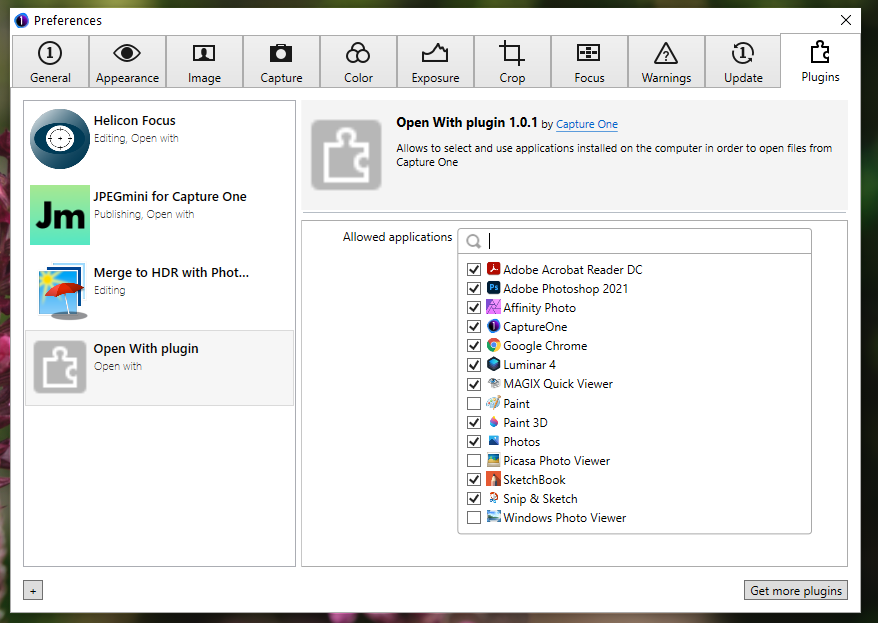 0
0 -
Yes, certainly different to mine as you can see. I wonder if it is left over from the Beta testing?
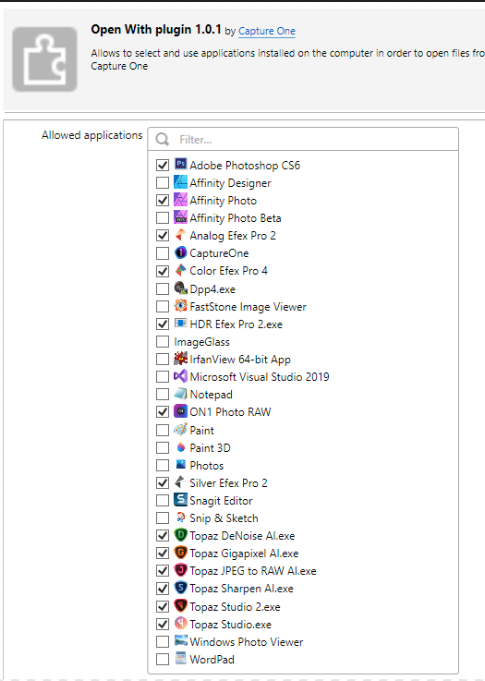 0
0 -
Indeed very different Don. Yours looks a lot more like what I had until the earlier versions of C1 20 as I have most of the apps listed on your list (and all those checked) and they work fine as filters from PS. No beta testing involved for me. I have submitted a request with C1 and see what comes out of it. Will share here when I get a response. Cheers
0 -
C1 works by populating the plugin menu with apps that are registered with Windows as "image editing capable" apps. This system works perfectly in Macs because on a Mac this is always done by any app installing on a Mac.
In Windows the app doesn't always register itself with Windows, particularly plugins which are usually called from a host app like Silver Efex pro.
So in order for an app to show in the "Open With" plugin in preferences then you need to "register" that app in Windows.
You do this by locating a jpg using Windows File Explorer, right clicking and selecting "Open With", browse to the app .exe file and open the jpg with, for example, Silver Efex Pro. Once the file has opened in the app then you can close the file and Windows will have registered Silver Efex Pro as an app that can edit image files.
Silver Efex Pro will now be available in the Preferences Open With Plugin.
Could C1 do a better job? Yes. Could C1 actually tell you to do this in the "Open With" plugin preferences? Yes.
1 -
Many thanks IanS, very sound advice. I have tested with a few plugins and it does seem to work and populate both the preferences and the edit with menus in C1 21. Will keep working on it but so far so good. Not very elegant but effective, very grateful for this workaround.
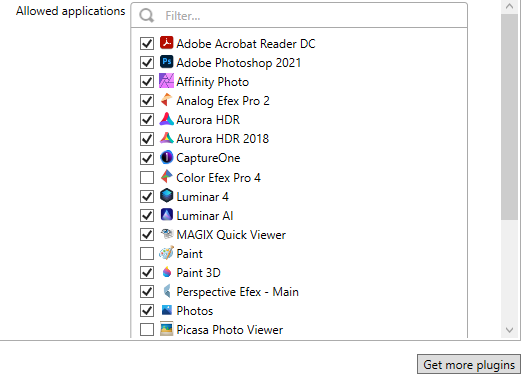 0
0
投稿コメントは受け付けていません。
コメント
11件のコメント