Capture One is big dissapoitment to me, please help to change this for me

I bought, some time ago, Capture One 12 for Fuji and played with it for a while. I was doing all my work in LR at the time, but was toying with idea to move out of LR.This year in Summer I wanted to upgrade and move all my 100k images to Capture One. After some testing and image conversions (because not all image types, formats which I had are supported in Capture One. It was working for a while quite fine. Maybe because I was not fully depend on it as my subscription with Adobe had few month to go. I am using Capture One 20 last update now.
In a last few month I have try to work fully with capture One. I have reported some issue (apparently moved to development...), but Capture One is seriously blocking my work.
I really do not know what I possibly do wrong, but every time I start Capture One it scans all the file (100k+) which even on my 32GB RAM, 2TB SSD, i5 4GHz is blocking Capture One for goof 20-30 minutes. When I have catalog up to 2-3000 images all is acceptable.
Filtering is not working until that is done, often it just hangs, if I start turning filters on, simple as to see images made in particular date, it crashes...
I am extremely frustrated and reason to write this is not to ventilate that frustration, but ask others who do use catalogs of similar size (100k+images up to 2TB disk space) for advice, tips.
I can not be alone with this, or maybe I am and I configured capture one in some extremely wrong way. Please share your experience and help.
Thank you in advance.
-r-
-

> Please share your experience and help.
I have the same problem since I work with C1. Not every time I try to filter but often enough. Therefore I hold several catalogs with not more than 20-30.000 images in it. This "collecting information" takes long enough. I think it's partly SQLLite and partly the way of programming that make the problem in Windows (MacOS is not quite the same behaviour).
But I know other users having the same problems and others - like Mark obove - who don't. We have tried to get out what runs in another way but were not successful.
Regards Ernst
0 -
First things first: Thanks to all for describing this problem and helping to get a step forward! Really helpful tihs thread even when we dindn#T solve the problem yet.
@IanS:
>...along with removing the corrupted files fixed my issues.
Nice hint, thank you. But how to get out such files? Do you have a wokable idea? Theese images behave like normal when working with other graphic software, and even with Capture One I cannot get through image by image manually (there are several hundredthousends of them). Catalogs (databases) proove okay.
@Mark Witherington:
>One thing I just thought of is you could try to create a new catalogue and import some images (at their current location) this may indicate if it is a catalogue issue or a problem with the application installation itself.
I can tell you, that this problem regards all of my twelve catalogs. Even the two I have created new an reimported... Maybe it helps to think further on.
>If it was me I would uninstall then reinstall Capture One...
I have done this too. This didn't change anything. I suspect it is kind of configuration - maybe in combination with other graphic software installed. Shared DLLs?
>...(note this is with All Images catalogue collection selected, not something that I would normally do). Selecting a folder with maybe 2000-3000 images does not make the pie chart appear (generally).
We come nearer to the point, thank you. I need to filter ALL images by some reasons very often - you do not. Therefore you did not find this an remarkable issue. Okay. But what I am interesting: You say "some minutes" and "about 190.000 images". With a catalog with 20.000 images and C1 V20 I need "some minutes" (means about five to ten, I have not measured exactly) usind an WD Red Pro HDD).. The time shortens a lot when working on a SSD - but C1 uses and needs absolute paths so I cannot move and move back easily the images (when sorted in a lot of different folders.
> Then I noticed that there are filters selected that I don't use. I had a look at the Show/Hide Filters option.
Great thing! Thank you so much. This I worth trying and I never tried before.
Now I tried but found all filters I do not use already deactivated.
@Richard Vanek:
>...as the support has not reacted on my ticket. I still have about four other open and few on hold...
This we all writing ticket know. It has become normal when not using Phase One cameras.
> I can not believe that pro people who using C1 have it.
You may not believe but I do. It's because of the extraordinary output quality. And believe me: I have a lot more serious issues in my C1 working set than that performance problem. I am working about four to five hours a day in my configuration and have to restart C1 several times a day. Even with this really annoying problems I am working on C1 further on. ;)
@Ingo Sarp:
> Finally support acknowledges that this is an issue that concerns Windows users and they promised to look into it. This was nearly three years ago. Until today nothing happened.
Exactly my story, word by word - and even three years waiting too. Just to know you are not alone with your pain. ;)
Kind regards
Ernst0 -

Ernst,
'Therefore you did not find this an remarkable issue.' To be clear, I didn't say that I did not find it remarkable, I just said it was not something I usually do. Clearly if the software allows the user to select a collection of all images then the software should still work sufficiently well in that mode.
I would say that the only time I have managed to make C1 give a similar behaviour to that being described is when selecting the All Images collection (as mentioned containing 190,000 images), then activating multiple filters. It did take a long time and C1 did slow in performance. I will also say that while C1 was building the filters C1 did remain usable for me although I have what I would call a fast system. Finally my experience is that once the filters had built then it did not seem need rebuilding when leaving and returning to that folder, even if I closed down and restarted C1 then the filters seemed to remain built.
I have noticed that if I select another filter from show/hide list then C1 does go off into a cycle of filter building, thus slowing again. Even if I then deselect this filter, then C1 still appears to continue to build that filter.
I increasingly think that this issue is filter related, but since I am not from C1 then I cannot be definitive about this, it's purely based on observation.
0 -
Hi Mark,
could be a missunderstanding because my mother tongue is not English. Sorry. I did not mean that you find this issue "not remarkable" enough to talk about, but you did not find it al all because you normally do not use this constellation and would not have got serious problems even when seeing it.
The rest I got I think. I will try a litte bit around filters to get a clearer sight. Filtering could speed up if I always hide ALL filters I do not need for the recent search - but this will slow down my workflow. On the other hand: If there is an long line of and/or terms each added to the other in one SQL query this will slow down a lot. We will see tomorrow.
Thanks, I appreciate your help!
Kind regards
ErnstPS: I do not unterstand the following statement:
> I have noticed that if I select another filter from show/hide list then C1 does go off into a cycle of filter building, thus slowing again. Even if I then deselect this filter, then C1 still appears to continue to build that filter.
If you deselect a special filter it should be hidden, isn't ist? Even then it remains in the cycle of filter building? Did you mean this? How to do to get filters out of this procedure?
0 -
Ernst,
No problem.
Firstly I correct what I said in my last post, I have just restarted C1 and it looks like each time the application restarts, the filters are rebuilt for the selected folder, i.e. C1 does not keep track of the filter status per selected folder and rebuilds each time (the image below shows partially built filters).
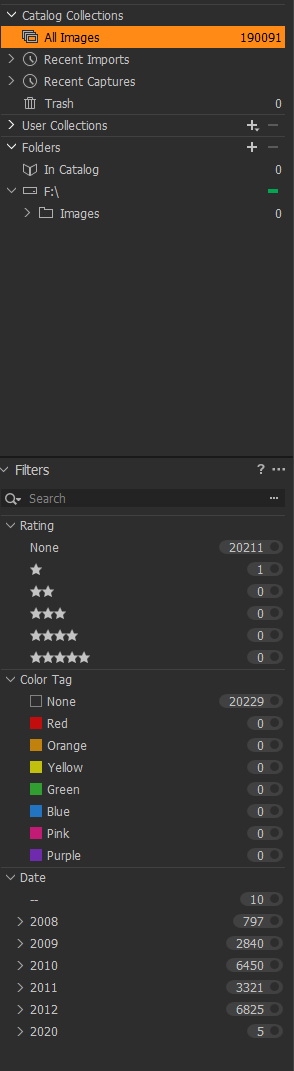
and what I call the 'pie indicator' returns...

What I meant about selection of another filter from the show/hide list is that if I open show/hide filters...
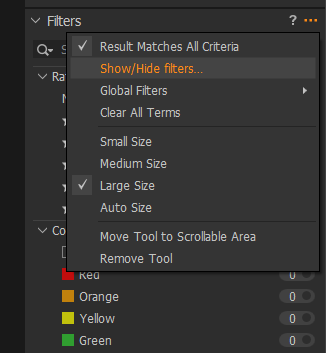
and select another filter (in my example Aperture)...
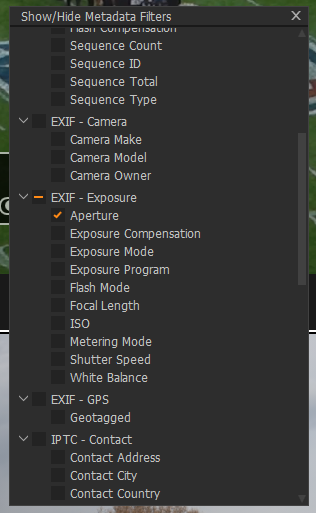
then C1 will then also start to build that filter (so each additional filter adds to the amount of time)...
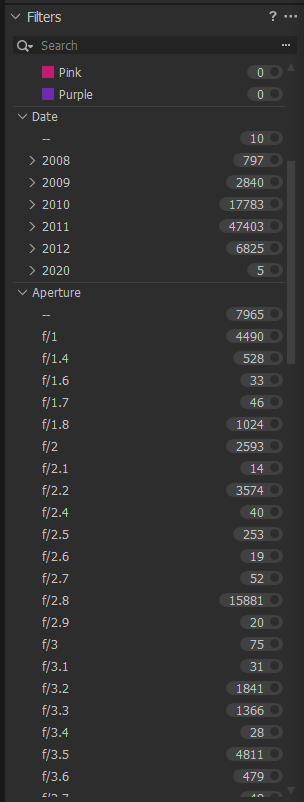
So, the amount of time taken to build the filters seems proportional to the amount of filters selected (seems obvious when I say it)...Each filter seems to take a different amount of time to build, for example Aperture seems to build very quickly, but Date, Colour Tag and Rating seem to be very slow. This seems linked to HDD speed as my HDD certainly has a lot of activity when building filters.
Again, only anecdotal observation on my part, but makes sense I suppose and maybe also be a 'red herring', but the only way I can make C1 behave as per others have said is to select a folder with 10's of thousands of images and select lots of filters.
1 -

Hi Mark
Have read your comment and suddenly understand what you have been saying (put it down to old age). I realise I have date, keywords and other filters permanently applied at startup, they seem to be the default settings of the program. Tomorrow I shall disable them and see what does to startup time.
Dave
0 -
I believe what you have applied (the selection click where the numbers are) is not that important. But what filters you have enabled, those which you see and you can turn on or off, that seems to be effecting the speed of scan (orange pie ;-)
The whole point is why this needs to be scanned every time even if you do not enable different type of filters.
I would understand if this is related to loading xmp files, those can change outside of C1 control, but the values in C1 DB? I have my xmp reading turned off.
1 -
@Mark Witherington:
In the meanwhile I got your intention. The "Filter" you mean are the fixed filter below the search box. Fine. I have taken out what I do not need there instantly. Remaining:
- ratings (first criteria important for me)
- color tags (second criteria for me)
- focal length
- ISO
The filter pass at start time has been reduced - but not significantly enough. And SSD (see above) for temporary additional speeding up workflow is not a practicable way. It would help; I can see on a catalog that is located with all images on a SSD. It would help - if we would have relative paths.
And the nearly unbelievable problem of different counts left below (filters) and right above (results) I have reported to Phase One years ago remained too. This Issue is "Phase One/Capture One verified and confirmed" but not serious enough to fix in Windows (this problem does appear in Windows version only). You can get a WOW effect from Mac user at any time when showing to them. ;) I have mentioned this issue in a blog post years ago - and get answers till today.
As I see we cannot do anything more. But your help was a very valuable input to speed up my daily workflow a bit. As I have to start C1 about ten times a day it saves many minutes a day. I appreciate! Thank you so much!
Kind regards
Ernst0 -
@IanS:
Maybe you did not see my question:
>...along with removing the corrupted files fixed my issues.
Nice hint, thank you. But how to get out such files? Do you have a wokable idea? Theese images behave like normal when working with other graphic software, and even with Capture One I cannot get through image by image manually (there are several hundredthousends of them). Catalogs (databases) proove okay.
Kind regards
Ernst0 -
I have sent all the logs and system info to C1 support as they requested it on my open ticket. I will inform you about the progress.
1 -
Thanks Richard!
0 -
Hi,
just quickly look through the thread, so forgive me if it was already asked and answered:
- What is your setting for XMP-Synchronisation? Did you try to switch it off?
- As we talk about Windows, I suppose that you have some Anti-Virus SW running. Which? Did you try to exclude the image and CaptureOne folders and files, such as the catalog & previews?
- Did you check in the taskmanager, if you see a some unusual load (esp. concerning the drives)? Also a very low load while scanning all images would be unusual...
CaptureOne will contuinuesly read from & write to the catalog file. If Anti-Virus is checking the file at the same time, you might experience a major slow down...
Btw., is there a reason why you want CaptureOne to start with displaying all images? CaptureOne seems to remember the last location from the previous work. It could be at least a workaround for a faster start...
0 -
Ralf,
to your points:
- It is none, so no load nor write
- None I do no use antivirus. MS Defender has exclusion for my image disk
- Yes I did there is almost no load activity on disks I have SSD and load is hardly 1 - 3% CPU load is around 40% on my 6 core i5 4GHz
It is not a reason to start displaying all images. It is that when I work on project I search through all my library based on keywords, sometimes date or locations and combination with color tags and star rating. I am not working on shooting assignment. Therefore I can not select subset and even if I wanted I need to first create those collections from all images.
0 -
MS Defender is a Anti-Virus solution. Are the catalogs and other CaptureOne files / folders excluded?
Btw, when I just played around with a catalog, I noticed that there was a concurrent Windows access to files (e.g., CO previews, thumbnails). I.e., the problem might not be located in CaptureOne but in the way Windows handles the file access. [I'm not using Win Defender]
(Btw., it would also be an explanation why it might not occur under macOS...)
0 -
Ralf,
I know that defender is antivirus from MS. And as I wrote before yes all catalog, image files and caches are excluded from defender scanning. I even disabled it once (you can do that only for a while) but not special impact only load of defender dropped from 4% to 0% (even all is excluded!)
I have run today process monitor during the start of C1 20. It seems that many files are scanned. I am analyzing it but it look s like all dng files almost not native raw files and very few xmp files (eve XMP loading is off).
I have offered these information to support and we shall see. I am quite sure that this is an issue of slow loading, but still I do not understand the reason the catalog is scanned every time at start.
0 -
So far not a real solution help or anything useful with this issue from the helpdesk. I will update if there is any progress. Today I was instructed to check 13.1.4 update, but it has no effect on this issue.
0 -
Unfortunately, no response from support anymore. On another from quite some few bugs I have reported and which were acknowledged I received following statement:
In this particular case, Capture One 20 (13.1.4) was the last planned service release for Capture One 20 which appeared on Dec 21, 2020 (this bug fix was not there). In case it would be decided to have another service release for Capture One 20, there will be an announcement over e-mail.
I am not willing to pay (and now even more after prices where raised) for software which doesn't work for me and where guarantee that bugs will be fixed is close to none.
I think this is the end of this thread and I am very sad.
1
投稿コメントは受け付けていません。
コメント
47件のコメント