Capture One Pro 21 crash/loop

So I edited 24 pictures and wanted to select them all to epxort via Recipe. Now I see the first 11 pictures on the screen re-scaling one after one and once picture 11 is done it start again with picture 1. All controls are frozen and there's no way to stop it. It keeps on going and after roughly 5 minutes I gave up on it.
Now, since the programm remembers this, every time I open the programm it gets stuck in this loop from second one.
Any suggestions how to solve this?
-

What you could do is with Capture One closed down, rename the folder that you have your catalogue in, then the next time you start Capture One, it will not find the catalogue and it will ask for the location. Hopefully this will break the loop. If you cancel then you will be in Capture One with no catalogue open. Then I would suggest you perform a verify of your catalogue (under the File menu). If there is a catalogue issue then hopefully this will fix it. Then close Capture One, rename to folder with the catalogue back to what it was and then restart capture one. Hopefully it will remember where your catalogue was, but if not then use open catalogue in the file menu to reload the catalogue.
0 -

I have exaclty the same problem. The only difference is, that the loop appeard by just selecting multiple images from a session.
I managed to re-opend capture one with another session file and verified the affected session twice now. The verification reported no errors or warning on both occasion.
But as soon as I open the affected session with capture one, it tries to display the same images again and freezes while re-scalling the first image over and over again in the middle window.
The session has been converted to the C21 "standard" the first time I opend it with C21 and the selection contains jpg and raw files from a Sony Alpha MII.
I have already worked and selected multiple images on the same session file for 2 to 3 hours before this error occured without any problems. (Actually never had any issues with Capture One before this happend)
C21 Pro version is 14.0.1.5
This is also the version with which I converted the session to the C21 standard.
I would appreciate a fast solution as I currently do not dare openning and working on any of my Capture One file as I do not want to loose my work.
0 -
I found a "workaround" for it.
Tried several things, including import the whole catalogue to a new one etc.
What finally solved it for me was this:
I opened a new session or catalogue, set the viewer to "main view" instead of multiview, closed COP21 and opened the old catalogue...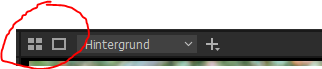 1
1 -
That is a great solution and works perfectly. Session fully intact.
And I found out when this loop occures. I could re-produce it serveral times with different images and sessions. It occurs always (at least on my pc) when I select pictures in the following order: 2 vertical pictures, then 2 horizontal, 2 vertical, 3 horizontal and on the 4th horizontal it starts looping.
*EDIT* It seems to be the combination of 2 vertical, 2 horizontal, 2 vertical images is the core problem. The error occured as well when I selected 2 or 4 horizontal images before this combination and horizontal images afterwards until I reach 10 total
Thanks again for the great and quick solution
0 -

Finally I read about this bug, which was there in v20 a year ago already. With Olympus files, when I selected more images than the amount that fit in the preview window (as thumbnails), CO1 would go into this loop that is described here, and no way to get it out, meaning a dreaded "force quit"was needed.
That was a nasty bug and I never dared selecting too many images from my Olympus cameras ever since. I suspected the 4/3 ratio to throw CO1 in a fit. Other cameras seemed to be ok.
I read in the release notes of the latest release that this should now be fixed.
0 -

June 25, 2021 I have the latest version of Capture One 21 running (build 14.2.0.48). I'm trying to batch edit focus bracketed shots (Fujifilm camera .raf) with Capture One and save them as .tif files before I stack and combine them in Affinity Photo. If I try to SELECT ALL files for editing in Capture One, and there are more than twelve files loaded into the browser on the right hand side, the program goes into an endless loop of trying to show the files on the view window (twelve files or less works with no problem). When that starts I lose all control over the program - it just goes on and on trying to show the images and telling me there are files that it can't show (for instance, if I SELECT ALL of 20 files, the program shows 11 files, tells me there are 9 more, and cycles continuously to keep presenting images of the 11 files on the view window). If I force stop the program with Task Manager and restart it, the loop just starts again. The only thing that seems to work is to shrink the program and then stop it, and then delete the Capture One Catalog and restart the program with a new catalog. I've tried multi-view and main view for the view window, but neither makes any difference to the looping error when I try to SELECT ALL with more than 12 files.
0 -
Is this bug still present? I never used a select ALL on Olympus 4/3 files since, have not shot Olympus for a long time.
I drew the conclusion back then that it had to do with the aspect ratio of the 4/3 format, but Fuji has a standard 3/2 ratio?
0 -
further to June 25, 2021 post above FirstName LastName: I did install version 14.2.0.48 of Capture One 21, but it appears it did not launch immediately. The new version has now launched; I just tried SELECT ALL with twenty files in the browser and the function worked as it should without going into an endless loop. It does appear that this has been fixed in version 14.2.0.48. Thank you to the Capture One team.
0
投稿コメントは受け付けていません。
コメント
8件のコメント