Capture 21 Pro Freezing when selecting color editor

Hello All,
I am new to the capture one family and I am really liking the software a ton. It is fast and easy to use and the results are quite nice. I am very interested in purchasing it if I can get my issue resolved
The program was flawless on day one of my free trial. Day two happened and something went terribly wrong. It just freezes when I try to select the color editor tab. Cant make sense of it too much.
I have uninstalled. Rebooting. Reinstalling.
I have EVEN reset my machine three times.
I have gone as far as diving deep in the registry editor to delete any remnants of the software before reinstalling.
I have used ccleaner as well to remove the bulk of related registry entries
I have gone through file explorer and searched and deleted anything "capture one" and "phase one" related.
I have restarted multiple times.
I have followed the directions on uninstalling capture one via this website.
and I simply just cant get it not to freeze. I really want this program to work.
Through my google-fu I have found some people having that same issue where it hangs up on selecting the color editor tab. I got close to a solution but it seems to have been deleted from the web. From what I was able to read, it appears that there is some double entry in some command prompt on "open with".
If anyone can point me towards the right direction it would be greatly appreciated!
Thank you!
-

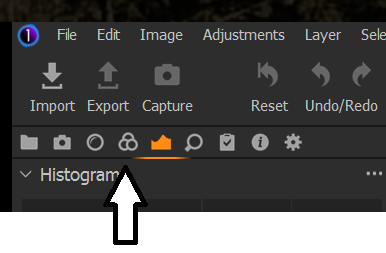
Colour Editor Tab as in the tab at the top of the tool stack window or one of the tabs within the colour editor tool?
After that the whole whole thing freezes up even after a full install?
I have to say I have never seen either problem. That makes me very curious.
When you first open the program what steps do you take and how far do you get? Image file open and other things working but not he colour tab? Or do you not get that far?
0 -
SFA,
 0
0 -
SFA,
I played around with it again and yes. I can edit (or activate) the capture tab, exposure tab, adjustments tab, output tab. But once i hit the color tab it freezes.
What I thought was interesting is that after I wiped the whole computer and did the full reset, and after I downloaded and installed the program again once I launch it I get the message saying that capture one didnt shut down correctly last time and if i want to send a report. Even after cleaning and deleting and resetting, capture one remembers that it did not shut down correctly. So there is something deep down somewhere that is perpetuating the error. I want to find that and remove/fix it so I can use the software without freezing.
0 -
Hey all.
I would like to announce that through playing with it some more I seemed to have fixed it.
It appears that because I was ending the program when it would freeze through task manager, some necessary processes were not being completed. I would continuously get that start up message stating that it did not shut down correctly.
Up until now I was ignoring it. One thing I did not attempt was simply quitting the program before it would freeze. I played around and avoided using the color tab and edited and exported one photo. I then closed the program like one normally would.
I launched it again and lo and behold it allowed me to select the color tab.
Thanks for reading!
0 -
Perhaps I spoke too soon. It just froze again. LOL. Back to the drawing board!
0 -
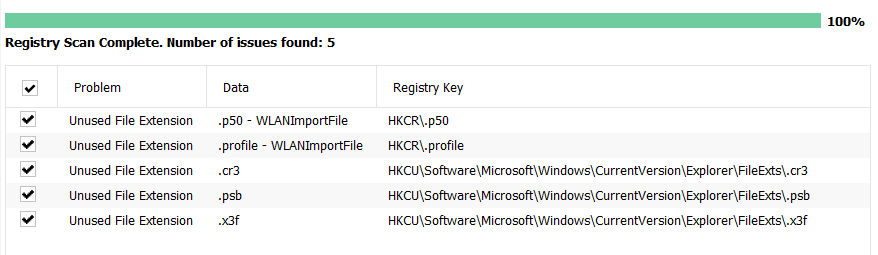
Drinking some beer and troubleshooting since browsing the web for answers frustrates me needlessly. Ran CCleaner and cleaned up the registry. Restarted the computer again. Booted up then shut it down. Booted up and then launched capture one and did nothing and proceeded to close the program. Ran CCleaner and used the registry cleaner and found these supposed issues. Do not know if this is actually an issue but these files seem to be related to capture one, specifically the last three. Dont know why they are not being used as defined by CCleaner. Running low on beer. hoping to find a solution soon. Till my next update....
0 -
Reading the report and I find this is what occurs moments before crashing:
********************************************************************************
[2021-01-30 17:56:46.986][000][ID:001, ]{APPL } | Application started, version PluginHost 1.0 - Located at: C:\Program Files\Capture One\Capture One 21\P1.C1.PluginHostProcess.exe
[2021-01-30 17:56:46.986][000][ID:001, ]{APPL } | Running on Microsoft Windows NT 6.2.9200.0
[2021-01-30 17:56:47.074][087][ID:001, ]{PLUG } | InitializationStarting
[2021-01-30 17:56:47.451][377][ID:001, ]{LOG } | Log file initialized.
[2021-01-30 17:56:47.451][000][ID:001, ]{PLUG } | Parameters: C:\Program Files\Capture One\Capture One 21\Plugins\OpenWith BuiltInOpenWithPlugin com.captureone.openwith
[2021-01-30 17:56:47.465][014][ID:001, ]{PLUG } | Discovering...
[2021-01-30 17:56:47.469][004][ID:001, ]{PLUG } | Discovering from path: C:\Program Files\Capture One\Capture One 21\Plugins\OpenWith with entry point: BuiltInOpenWithPlugin
[2021-01-30 17:56:47.471][001][ID:001, ]{PLUG } | Dlls discovered: C:\Program Files\Capture One\Capture One 21\Plugins\OpenWith\OpenWithPlugin.dll C:\Program Files\Capture One\Capture One 21\Plugins\OpenWith\P1.C1.Framework.Native.dll C:\Program Files\Capture One\Capture One 21\Plugins\OpenWith\P1.C1.Localization.dll
[2021-01-30 17:56:47.524][053][ID:001, ]{PLUG } | Discovery OK
[2021-01-30 17:56:47.525][000][ID:001, ]{PLUG } | Creating a new instance...
[2021-01-30 17:56:48.079][553][ID:001, ]{PLUG } | Starting service...
[2021-01-30 17:56:48.115][036][ID:001, ]{PLUG } | Adding host at: net.pipe://localhost/PhaseOne/Plugins/com.captureone.openwith/P1.C1.Plugins.Common.Wcf.IPluginHostOpenWith
[2021-01-30 17:56:48.167][051][ID:001, ]{PLUG } | Adding host at: net.pipe://localhost/PhaseOne/Plugins/com.captureone.openwith/P1.C1.Plugins.Common.Wcf.IPluginHostSettings
[2021-01-30 17:56:48.172][005][ID:001, ]{PLUG } | Service started...
[2021-01-30 17:56:48.173][000][ID:001, ]{PLUG } | Plugin initialization completed
[2021-01-30 17:56:48.173][000][ID:001, ]{PLUG } | InitializationOk: P1.C1.Plugins.Common.Wcf.IPluginHostOpenWith, P1.C1.Plugins.Common, Version=1.0.0.0, Culture=neutral, PublicKeyToken=45b76d0ca35b690a| P1.C1.Plugins.Common.Wcf.IPluginHostSettings, P1.C1.Plugins.Common, Version=1.0.0.0, Culture=neutral, PublicKeyToken=45b76d0ca35b690a
[2021-01-30 17:57:32.744][571][ID:009, ]{PLUG } | GetOpenWithActions -> keys: .jpg, values: 1
[2021-01-30 17:57:32.797][052][ID:007, ]{PLUG } | GetOpenWithActions -> keys: .jpg, values: 1
[2021-01-30 17:57:32.844][046][ID:007, ]{PLUG } | GetOpenWithActions -> keys: .jpg, values: 1
[2021-01-30 17:57:32.864][020][ID:006, ]{PLUG } | GetOpenWithActions -> keys: .jpg, values: 1
[2021-01-30 18:01:43.877][012][ID:001, ]{PLUG } | Plugin exiting0 -
And this is what happens right before the text becomes unintelligible, at least for me:
</Plugins.com.captureone.openwith.log>
<IcKernel.ICOCL.xml><?xml version="1.0" encoding="utf-8"?>
<device>
<Index>0</Index>
<Platform>NVIDIA CUDA</Platform>
<Version>OpenCL 1.2 CUDA 11.0.228</Version>
<Device>GeForce 930MX</Device>
<Driver>452.25</Driver>
<GlobalMemoryMB>2048</GlobalMemoryMB>
<NumberOfKernels>1290</NumberOfKernels>
<NumberOfCompiledKernels>1290</NumberOfCompiledKernels>
<Benchmark>1.007840</Benchmark>
<Status>Benchmarked:CL_SUCCESS</Status>
</device>
</IcKernel.ICOCL.xml>
<IcKernel.ICOCL1.xml><?xml version="1.0" encoding="utf-8"?>
<device>
<Index>1</Index>
<Platform>Intel(R) OpenCL</Platform>
<Version>OpenCL 2.1 </Version>
<Device>Intel(R) HD Graphics 620</Device>
<Driver>22.20.16.4771</Driver>
<GlobalMemoryMB>3227</GlobalMemoryMB>
<NumberOfKernels>1290</NumberOfKernels>
<NumberOfCompiledKernels>1290</NumberOfCompiledKernels>
<Benchmark>1.543410</Benchmark>
<Status>Benchmarked:CL_SUCCESS</Status>
</device>
</IcKernel.ICOCL1.xml>
<IcKernel.ICOCL_all.xml><?xml version="1.0" encoding="utf-8"?>
<query>
<DeviceQueryResultCode>0</DeviceQueryResultCode>
<DeviceQueryResult>no error</DeviceQueryResult>
<FoundDevices>2</FoundDevices>
</query>
</IcKernel.ICOCL_all.xml>
<HangDump>0 -
To met it looks like the program is trying to open a plugin. What that plug in is, I dont know. Also dont know how I was able to play with the color tab just for a minute before freezing again.
0 -
Did another uninstall but I forgot to do some other things so when I reinstalled it, it did not ask me for a subscription key and took me straight to the last place I was pre-uninstall. Out of beer and out of the will to continue this tonight. I am going to log off for the rest of the night and play with my dog.
0 -
Charles,
The last section of the log file just before the "hang" message is all the logs from the attempts to set up configuration files for the two GPU capable devices on your system.
It is interesting that n your system the "Device 0" (i.e. the first discovered GPU processer) is the GeForce 930MX and the second one (Device 1) is the built-into-the-CPU Intel HD Graphics 620.
On my older system it is always the other way around and the Intel ends up being rejected for lack of processing power (it's an older product than yours) whereas the Quadro just about passes the test. However in recent times and I suspect due to a Windows 7 up date on that machine, the kernel driver build for the Intel component would usually fail and thus prevent the Quadro kernel build completing on the first attempt.
The two kernel build processes appear to be run in parallel rather than sequentially to the log messages can be intermingled making them not so easy to follow. When the first one failed the whole process would stop.
Running the start up/GPU assessment again normally meant that the Device 0 was an already known failure so that was skipped and the Device 1 assessment would continue to a usually successful conclusion. (Usually successful because the potential capability of the GPU is borderline and anything that resulted in a poor potential performance assessment rating meant it was rejected.)
That problem seems to be generally resolved now. I'm not entirely sure how it was resolved. I think a Windows update - one of the last Win 7 updates to be applied but it may have been a system bios or approved driver update via Dell. I suspect that the fix was not a "direct" fix but an indirect "something fixed something else which meant that other errors reliant on "something else" were eliminated.
Anyway, while the possible problem with the GPU kernel build is not great it would not immediately seem to have any obvious connection with a non-functioning tool tab.
Have you tried opening a different Workspace? One that has the Colour Tools tab but not based on the same workspace that has the problem.
Are you using the supplied Default Workspace or one that you have modified and saved as a user Workspace with a new name? If so was it created with an older version of C1? This may be an entirely wrong direction to consider but I think that anything that fails to open a tool tab when requested needs to be considered right from the start point of what should happen just opening a tab. Or maybe deleting a tab?
The Workspaces are XML files - so basically a form of text file with instructions - and it is not inconceivable for them to pick up the odd internal data problem from time to time. Rare, certainly, but no inconceivable.
In used the current display and configuration settings for a Workspace and it component Tabs, etc., are going to change and these change are recorded in real time in a user configuration file in detail and also by session/catalog so that one can return easily to a "last used state" for any aspects of functionality recorded at the level. (Some things are not identified at the specific session/catalog level but will still be recognised and retained in the user config file. If the User Config file has developed a glitch for some reason there is potential for that to to have effected a specific part of the "in use" Workspace record - maybe for one tab - and make it impossible to correctly interpret the settings for that particular function.
Whilst this may be a dead end it is nevertheless something that should be checked. Changing the work space or perhaps deleting the tab and re-adding it could be a useful experiment if you have not already done it.
Also a quick check that you can add the color tools as floating tools? And maybe just try adding a new tab and then the color related tools to the tab and make sure that works.
The one thing that was long and issue with the Tab of the color tools was that the Advance Color tool, when opened, required quite a lot of vertical real estate. On some system with marginal vertical screen resolution available the tool might not open. However this was largely resolve when the V20 ability to split the tab into fixed and scrolling sections was introduced. Providing the facility is used by adapting any previously created personalized Workspaces. I mention that mainly for completeness, just in case it could be a factor.
0 -
SFA,
I think what is happening on my end is that there was a previous install that is messing things up.
I had to reset my computer for a completely different reason (It is old and was full of junk and hardly any disk space) and the issue arose after I reinstalled capture oneI have tried moving the workspace just to the other side (from left to right) and that is about it.
While troubleshooting, I did delete the color tab from the sidebar and then readding it. Are there different workspaces available to choose from? I will look into that.Perhaps I should try deleting, saving the workspace, exiting the program, and the shutting down the pc and rebooting to see if that has any effect.
I did find some XML files but did not pay attention to what they actually were. I simply looked for the dates and if there were any duplicates or just anything out of the norm in terms of files being there. I did notice a user config...
I do plan on building a PC with much higher performance (I need it to run autodesk, astro-imaging software, photo editing software, and microsoft flight simulator) so if my computer is barely passing to make the software work, it gives me hope to think that this kind of issue will not be present in the future. I aim to have the pc built later in the year. This laptop is a very entry level laptop that I just used to finish school. I finally have a big boy job and now can justify getting something capable for my hobbies instead of just dealing with the barely adequate performance.
I did download the previous release of capture one, just to see if the issue would pop up. I played with it for a limited time but I was able to use the color tab. I will use this version to learn more about customizing the workspace and seeing the quirks and features of the software before I attempt fixing version 21 on my laptop.
I will definitely be much more careful with my future PC build.
I will report my findings.
Thanks for taking the time for writing a very thorough and meaningful reply.
Cheers!0 -
Hey SFA,
Downloaded and installed Capture One 21 Pro and did as you suggested. I changed the workspace to simplified and was able to use the color section without freezing. Still playing around with it but it looks like what you theorized was correct. Thanks again for your help!
0 -
You are welcome.
I'm glad you got things working.
Workspaces are very powerful assistants. Now you have had some involvement with them I highly recommend taking a few minutes to discover a little more about them - early prep and appreciation of how they can help when you are ready for them later!
0
投稿コメントは受け付けていません。
コメント
14件のコメント