poor performance CO 21

Hello,
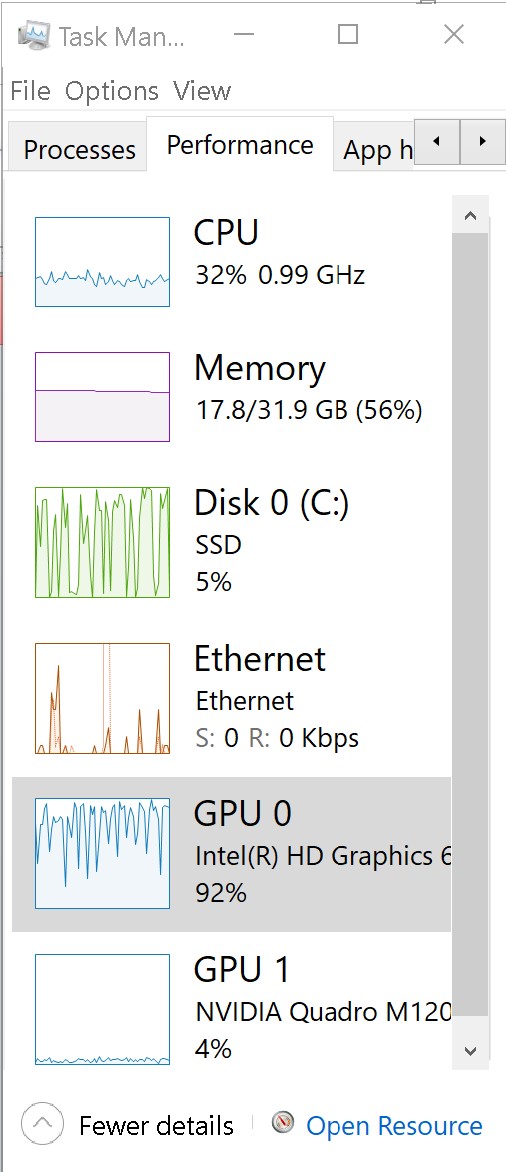
I'm experiencing poor performance on my Dell Precision 5520. Specifically, CO 21 doesn't appear to use the dedicated graphics card (M1200), only the integrated Intel Iris 630. The screenshot below was taken while rendering previews. IN this instance it took over an hour to render 700 previews. It's a constant bottleneck and I can't really do anything else on the machine at the same time.
Use open CL is set to Auto for both options and the message says that CO is using hardware acceleration.
Any help is appreciated.
Thank you!
-

Hugh,
First thing to check is the log file that records the creation of the kernel files to drive the discovered OpenCL compatible devices.
Are you familiar with the location of the C1 log files and with reading log files in general?
Secondly, my Dell M4700 has an M1100 GPU and that, in the context of an 8 years old machine, was just about worth using when assessed by the setup program. The onboard Intel was always rejected.
The NVidia application has an option to force use of a card for specified programs.
In the early days of the 4700 and GPU availability I set that up and made sure it was always selected but on that machine there was little difference so far as I could tell (Win 7) between using the GPU or simply running everything through the CPU. Some parts of the processing task are CPU only.
I have recently obtained a 7550.
C1 uses both the Intel and the NVidia OpenCL options. I felt the dedicated card T2000 seemed to be under stressed (perhaps for good reasons as part of the overall package ) so again forced its use via the nVidia application. Interestingly for many situations the load on Intel and Nvidia facilities are quite similar. I can be sure the cards are working by checking the Task manager, listening to the fans and feeling the heat generated! But it seems the heat is always there no matter the application in use.
Dell has some apparently smart management software installed and it may be that I will be "managed" based on use over time.
It has just reminded my that I have not run the optimiser for over a month so I have rectified that and will now see what it is suggesting.
For what it is worth I don't think the preview rendering process is the best way to assess the effectiveness of the cards and whilst the availability of Hardware acceleration is certainly useful the benefits are likely to be more visible in the Task Manager when producing a large output batch.
Or if you want to see a high% usage and a consistent load run some video editing applications.
Bear in mind that, depending on the system configuration, C1 may feel that some, perhaps many processes, will likely be faster and better managed if run through the CPU rather than passing them off to another device and then collecting them and joining them back into the workflow later.
FWIW the CPU in this system is a 10875 currently running only 16Gb RAM and a 500GB NVME SSD.
0 -
Hello and thank you for your detailed response.
A couple of things I should mention:
-nVideo prefs set so that the M1200 discrete graphic is the default. It's not set by program;
- I do a lot of video rendering and playback on this machine without issue, which is why it's a surprise that CO is an issue!
-no troubles editing video in Premiere, encoding in Media Encoder or VJ type work in Isadora. Clearly the machine is underpowered by modern standards, but no bottlenecks, or stutters, usually.
-unfamiliar with log files and how to find/read them. Familiar with Google.
- 32 gigs of RAM here
Thank you,
Hugh
0 -

I have the same problem on two Windows 10 computers:
- Desktop, Intel(R) HD Graphics 630 + NVIDIA GeForce GTX 1080 Ti
- Notebook, Intel(R) UHD Graphics + NVIDIA GeForce MX250
C1 compiles kernels on both GPUs but it always selects Intel to offload processing. The only workaround I have found is to go to Device Manager and disable onboard Intel GPU. Then C1 will utilise NVIDIA to do the processing.
I have engaged with PhaseOne a number of times via official support channels and via beta programme (since 19 beta) but up to this moment, no solution has been provided.
P.S: I am surprised to see GPU is being utilised to create previews. GPU does speed up image processing and export quite a lot, but I have never seen C1 utilising GPU for previews neither on Intel nor on NVIDIA GPU. Is GPU processing supported for previews? Or is it only my configuration where C1 does not leverage GPU power to create previews?
0 -
damjan,
My Windows 10 notebook has an NVidia T2000 GPU.
The NVidia management software has facilities that provide for specifying that some applications should always use the NVidia driver for 3D processing. This has been around for a long time and does seem to work.
For example, it worked to get my just-about-useful Quadro GOU working regularly with my older Win 7 notebook. The Intel software GPU on that system is always rejected due to a lack of sufficient processing power to make it useful.
The current installation on my Win 10 machine for the NVidia Control Panel indicates that "Windows OS now manages the selection of the graphics processor" and offers a link to "Windows graphics settings".
There one finds controls to turn "Hardware-accelerated GPU scheduling" on and off.
And for "Graphics performance preference" related to battery use (but possibly more generally functional) one can choose apps/programs and specify what performance level should be applied if they are operational.
Having set both the NVidia and Windows 10 values I can observe GPU usage as reported by NVidia (Which applications are using the T2000) and Windows (load monitoring for both the Intel and the NVidia devices) and it is clear they are both working.
Does it really make a difference?
Difficult to tell. I suspect the CPU may be powerful enough that there is little benefit to passing off most editing tasks to GPUs but I can see spikes in usage when editing.
Batch output processing is a more obvious area where benefits might be derived.
Video processing shows a much more significant usage for CPU and both GPUs but then that is to be expected based on the way video works.
Adding to the complexity this Dell device appears to have some built-in "intelligence" that learns how the user uses the machine and installed applications and so can fine-tune the way the system works to best support their typical activities. It will be interesting to see how that develops and what it turns out to mean in practical terms.
I have just checked what happens when I run "Regenerate previews" and the Task Manager Performance Tab graphs indicate a level of CPU activity but no visible GPU activity for either GPU.
Things may have changed over the years since OpenCL and GPU support was implemented but as I recall the use of any CPU is quite selective depending upon the types of edit applied to an image and, at least at some times in the past, the format of the RAW file produced by the sensor that captured the image.
Not all edit activities are viable for GPU performance enhancement and we should not have an expectation that a GPU will always show some activity just because it exists.
Although I do have my system set to prefer the NVidia GPU available when Capture One is deployed I have evidence to suggest that making it work that way offers a performance advantage in all situations. It may not.
Moreover, the potential configuration variables within a system probably mean that there is no "one size fits all" solution or recommendation that could be applied.
0
投稿コメントは受け付けていません。
コメント
4件のコメント