Editing from an external SSD and reedit later from another source?

Hi,
I plan to use an external SSD disk via USB-C connection to a mac Mini M1, to edit my raw images with Capture One 21.
After the projects are finished, I will move the entire project to an external HDD + backup disk drive.
When the SSD is full, I will delete the images and the originals become the copy that is in the HDD.
The C1 will "see" the images to be edited from the editing SSD, while the editing work lasts. Then the images will be on the HDD unit only (+backup). If later want I need to reopen and re-edit those images, what do I need?
Just keeping the projects with the proper editing instructions on C1 Catalogue and reconnect the missing files with "?" mark, to the new location on the HDD and is editing possible again?
Thank you very much.
-

If you move your files from the SSD to the HDD from within C1 (by simply dragging and dropping them from the SSD to a folder on the HDD) then C1 will know where they are and the whole thing will be seamless.
The alternate is to use the Locate function within C1 to point the catalogue to the new location of the files, but I would strongly suggest you take the easy way and just move them as outlined above.
0 -
Hi Shane,
thank you very much for your help. It is an easy task. Good news ,-)
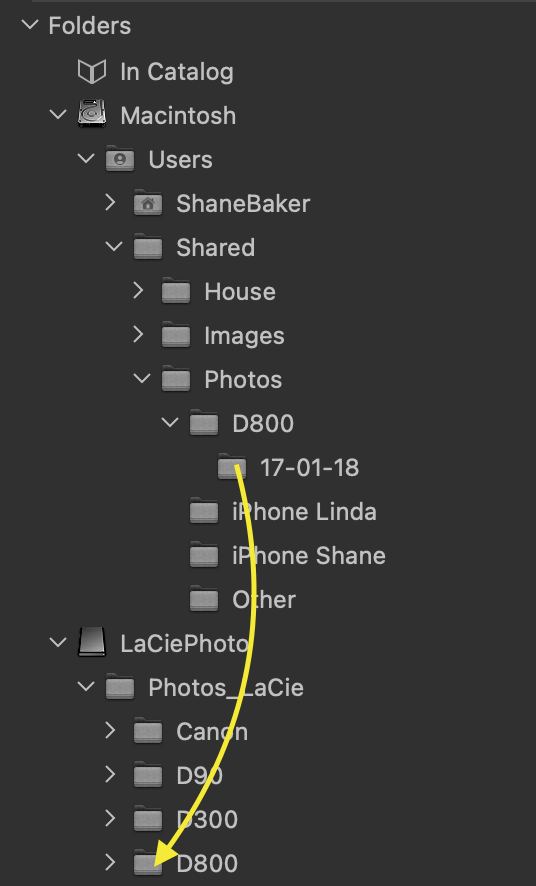
You mean, "dragging and dropping them from the SSD to a folder on the HDD", " from within C1"; doing that from the Folders menu bar, where I see my disks; moving folders with images from the SSD to the HDD on that list of disks? Just to be sure ,-)
0 -
Gidday Luís
Yep, just drag and drop in Folders:
 0
0 -
Perfect! Thanks a lot. What a beautiful explanation with visuals and everything.
,-)
I assume that the opposite is also possible? From an HDD to an SSD back?
0 -
Yep.
0 -
;.-) Thank you very much Shane.
0
投稿コメントは受け付けていません。
コメント
6件のコメント