DxO PureRAW and CaptureOne

Just gave a go the the newest DxO addition "PureRAW" "pre-editor" software.
I must say I am speechless.
The software is designed to improve (of course with DxO) the optical rendition of your pictures, but also of old RAWs. Besides, it contains the newest version of the DeepPRIME denoiser - that produces incredible results. So, yes, I am sold to it.
Question is: it can only export to DNG formats - which are then opened in the Editor of your choice, including C1P.
How good is C1P at working with DNGs ? Does it retain the same editing capabilities as with RAW files ?
I trust the experience of those who already have worked on DNGs with C1p to share their findings, good or half-satisfied.
Many thanks,
-
I haven't tried DxO Pure RAW, but tried DxO DeepPrime with a trial version of Photolab 4. And, indeed it gives good results. You can get linear DNGs, which means that they can be processed in the same way as an original RAW. I didn't observe any limitation in the adjustments when going further to Capture One.
0 -
Thank you Robert.
I'll have to see how to modify my workflow to integrate this new tool.
0 -

I would recommend you wait till DXO PL is discounted again and get the full version because it is not much more expensive but offers very useful control not available in pureRaw but you can do the very same - export linear DNG files.
deepPrime is really amazing and not only useful for noisy images it performs very similar to adobe enhance raw so compared to c1 you will get better detail ( especially geometrical pattern ) with much less or zero artefacts. exposing for the highlights and lifting shadows is also improved with deepPrime as it clearly extracts more noise free detail in dark areas. so far I have also not seen issues using linear dng files instead of the original raw.
0 -
There is for the moment 30% discount on PureRAW, which makes it affordable at 89 euros (we pay more for a C1P update :-) )
I didn't really find my way in PhotoLab - otherwise, I would possibly have switched.I wish DxO would licence that technology to third-parties .... and that C1P would buy it !
PS: PureRAW is indeed a stand-alone module of the DeepPrime de-noiser, including lens correction files.
I wonder how they can reach that level of quality, while others (guess who ? ;-) ) seem to be struggling in that field !0 -
I recommend PL over pureRAW because I often see the need to change deepPrime settings or had to adjust the lens correction values, impossible with pureRaw, for optimal quality.
yes it takes some time to understand PL as it behaves different to adobe and c1 but to use it only to apply deepPrime and lens corrections is not that difficult.
why should they licence their technology ? the real question is why did c1 not develop such technologies as it was clear in which direction things will go ? c1 very much gave up developing core improvements, their focus seems to make as much money as possible with an ageing code, very different to dxo which as the smaller company with less market share needs to attract new user with really useful and innovative features and to offer visible better image quality is a very good argument, no? as in other fields to develop something new you need to build up expertise, this needs time and money and also a dedicated management which thinks in longer periods and not just accountants and a office full of marketing people.
0 -
I agree that C1P should wake up.
Must say I am pleased to see that they have now monthly updates - maybe they are heading back to the right track ?
On the other hand, DxO is much less expensive than C1P, with some great tools - deepPrime is truly amazing.
That's why I talked about licensing: they might make some "easy" money from companies like C1P that don't want/can't dedicate resources to development, while reaching a market that currently is not their main target.And C1P would get a boost in terms of quality for the pros that use it in production environments.
1 -
when dxo would licence deepPrime to c1 they would only make their competitor stronger and I'm very sure this is not in their interest. but c1 could sell a bundle with pureRaw, a real value compared to their insane priced presets !
0 -
as i do use linear DNG files more often i thought it is a good idea to do a little stress test to see how this files perform with extrem off WB and +/- 3 stop exposure in comparison to the same original raw. from my test I would say practically similar, the only issue I found was a very small color balance difference with blacks when massiv over exposed and corrected in software.
0 -

I use C1 21 most of the time, except when I am working on high ISO images. Then I work with DXO Photolab 4 Elite because of the excellent noise reduction tool (DEEP Prime) in PL4, although I have to miss the excellent local adjustment possibilities and other assets (coloradjustments!) of C1. DXO PureRaw seems to give the opportunity to efficiently use the best of both worlds. But... Does anyone of you know which of the C1 (auto) correctionsettings must be switched off when starting to work in C1 on dng files that have come out of DXO PureRaw? Because when you don't do that, I suppose, C1 doubles the corrections DXO PureRaw did already apply.
0 -
I have seen that c1 applies unasked - sharpening, color NR and CA correction. but when you already have PL you don't need pureRaw because you can do the very same - export a dng with only NR and optical corrections applied.
0 -
Thank you for your explanation. I have tried this in PL4. Which worked , but also resulted in another question. What does DXO PureRaw actually do and what not, so what is left to - in my case- C1 or e.g. Lightroom?)
Or in other words: Do the optical corrections in Photolab 4 (in the DNG export NR-and-optical-corrections-only-method) concern only distortion and vignetting (both Auto with DxO Optics Module) or also lens sharpness?
0 -
PureRaw only applies de-noising (3 different levels to chose from, including the excellent deePrime), and the Optical modules of PL4.
It is kind of a stand alone app to benefit from DxO best expertise - w/o taking other steps.
When denoising and optical corrections are applied, you click "export to.."<your preferred software>, and you finish your editing work there - on the DxO-produced DNG.
Your initial RAW file remains untouched and stays where it was.
1 -
Aha, now I understand that DxO PureRaw = PL4 with the DxO Optical Corrections only Preset + one of the three Denoising Options chosen. Thank you!
0 -
Exactly.
As DxO states it themselves, PureRaw gives you the possibility to benefit from DxO's best tools (denoising and optical corrections) while retaining your usual photo editing software for touching up your images.
A smart move, I would say, as it brings them more cash (w/o additional development), displays their savoir-faire, and don't force a migration.
0 -
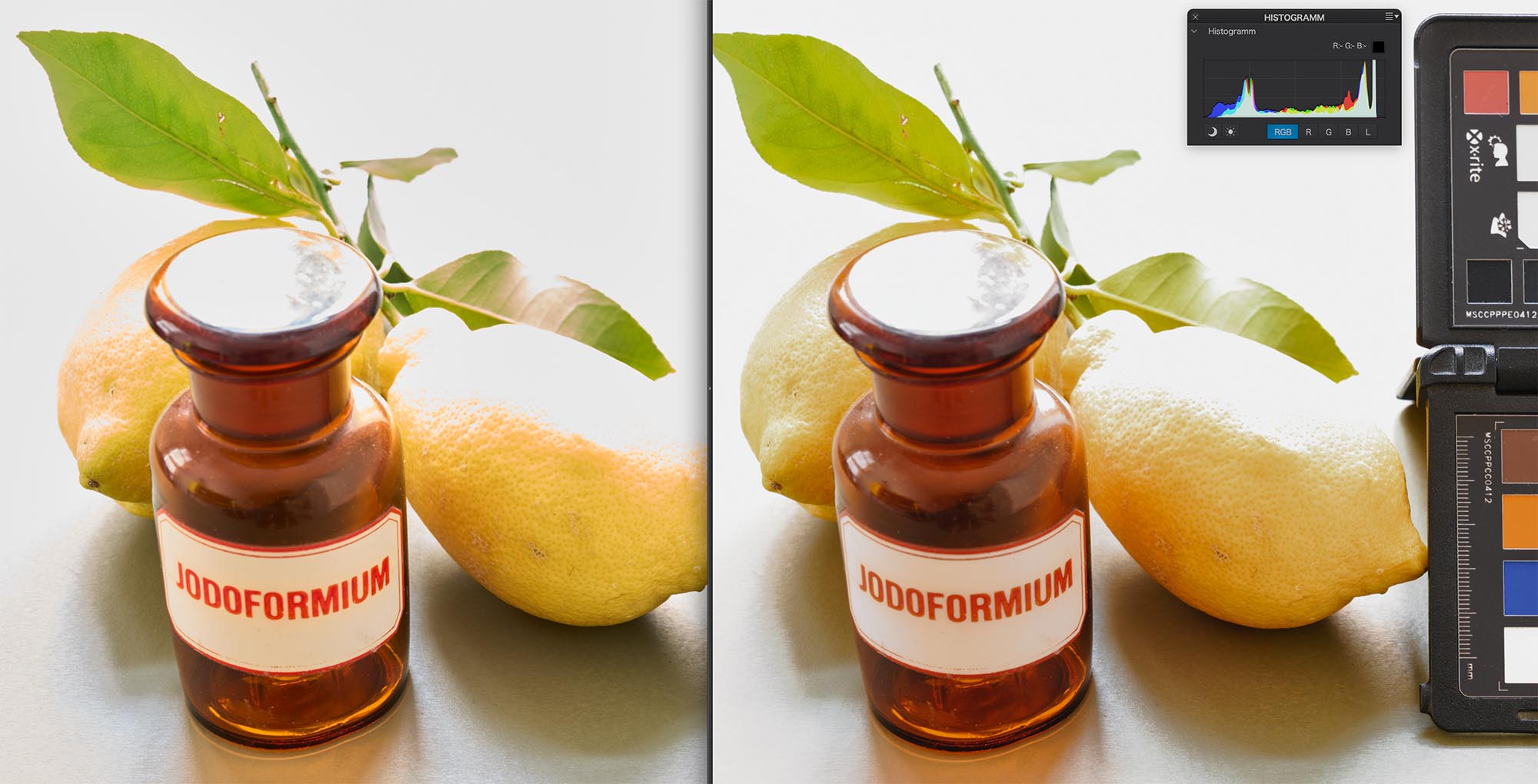
it is for sure a good move which benefits many user but I'm not sure it will help them in the long run because it will prevent user from looking closer what PL offers. this are files from my linear dng stress test and I have to say I was a little surprised by the outcome. +3 stops over exposed. the banding in the highlight transition is an old c1 disease but while dxo is not able to recreate blown out colors as good as c1 in general it does a better job with this subject.
 0
0 -
Because when you don't do that, I suppose, C1 doubles the corrections DXO PureRaw did already apply.
From what I can see (but I can be wrong), once pre-edited with DxO puerRaw, C1P's lens corrections are set to "generic", with all slider on "0"
1 -

I usually reduce sharpness (+50) and exposure (-0.2 approx) once in C1 tho.
But yes, DXO is known to be a bit worse when it comes to blown highlights. Overall, I am very happy with DXO PR. I just shot a Macro at iso10000, looks like an iso 100 after deep prime 🙃
0 -
yes, deepPrime is really amazing. some denoise filter are also really good but still not comparable as deepprime does reveal more detail and less artefacts something the filter applied after demosaicing can't .
0 -
I have worked with the new DxO Pure Raw program with some of my older Leica Vario files. There is a very noticeable improvement.
Perhaps I am not working with such files correctly in Capture One. However, the editing of such files from DxO PR is much easier and better in ACR, especially since ACR has been updated with the new and vastly improved masking and "pseudo-layer" workflow. My approach-which I am still refining-is to treat these DxO PR files as the initial conversion. I will then apply another DNG demosaicing program such as is available from Color Fidelity TO the DxO "pre-conversion" and work in ACR. The recovery of detail, saturation, dynamic range, and color fidelity has been remarkable and confirms statements from many that the combination of the Leica Vario lens which is precisely attuned to the Vario sensor can produce files that rival those from the M series of digital cameras....but at a fraction of the cost.
0 -
CSP:
I recommend PL over pureRAW because I often see the need to change deepPrime settings or had to adjust the lens correction values, impossible with pureRaw, for optimal quality.
I am still in the testing phase with PL but fully agree. The effect is sometimes too strong imo, and if settings cannot be changed in pureRaw you will be missing the real benefits of the denoise in some of your images.
0 -
Thanks. I have a few images which greatly benefit from the NR, so it is already set that I'll buy a license when the next good rebate is offered.
I will explore other features too. For an important image (an image which I print large) I anyway develop different variations with other raw converters (currently C1, NX Studio and darktable) before I print.
0 -
NX Studio is good at colors and tonality. But not as good as C1 with NR, and bad at blown highlights. So it depends on the image.
It is all too easy to fall into habits and be blind for some things. All converters have a different default rendering and the tools give different results, which gives me ideas or other perspectives to either validate my original development or to change my mind on one or the other decision I took, it's almost as if another guy would have developed my image with the same app and we were discussing about it. So sometimes I use another converter just for this reason and change and finish my edit in C1.
2 -
Our discussion has become rather interesting in that many of us find that images from various cameras will be somewhat "different" depending upon the RAW processor....exactly what one would expect.
Can one bring a RAW file/image that has already been "processed" into Capture ONE WITHOUT having Capture One apply any additional demosaicing?
0 -

> Elliot Puritz: ...WITHOUT having Capture One apply any additional demosaicing?
Wow, I did not know that C1 further demosaics an image that has already been demosaiced.
0 -
Indeed....for those who are using other RAW demosaicing paradigms, might they tell us how they use such in Capture One so that Capture One does not apply the C1 RAW conversion to the RAW conversion they have moved into Capture One?
Thanks.
0 -
Somehow Capture One has to be "told" that the file has already been converted and that the image can be edited "as is" in Capture One.
0 -
It's why I never like "AI" process where an application choose "corrections and adjustments".
With the exception of dxo deepprime noise reduction and sharpening I assume...
DNGs from dxo are demosaiced RGB images, 3 times the file size of the original raw (which only has 1 value per pixel) makes me believe that. So, nothing to demosaic for C1, I doubt it will.
0

投稿コメントは受け付けていません。
コメント
27件のコメント