Analoge scanned photos - no chance to change metadata

Hi all,
does anyone know why it isn't possible to change the metadata, especially the timestamp, in C1? The reason to protect the original date of the creation of the picture has no basis. Anyone who wants to change the date will be able to do so too. I also take analogue photos and switch back and forth between my Leica M7 and my SL2 depending on the subject. Unfortunately, the scanned photos have no information on the date and time. So why shouldn't one be able to change this?
-

No, C1 can‘t do this. You have to use EXIF TOOLS, Photomechanics etc. to manipulate exif data
0 -
It's a question of general philosophy of the software. EXIF are considered by many (including Capture One) as belonging to the signature of a picture, in the same way as the copyright, for instance. Accordingly, changing them would need some more work..... I put a date/time on my scanned films using a third party software. There are many.
0 -

> Harald Schmidt: So why shouldn't one be able to change this?
My guess is that it comes down to C1 policy: Never overwrite an image file (where Exif is embedded).
I think I understand how they got to that position, but C1 takes the policy to the extremes in my opinion, with weird consequences for their users. It has been that way for a long time and I do not expect it to change.
0 -
No, C1 can‘t do this.
I'd change that to "C1 refuses to do this". There is no reason they couldn't do date and time changes like they do other metadata changes. It doesn't HAVE to be written back to the original file. Updating the database or sidecar file (if used) would be adequate. My goal is to be able to sort and search by date inside of Capture One.
My current solution is to scan using Vuescan. It lets me specify the date/time of the image. That is fine for current images. But Capture One ignores dates before 1/1/1970 so I'm still out of luck when scanning old negatives, slides, or prints. I've reported that as a bug probably back in version 12. Finder can handle the earlier dates. So can other image editing programs. Not Capture One.
0 -
@ Marco :
"But Capture One ignores dates before 1/1/1970 so I'm still out of luck when scanning old negatives, slides, or prints."
The last version (21) allows times/dates before 1/1/1970.
0 -
Not on my system. Exiftool says:
Date/Time Original              : 1968:01:01 12:00:00
Create Date                     : 1968:01:01 12:00:00
Capture One says:
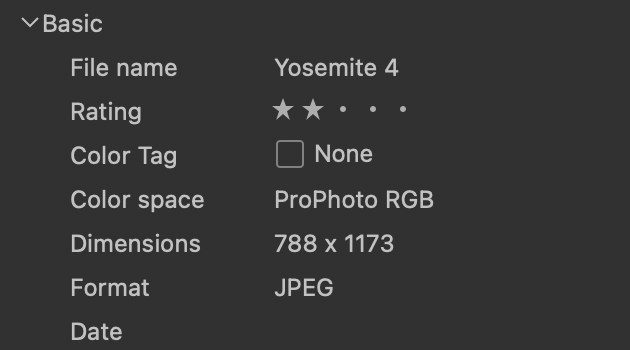
Notice that the date is blank.
0 -
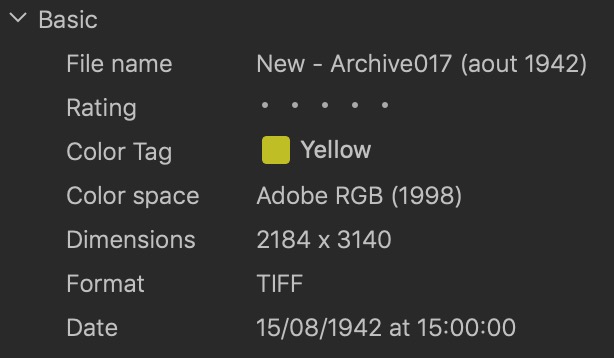
On my system, it works !
 0
0 -
Thank you, thank you, thank you. Your comment got me thinking. The aha moment was when I realized I'd not tried to re-load metadata since the images were initially imported. Image -> Load Metadata and the selected images now show the date.
Time to go through my pre-'70 images.
0 -
There is a big BUT in this discussion. Sure you can modify metadata with 3rd party tools, But I AM THE CUSTOMER and no one should save me from anything. I should drive the tools and not vice versa. We have this kind of software company philosophy since over three decades. I didn’t purchase an image insurance. I brought a tool which hopefully supports me to process my analog workflow. It is always a mess to develop a software with different programming languages, and it is also a mess to process a workflow with different tools. Especially if we talk about such a tiny feature like the image capture date.
0 -
> Harald Schmidt: ...no one should save me from anything
Then C1 may not be the right tool for you.
C1 is not the right primary tool for me, it is just one of my third party tools that I use for developing raw image files, and for occasional tethered tabletop close-up/macro work. From the top of my head I don't think I use C1 for anything else, and I certainly do not trust C1 with image metadata.
0
投稿コメントは受け付けていません。
コメント
10件のコメント