Synchronize subfolders

So how does it work exactly? I only used sessions to organize all images but does this new feature allow you to organize all sessions in the catalog? I still don't understand the feature since I never used catalogs.
-

Catalog only users don't know that session users have it easy. No import needed. The act of visiting a folder is enough to see (and edit) the images in the folder. If you are looking at a folder and a new image is added to that folder outside of Capture One you will see it without doing anything. Capture One notices the change to the folder and updates its view, showing you the added images.
That is not the case with a catalog. Images must be imported. The folder(s) containing the imported images are then noticed by Capture One. But images added to folder after import are not seen. Capture One doesn't know they exist until you import them, too. Importing a subset of images in a folder could be a pain -- you had to go through thumbnails of all the images in the folder and select the images to be imported. Or you could select all images and turn on the "do not import duplicates" option.
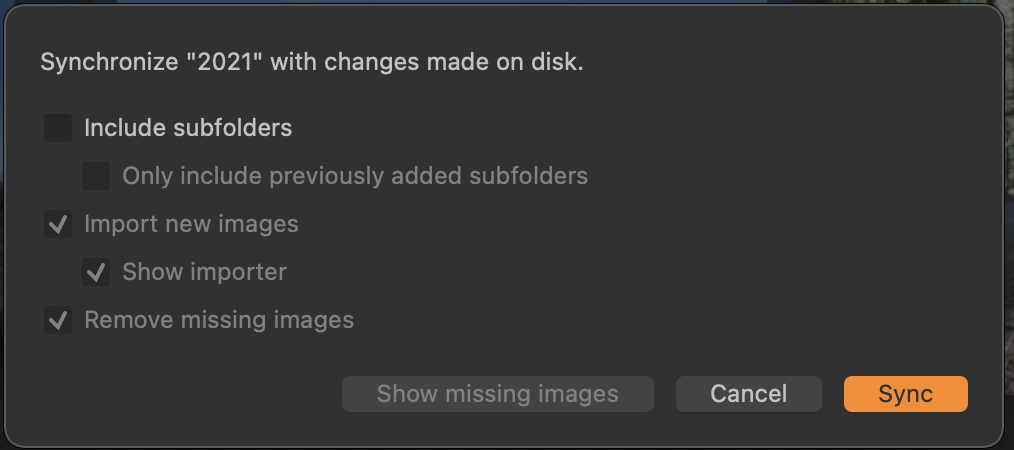
Now you can right click on a folder known to Capture One -- usually one containing previously imported images -- and select the Synchronize option. Capture One will find the images that it doesn't know about and let you import them into the catalog, too. It is slightly easier.
This is the dialog you get. If you pick a folder that contains other folders you have the option of scanning the sub-folders, too. Or adding unknown folders.
The feature is not one I'll use often in my workflow, but it is handy to have available.
0 -
@Benjamin - yes this is pretty much a catalog thing, I think.
@Marco - I used to use only sessions, but after Media Pro was discontinued, I switched to sessions + a master catalog, to enable me to find stuff from multiple times, such as all photos of a certain species of bird taken over the years.
Ian
0 -
Tell me more. How do you handle future re-edits? If you re-edit in the session the catalog won't see the changes and vice versa. Or do you get rid of all the session Capture One folders and do everything in catalog once the session was imported.
I use a "master session" for some of my images (the others are in a catalog). Once edited in a session I create a folder somewhere on my disk and move the edited images to that folder. Then I add that folder as a "favorite" to my master session. I can search among all the folders in the master session by selecting the All Images album and then searching.
0 -
Once I have added images from a session into the catalog, I don't edit them again in the session - only via the catalog. I don't get rid of the session Capture One folders, as there is no real need to. Probably I don't need to keep them, but this is the habit I formed when I started using the catalog. I supposed that if something went dreadfully wrong with my catalog, I'd still have the session to fall back on.
Ian
0

投稿コメントは受け付けていません。
コメント
4件のコメント