Images Only Half Size After Import

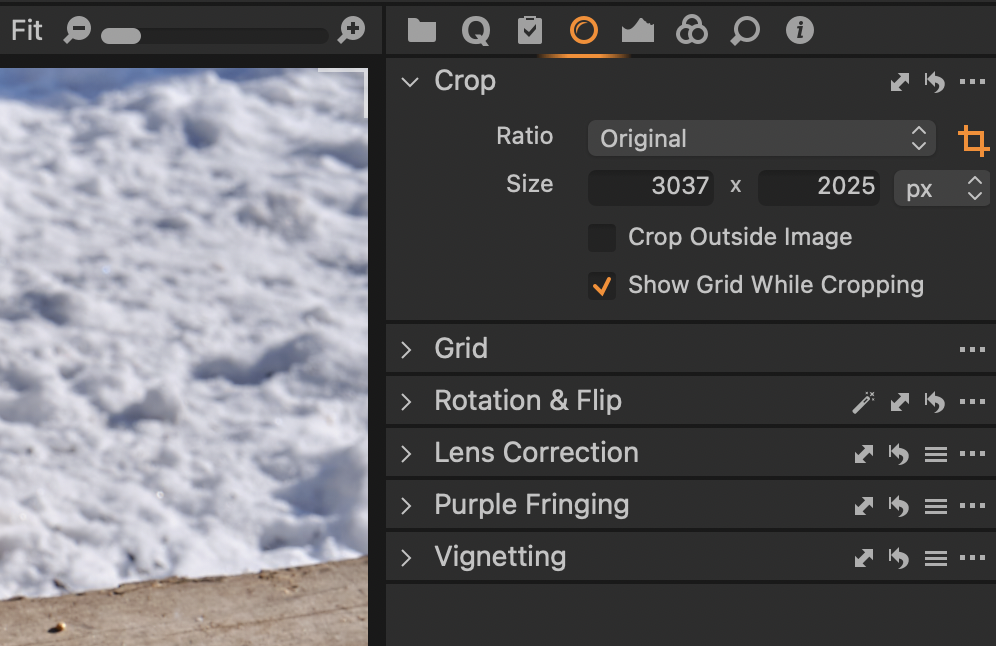
I'm probably doing something wrong, but when importing RAW from an XT3 6240x4160, images in C1 22.x are only 3037x2025.
When I import on C1 13.1.3.9 the same images import at the original size 6240x4160. Strange, anyone know what might be up?
-
Where do you see the dimensions, in the Metadata tool/Basic/Dimensions?
0 -
I see it in the Crop panel, and also if I export the image, in the file information.
I might add I'm running the new MacBook with the M1 chip on C1 22.x, and an older iMac with C1 13.1.3.9.
0 -
 0
0 -
I hadn't looked at Metadata > Basic > Dimensions, there it is correct! So I guess I need help with the image size itself, I'm not able to export it at the original dimensions
0 -
Most probably your export recipe, check the settings there.
1 -
Ahh, yes! I never had to adjust that in the old version of C1, but yes it was set at 50%, that's it, thanks BeO
0

投稿コメントは受け付けていません。
コメント
6件のコメント