Can't get rid of a folder in my catalog

I'm having a weird error where there's a "ghost" folder in my catalog I can't get rid of. I keep my images arranged (on my hard drive and in C1) in a Year>Month folder set up. So, in C1, I am showing two 2021 folders. I think this initially got screwed up when I messed up some of my import tokens (?), but when I dragged all my photos to where they belong (within C1), and removed the empty folders, I'm left with this: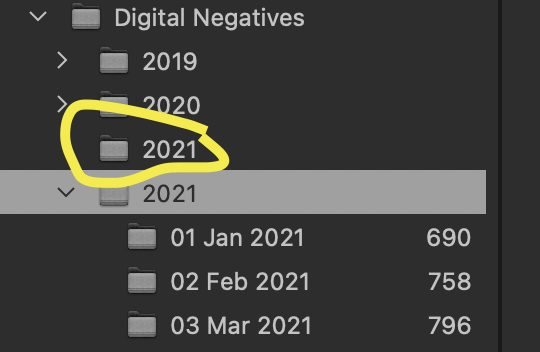
Here's the weird part: When I choose to show those folders in finder, it takes me to the right folder; they both link to the right place, to the single 2021 folder I have on my HD. If I try to delete this phantom folder from within C1, it deletes both 2021 folders. When I re-import, it brings both 2021 folders back.
However, when I try to add a new folder (my new August folder, for example), I click on the populated 2021 folder (with the other months included), and choose "Add folder", but it imports it to this other phantom folder. It looks like this:
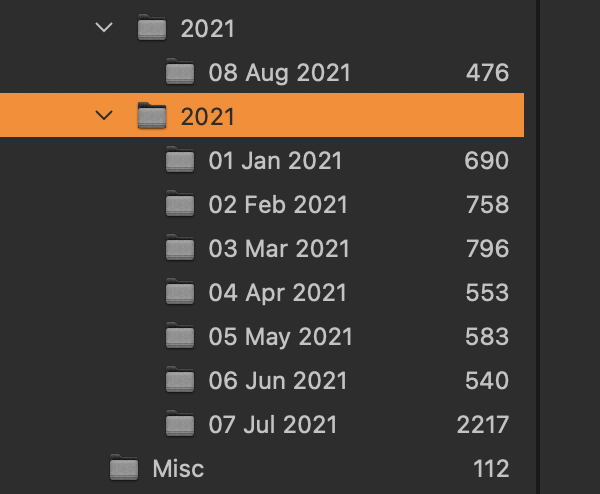
When I try to drag 08 Aug 2021 to be in the 2021 folder with all the others, it tells me it will merge them with an existing folder, but then nothing seems to happen.
Can anyone help with this? It's so, so frustrating.
-

Could be that the database has messed up links. Have you tried creating a new catalogue and importing your existing one into that?
0 -
So I tried this, and thought it was working at first. My catalog consists of photos both on my laptop, and on an external hard drive. I have around 80,000 images in my catalog. Well, upon importing my catalog to a brand new catalog, I saw that only 17,000 or so were imported. Upon further investigation, I realized it had only imported the photos on my local hard drive. None of the photos on the external were included.
Can you help me understand what I'm doing wrong? My original catalog still shows 80,000 images, and I can access them all without issue. Why didn't they get imported?
Brandon0 -
Don't know about the cause, don't know if it helps, but I would try File>Verify Catalog.
0

投稿コメントは受け付けていません。
コメント
3件のコメント