Copyright symbol & name watermark on export image has top edge cut off

Hi,
I have recently upgraded to Capture One 21 for Sony (Build 14.3.0.260) and my copyright and name watermark on exported images has the top sliced off. I've tried changing the fonts and font sizes but that doesn't seem to help, neither does pasting the copyright symbol or inserting with control+g (mac). Any suggestions as to how to fix this?
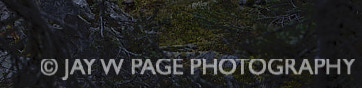
-

I've had this same problem forever - guess I just learned to ignore it! If there's a solution I'd like to hear it.
0 -
Upgrading to 14.4.0.135 hasn't made any difference. This problem just started in the past year, previously posting a text-inputted watermark worked fine.
As a work around I am using my copyright as a PNG file and inserting the watermark as an image. This works but is not as convenient as inputting tax because I have to change the PNG file occasionally depending on how dark the background is.
0
投稿コメントは受け付けていません。
コメント
2件のコメント