Nik Collection 4 Fixed!!

V4.2 is out and it now works with C1!!!!
-

Indeed. I saw that in the release notes and downloaded the trial again. Unfortunately, they didn't reset the trial period so I cannot test. Not sure it's worth trying to contact DxO to extend the trial.
I'll be looking here and elsewhere for comments on how it's working before I think again about buying.
Cheers
0 -

Not here it doesn't. Nik installer does not offer CaptureOne as a host.
0 -
Hi David, you need to install it as a seperate folder, when you install NK4 it provides a list of host applications, and you have a choice to install manual, that's what I choose create a folder and install. They will then appear in the edit with option in C1.
 0
0 -
Yes.. but that's nothing new, is it? I understood that Nik now includes C1 in its host application list. The updater refused to work, because I had manual installs defined. I had to delete v4.1 first ... and of course I then lost my manual installation for C1 :-)
0 -

Does not work for me either (OSX 11.6) C1 14.4 on either of my Macs. Edit with does not work with any external editing application, including NIK and Affinity. It used to, when I first had version 12, but something has messed it up. All the applications appear in the drop down list and Open With works fine from C1
C1 workflow is completely messed up as a result and I'm not giving any more money to this company until they fix it... and if they take too long about it, I will switch to Affinity when they launch their media app.
And before I get the usual rubbish of the kind 'did you switch it off and on again' or 'it is a fault of DxO'. - this is a known issue, on multiple forum posts and since it is across multiple apps from different providers, the common denominator is C1.
0 -
I David, previously V4 Viveza and Silver Efex wouldn't return the edit to C1, that has been fixed, along with Perspective Efex as well. Not sure why you both are having issues, but it is working flawlessly for me, but I did have to remove all of Nik stuff first.
0 -
ah, ok. I just assumed that it meant DxO officially supports Nik for C1, hence it would appear as a supported host. I shouldn't jump to conclusions!
To be honest I've never used Nik directly from C1, even though I'd configured and tested it. I prefer to edit in Photoshop and apply Nik from there.
0 -
so - I'll can give it one last try (uninstall C1 and NIK then install C1 and then NIK manually) but what about C1 not doing edit with Affinity?
0 -
Ok for me I already had C1 installed.
I then removed using the Nik uninstaller the previous version of 4.1.1
Reboot and then installed the 4.2 version, when its asks for the plugins and supported software you must add one manually, if you don't you can't retrospectively do it. So I just clicked the button and created a folder called Nik Software and the standalone software was installed their as well as into PS etc. It then may take a few loads of C1 for them to appear in the Edit With menu, or you may need to clear down all your preferences.
0 -
James, thanks. Just done a fresh install as described - the NIKs appear in the edit-with menu and nothing happens when I try to send them a TIFF.
0 -
Edit with does not work with any external editing application, including NIK and Affinity.
Edit with... launching Affinity Photo works with 14.4 on my intel Mac running 11.6. Wonder what's different between our systems?
0 -
James, thanks. Just done a fresh install as described - the NIKs appear in the edit-with menu and nothing happens when I try to send them a TIFF.
the plugins take a while to load the first time, have you activated them?
0 -
in C1 preferences? yes - they have ticks next to them. Several reboots and still the same. It is a complete puzzle.
0 -
I guess DxO finally got over being offended when I suggested they remove all refererces to the strings "Capture One" and "On1 Photo" from the rewritten and newly written apps in Nik 4 Collection. This suggestion was based on hex dumps of SEP and Viveza I found online that showed them treating C1 and On1 as if they were PhotoLab or Photoshop and calling SEP and Viveza as a plungin. Even the error logs showed 'expecting standalone' when C1 made the call. Is Nik Collection 4 called from the Plugin list 'Open With" or Edit-with List in C1? My guess is each Nik 4 collectin app will have to be added the the 'Edit-With' list in preferences.
Hey, DxO, Can I get the pre-release discount again?
0 -
The great thing about how DxO does business is that it makes us realise that CaptureOne actually are really not that bad :-)
0 -
Yep Edit With:
 0
0 -

Just tried a fresh install on a different Mac - Fuji Express version and the latest Nik - same result, the Affinity and Nik applications appear in the edit drop down list but without actually doing anything, nothing happens after the confirmation dialog on the file transfer format. I'm running latest Big Sur and this is just a daad end.
0 -

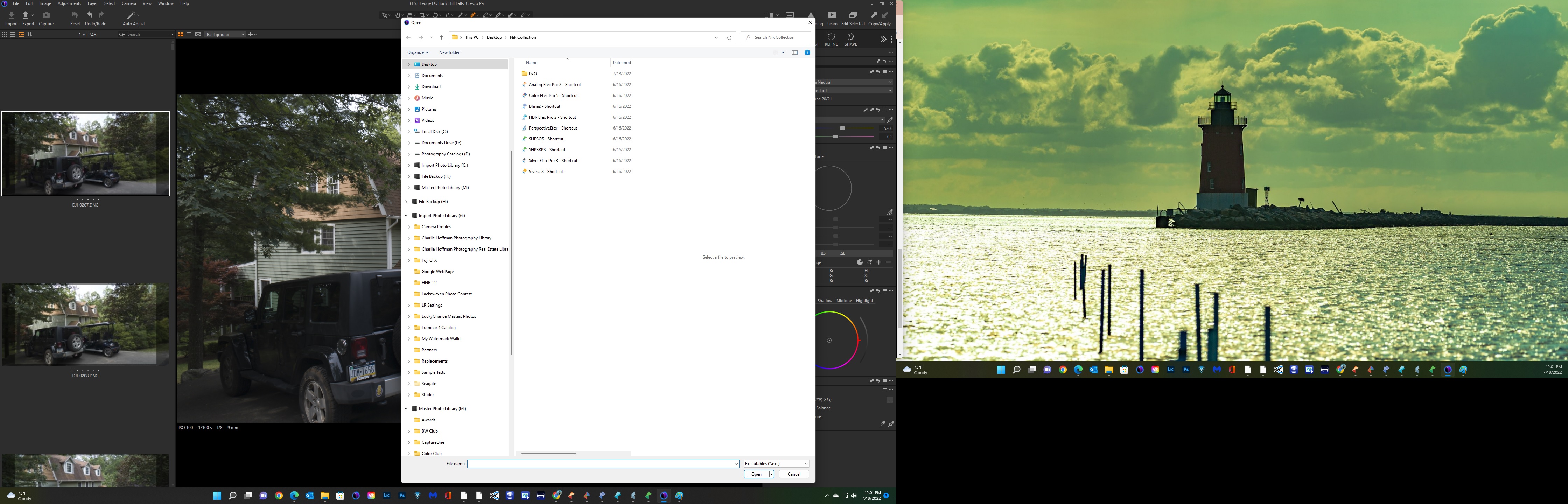
 Hello, All. I'm have a bit of a issue getting the Nik Collection 5.0 to load into the C1 15.3 I have created a desktop folder with my Nik shortcuts, but to no avail, I can not for the life of me get them to propagate in the list of options "Open With or Edit With". Its kind of strange even the plugin manager is different Open With 1.0.1 However if I use the browse feature and point to the shortcuts I can open it.
 I really could use some assistance if anyone has a solution.
Cheers
Charlie
0 -
Open with will not work as that indicates sending the current file which may be raw. Nik collection does not process raw files but works best with tif files. Edit With may need to be set up in Preferences->Plugins, click on Open With Menu, the last choice in the list in the left panel of the plugin preferences. Clicking on Open With Menu opens a list of applications that you can select for the Edit With Menu. These are listed by app name so you will have to check Analog Efex Pro then Color Efex Pro etc. Hope this helps
0 -
Hi Gerald Thankyou so very much for getting back to my post. I have tried Edit>Preferences>Plugins and when I click on the "+" symbol and go the C:>Program File>DXO> Nik Collection nothing there is recognized by C1. C1 wont let me add a program. Oh when I have or click on the "+" and navigate to the programs file the search bar wont let me change the extension preference...only looks for C1

 0
0 -
I checked a couple of versions I have and the Open With Menu is version 1.0.0, even with the latest version of C1 which I don't use much, only on a test computer but that is a different issue. It looks like the + at the bottom of the list of apps in the preference window is expection a .plugin file type to install an Open With Plugin not an application name. When i tested this out only the .plugin files were available, apps were grayed out. This is on Macs, are you running windows? When I searched for Nik Collection 5 not working with C1 one link pointed to the C1 community where windows plugin version 1.0.1 was not working from 2 years ago. Here is the link
https://support.captureone.com/hc/en-us/community/posts/360012634878-Open-With-Plugin
Here is another link about Edit with config file which you may have already viewed.
https://support.captureone.com/hc/en-us/community/posts/360011225157-External-Editor-Configuration
Sorry the earlier post did not help, have you reached out to Capture One support?
When I get a chance, I will free up a license to C1 and install the latest on a windows laptop to see what the edit with plugin looks like. I can't move Nik over since it takes a sworn affidavit, first born, and leaving DxO stuff in my will to get them to free up a license, but there are other apps I can try to link.
0 -
Good Evening Gerald, Thank you so very much for helping me to try and sort this out. Yes indeed I have the plugin manager 1.0.1 and C1 v22 pro (15.3.0). I guess the work around has to be for now opening the Nik module in brows and point it to the shortcut. I did reach out to both C1 and DXO for assistance. This is all on a Win11 machine with plenty of horsepower. If you should discover a additional solution I'd be grateful to hear it.
Thank you again Sir for your assistance
Charlie
0 -
SOLUTION for Nik 5.0 and C1 15.3.0
Julia Seutsova (Capture One)
Jul 18, 2022, 20:19 GMT+2
Hello Charlie,
From Windows Explorer find an image folder, select a file, right click on it. Select 'Open with' > 'Choose another app', then scroll to the bottom of the presented list and choose 'More apps'.
Scroll to the bottom of the presented list again and choose 'Look for another app on this PC' and then find and select the application that was NOT initially listed in Capture One ‘open with’ list of apps – eg. This PC > LOCAL DISK (C:) > Program Files > Nik Collection
When the image is again selected in Explorer, right click and choose 'Open with'. The Nik Collection application is now INCLUDED within the available applications listed. In Capture One the related icon and Application should be now listed under the Edit/Open With menu option and also in the Preferences > Plugins”.Kind regards,
Julia - Capture One Customer SupportWe encourage you to browse our Help Center for detailed product documentation, helpful pro tips, and much more.
0
投稿コメントは受け付けていません。
コメント
23件のコメント