Capture One is only exporting 1 image at a time

I'm not sure what's going on but for some reason when I select multiple images for export it will only export 1 photo. This all of a sudden started happening. I can not find what I must have adjusted for this to start happening.
Any suggestions on how to fix this, thank you.
-

You might want to check if it works after pressing Cmd+Shift+E...
3 -
Marcel, Thank you, that solved the issue.
1 -

I have a similar problem. It says it is going to export 10 (for example) images but exports only 1. The only thing I have changed recently is an update to macOS Monterey. I tried Marcel's fix above. It exported all the images but ignored my cropping.
0 -

Did you check whether the export process was set to include or exclude the crop settings?
You probbaly did check ... but it would be unwise to make that assumption without checking with you.
0 -
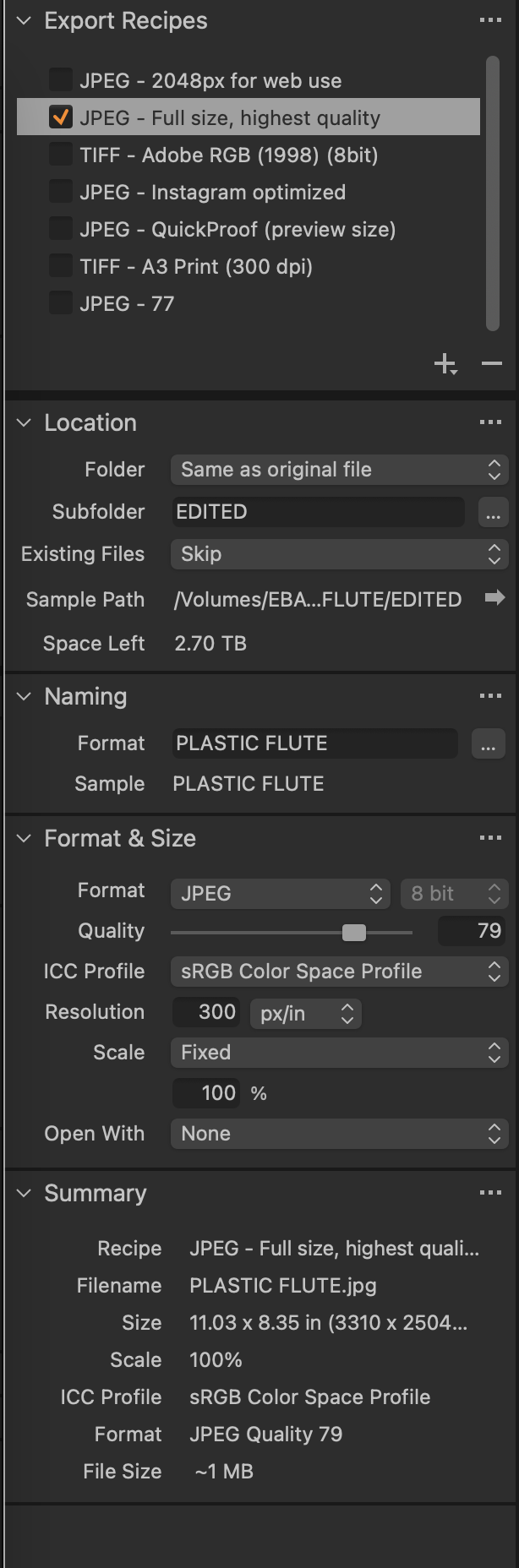
Not sure—do you mean "recipe?"
 0
0 -
Okay—I see. Yes, it was set to "respect crop."
0 -
Solved. It seems that each file was overwriting the one before it because I had failed to add a one digit counter to the name. So, pilot error. Thanks for making me look at the Export parameters more closely.
0
投稿コメントは受け付けていません。
コメント
7件のコメント