Move export tool panels to the right side of the dialog window.

Is there a way to move the tool panels, in the export dialog window, to the right side. I work with all my tools on the right, and this window is really messing me up. Better yet, get rid of the whole thing and go back to the old way of export. I have to tell you that, although it my sound trivial, it really is a huge deal, and a deal breaker for me if you don't get this fixed ASAP.
-

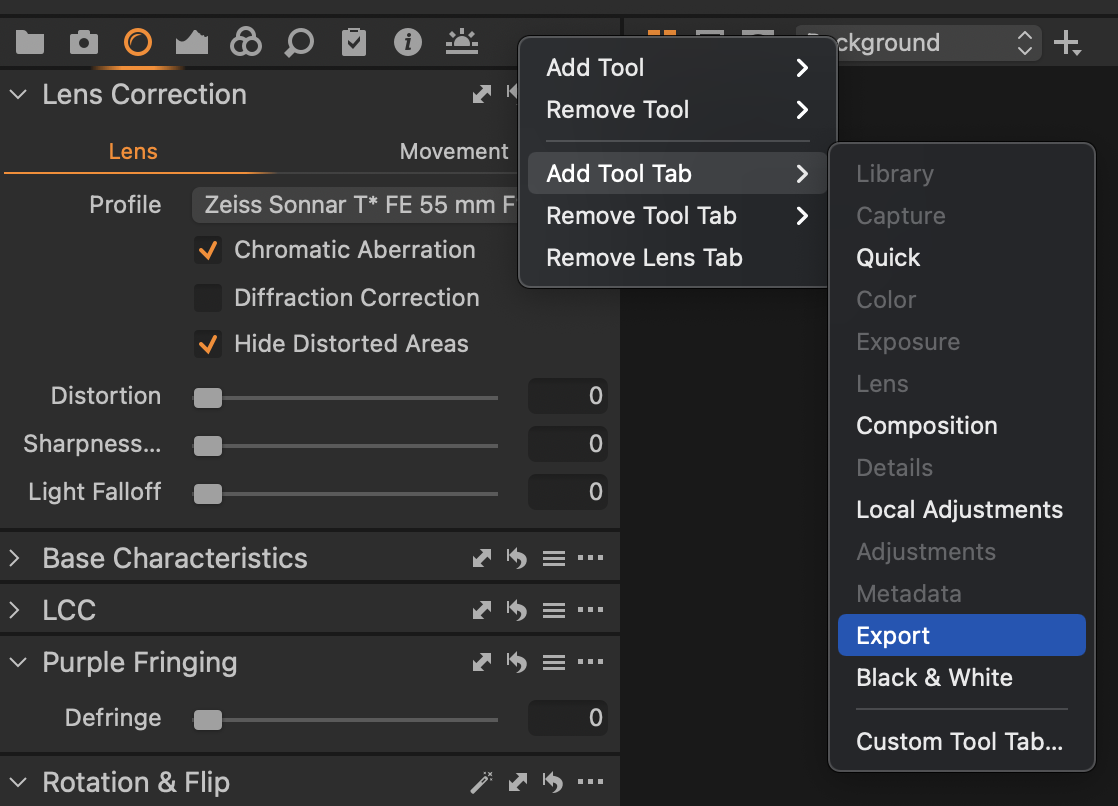
The old process recipes tab is back since version 14.4, it is just called export tab now. You have both the old and new ways to export now, try an update and see if you have any luck.
0 -

Hi Larry, Capture One 21 version 14.4.1 can be downloaded from: https://www.captureone.com/en/account/download
Right click your tool tab bar in the empty part of it - Add tool tab > Export
 0
0 -

Ctrl+Shift+T will move Tool sidebar from left to right or from right to left.
0
投稿コメントは受け付けていません。
コメント
3件のコメント