Linear / Flat response to File Import (Comparison to Lightroom)

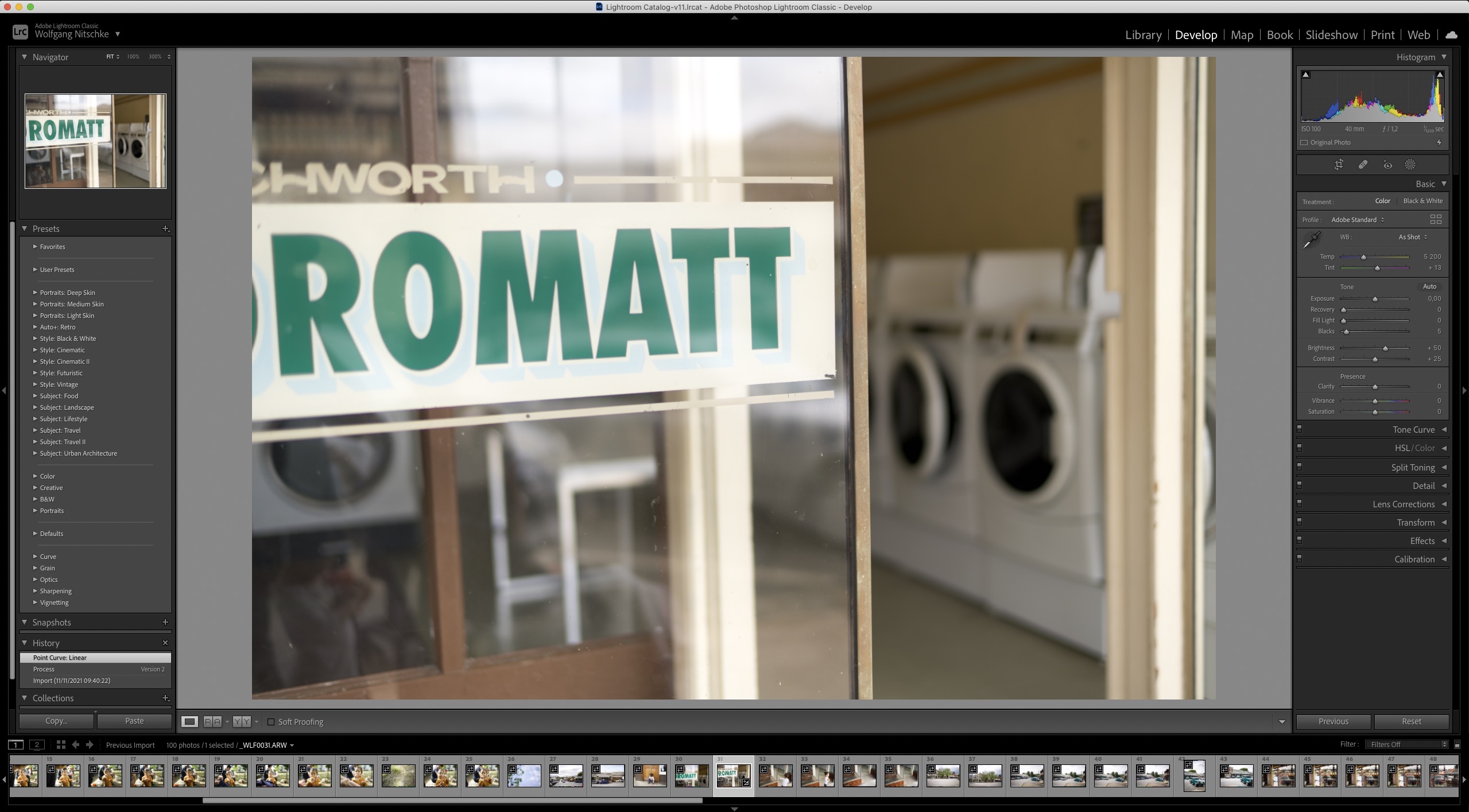
I've attached two screenshots - one with C1 and one with Lightroom. I love the whole file management in C1 (except keywording and some other aspects like changing the date/time being impossible). But all in all the workflow and sessions are brilliant and just what we need! Adobe really gets my head in with their forced cataloguing system. Which is why I am still with C1
But increasingly with every new version C1 adds more and more contrast to the read out of RAW files and increasingly I find myself using Adobe Bridge to bypass Lightroom and use the Adobe RAW Converter instead... why?
Because I must say that I simply expect that a RAW processor reads out a flat linear profile of a RAW file and provides me with the flat response rather than adding a contrast curve ... to add insult to injury C1 provides me with no way to undo the artificial curve — even if I choose a linear profile or ETERNA it always has too much contrast
Two things C1 should really change
1. Out of the box Adobe comes out flatter — at least give us the CHOICE to have a really flat profile!
2. In addition in Adobe I can go to the curve section on Version 2 and remove the curve altogether creating as close of a lInear response as possible. It tells me what 0 contrast actually is. This is a much better base to apply my changes to a file. C1 should provide us with the absolute 0 point - Adobe's 0 is probably an interpretation too. If c1 says what actually 0 contrast is it would be a real differentiator.
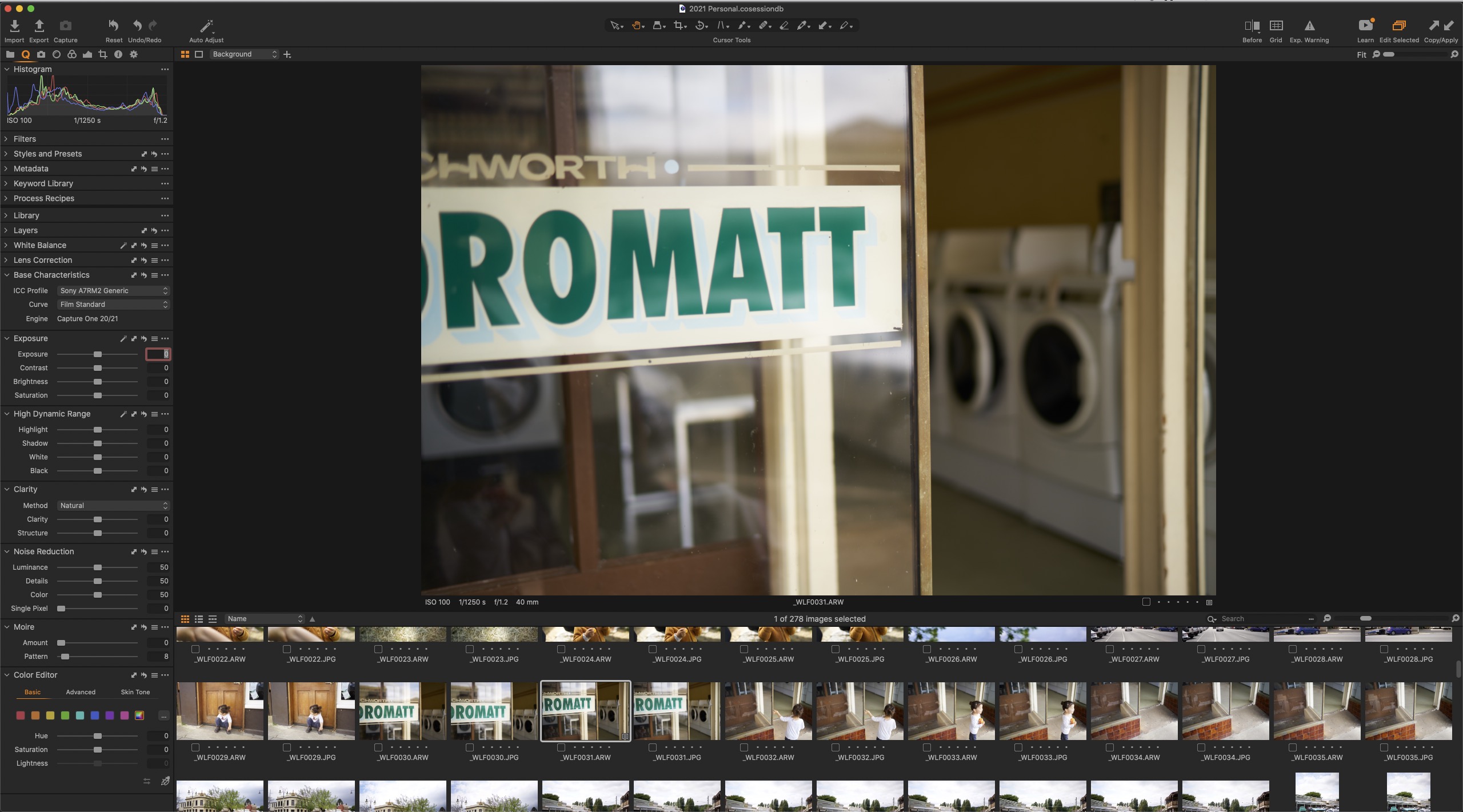
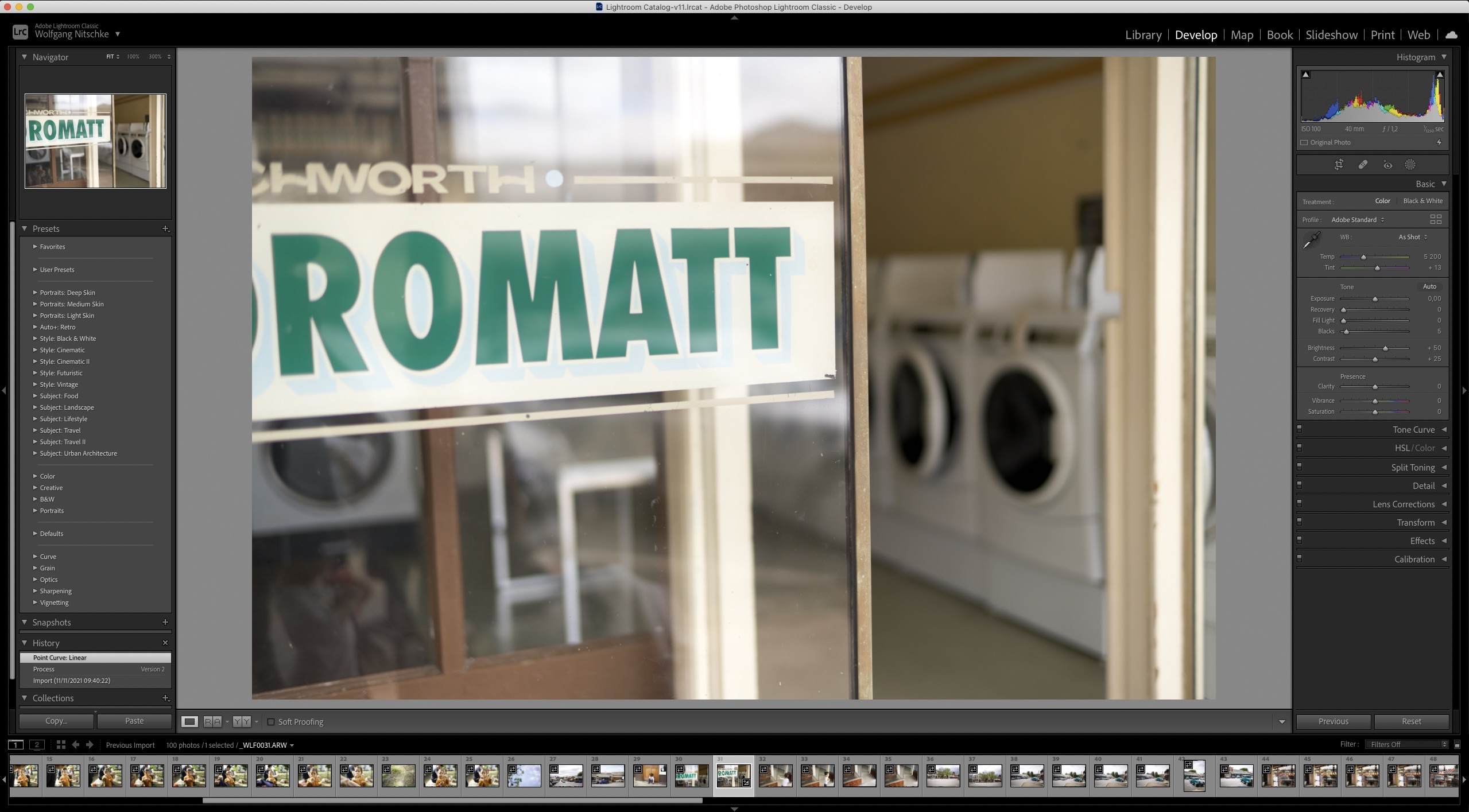
-
You show us Film Standard curve in C1 base characteristics, not Linear Response, so I am not sure you ever tried the Linear curve though you mention it is your text.
0 -

In addition to BeO's comment, do you see different results if you use the "Standard" rather than the "Generic" ICC profile for the camera model?
0 -

agree, I too think the c1 default is far to harsh and in opposition to the believe of many user here I think linear is not the solution as it adds just other issues caused by the outdated c1 color processing ! but what we see as wrong is why many user like c1 including the rather strange color rendering. c1 does very much the kind of processing which was useful when digital cameras had low resolution to make the pop but today this looks always artificial and unnatural in my view and is a very bad starting point.
0 -
Wolf,
CSP does not like the C1 rendition, but that should not stop you from at least trying the Linear Response curve, then set the black and whitepoint (note, in C1 this is in the levels tool, or try auto adjust the RGB levels), then increase saturation to your liking.
And then adjust the specific image, ideally with the curve tool, but you can also use all the others.
You can set the curve and the saturation as a default for your camera (or create a style for that purpose) as a starting point.
CSP, do you mean contrast when you say "harsh", or rather clarity, structure? Contrast or curve-wise, I don't see anything which cannot be done in C1 especially with the Linear Response curve.
0 -
BeO,
as the color profiles are very likely designed to work with the std. tone curve this approach throws the rest of color accuracy out of the window. even the c1 exposure tool shifts hues and saturation not to speak from the rgb curve. the new pro std profiles are worse when used this way.
I also do not have a better word to describe the total effect of overall too much contrast and local contrast than harsh. c1 does not offer the possibility to reduce loco as the clarity tool effects detail already at very low minus settings. after using the loco tool in dxo pl for some time now I see what dramatic impact a change from overall applied loco to selected tone ranges can make but it is impossible to simulate this with c1 as it is adoptive and it would need a lower starting point.
0 -
Guys, I initially added the Film because it is the closest I can get to the ACR Linear.
If you use Linear it is even worse.... I've attached the Linear C1 read out vs the Linear Adobe
Sorry for the confusion
The question really is, how can two professional tools be so wildly different. Let's assume one of the is correct — which one is correct? Logically it must be Adobe. Which doesn't give me much confidence in C1!
I suspect both aren't actually fully Linear.
Hence my request for a "feature" (which really should be the base standard for a professional 'instrument' like a RAW converter) to either give us a FLAT PROFILE or a NEUTRAL 0 PROFILE or to actually say what was added to the mixture when importing the file.
My hunch is that a lot of CLARITY was added and that CLARITY also adds a lot of CONTRAST which mushes up the shadows and colours. You can give this a test on any file. When you add clarity the shadows do go mush. The other problem is - who knows if what is added to the mix upon import is the same all the time. Maybe C1/Adobe have an algorithm that adds more or less of an effect depending on various factors. Which means we're constantly second guessing.
I just think we deserve better. FILMMAKERS get flat profiles because otherwise they wouldn't be able to work. Photographers can because they are dealing with only a few frames. But imagine if we could actually know what the camera recorded!
1. We would become better in handling the camera because we would know how tro make the best exposure
2. We could learn about the strength and weaknesses of the camera
3. We would be making consistent decisions
Someone told me that photography is an art and that'd why I shouldn't care.
I disagree. Photography three things: engineering, design and art.
The RAW conversion (importing the file into the convertor) should work like a thermometer. This is the engineering phase. It should give me an accurate reading of the file!
Then comes a design phase where I make the changes I think as a photo-designer to "develop" the file (the decisions I would take in the darkroom to improve upon the negative to create an image).
The artistic phase really is the retouching where I go above and beyond the development of the image. Like changing colours, removing distractions, etc.
Neither Adobe or C1 provides a clear reading of the file upon import. C1 could really make a difference by providing such a LINEAR reading.
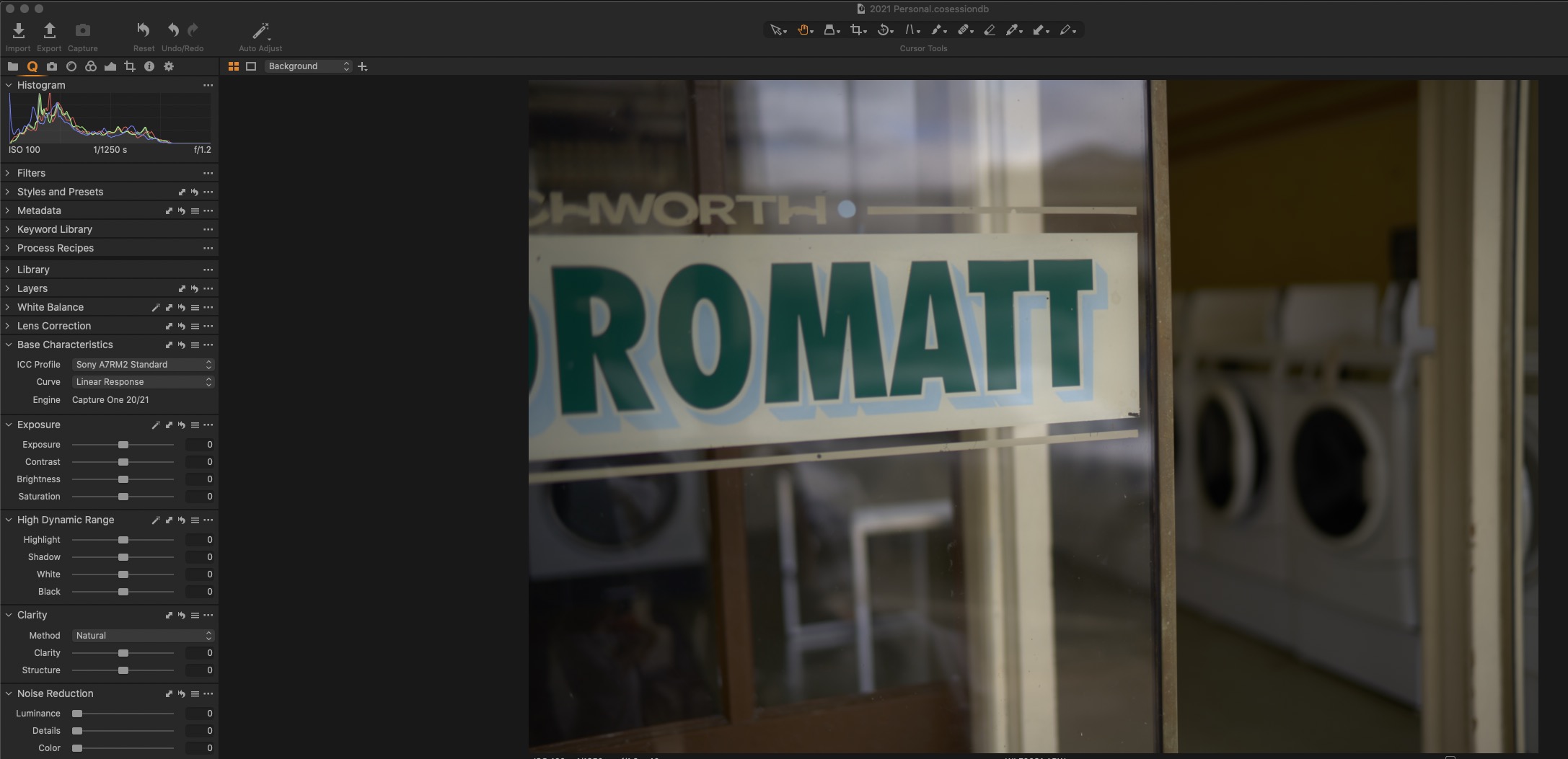
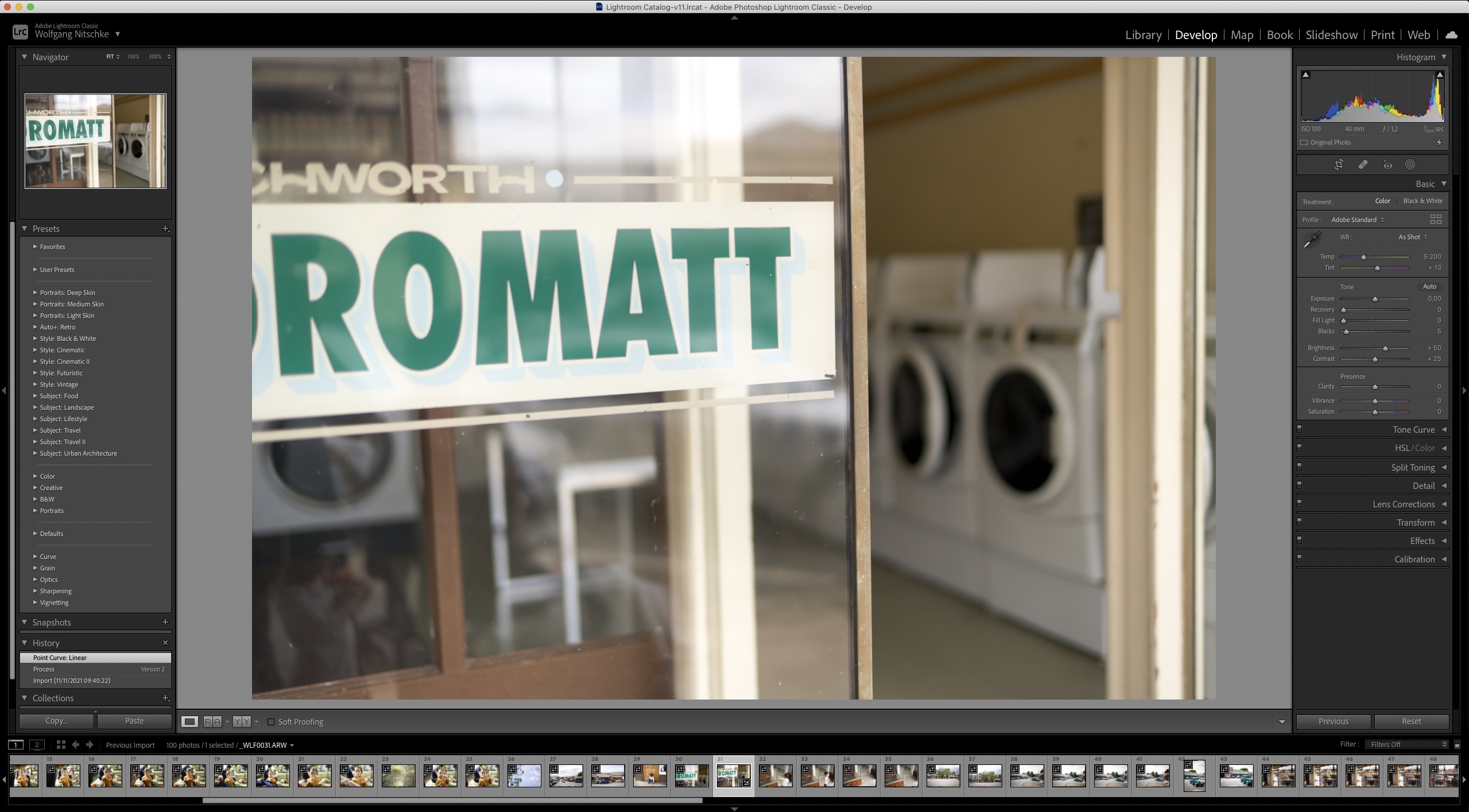 0
0 -
Hi Wolf,
I am not sure that there is right and wrong, and the sensor data (nothing else the raw file is) needs interpretation. Analogue, the film out of the film camera need some chemicals (which?) and if you would give the same film to two different developers you'll get two different results.
Here is an attempt to develop a digital raw file as less as possible:
https://petapixel.com/2019/07/15/what-does-an-unprocessed-raw-file-look-like/
Hi CSP,
when it comes to color accuracy, I do not verify with a color checker or grey card or alike (so I can't verify or falsify what you say). I use the WB (and other color tools) to visually adjust my images to my liking, I try to achieve a natural look (most of the time). True, the Luma curve tool often is easier to use than the RGB curve with Linear Respone.
It would be interesting to see an example where you tried your very best with both with C1 and DXO.
I am open to any raw developer which gives me the best, most natural looking image quality, unless it is only nuances this is the most important to me (given it is a tool which is not a headache to use).
I think the camera model also matters, I shoot with Nikon Z7, but was also happy with C1 with a Sony a6000, what camera do you use?
0 -
Wolf,
your last two images: C1 is darker, LR is brighter, not very comparable, you should equalize that, I think contrast is similar, and I think you should use the same background color for better comparison. I don't see an advantage in either image as a starting point.
0 -
BeO this is where I have to disagree strongly. Both of them are set to 0. They should be fairly the same!
Let's assume the camera captured 12 stops of light from +6 to -6, then C1 and ACR should provide us with 0! Not with +2 or -2 ... it should be 0 when you select 0. So both should be similar - maybe the flavour could be a bit different because there always will be but things lke brightness and shadow/highlight details should be fairly similar!
A temperature gauge also shows me the accurate temperature and not some interpretation of what would feel better.
0 -
Thanks for the Petapixel article link BeO.
As one of the commenters mentions, succinct and accessible without having to wade through too much technical jargon.
One of these days I hope to find an article that discusses the human eye and the degree of variability of interpretation of colour as well as sharpness across ages, perhaps sexes and maybe ethnicity and lifestyle.
I often wonder whether sitting at a screen editing digitised images allows us a better opportunity to assess colours, etc., than being outside or away from screens and experiencing the world at large through whatever filters (rain, mist, current "colour temperature" for the time of day ...) are changing the way we see things at that moment in time.
0 -
You can clearly ignore all the rest I said, it is up to you.
So, do I read you correctly, your request is to have LR image in C1? Or change both softwares to show a FILMMAKER standard image?
0 -
BeO — I'm not ignoring what you say. But what you suggest is that I have to correct the files to see what the camera recorded. And I find that defeats the purpose. There is a way to get to a neutral file as per this post on Adobe. But again, I have to go through a range of hoops to get there. When the "feature" I am requesting is that C1 provides that starting point on import.
0 -
"A temperature gauge also shows me the accurate temperature and not some interpretation of what would feel better. "
A second temperature gauge might well show a different reading.
And then there is the human interpretation of what the numbers mean in real life. Is the number hot or cold for example.
My wife, to use an example that provides me with regular reminders of how humans "experience" temperature, can usually manage to describe a generally accepted "comfortable" temperature" as "cold" or "hot". Sometimes both within minutes of each other with no change at all to the reading on a nearby temperature measuring device.
0 -
What is your reference point for the +6 to -6?
On a side note, I have a multitude of temperature gauges and depending on low or high temperature they deviate from the "true" temperature, some more on low some more on high temperatures. And every one differs from each other, most of them within their specification but not all. Apart from that some of them adjust slower than others.
Each interprets the true temperature differently.
0 -
I will read the article you linked. Maybe you find my link interesting too.
0 -
I very much agree that we should get to see what was actually captured without too much clipping, contrast and loco enhancement even when the file looks flat. the smart people at adobe did this at the beginning but uneducated photographers thought this is bad because the lack of contrast irritated them so over the time they moved in the direction of c1. other converter offer this as an option, with adobe you can easily build a linear profile with c1 it is more difficult but also doable.
there is no definition how a raw file should be rendered so it comes down to the taste of the developers even when the basic processing steps are similar. ( https://www.strollswithmydog.com/raw-file-conversion-steps/#more-1913 )
a problem with c1 is that the gamma adjustment is split between the filme curve and a second adjustment which is applied with the profile so you never get a true linear rendering. the linear filme curve seems also tied with a different default brightness adjustment this is why it is darker compared to std. or the adobe rendering.
0 -
Wolf,
The C1 starting point, by default, is generally to provide something that is sort of "film like" since, historically, the majority of people seem to like that as a starting point.
I have come to prefer starting with a Linear Curve for my main Canon and have that profile set as the default for the camera when importing.
I do not assume that such a choice would be the best choice for all cameras or even all Canon Cameras.
This blog entry from 5 years ago may be of interest in the context of this discussion.
https://learn.captureone.com/blog-posts/customized-workflow-workspace-tips-and-tricks/
This blog entry from way back in 2013 may also be of interest.
1 -
Here's another one
https://support.captureone.com/hc/en-us/community/posts/360012422518-What-is-Linear-Response-
It also includes an explanation from apparently a C1 employee, that C1 Linear is linear except for highlight protection, and CSP did link to an interesting article about gamma at cambridgeincolour.com.
I want to reset here, it started with a request for a more flat/linear baseline to start with, but with a wrong screenshot (film standatd curve) so I thought I can help with pointing you to the Linear Response. But you know this already and don't seem to like it (I still think it is a good starting point though), so your request is valid and got my vote.
CSP
a problem with c1 is that the gamma adjustment is split between the filme curve and a second adjustment which is applied with the profile so you never get a true linear rendering.
Good point, so a true linear curve would have to be paired with a true linear icc profile.
the linear filme curve seems also tied with a different default brightness adjustment this is why it is darker compared to std. or the adobe rendering
Yes, hence the LR image and C1 cannot be compared without further adjustments in either LR or C1.
The point which bugs me is the statement that the C1 tools do not play well with the C1 linear curve. I cannot see this but that does not mean it isn't true, would be interesting if you could show this somehow, CSP. Are there other curves for which you think this is the case? I use Linear and Film standard only, btw.
1 -
CSP and all, excellent input.
What I find the gap is that everyone working in the Linear response seem to think it is actually Linear. When there's already a lot of compression in it and it is obvious when you compare it to early ACR versions with a flat curve which has a lot more dynamic range available.
Shouldn't RAW Convertors provide us with a file with the MOST dynamic range possible? I think yes.
It's not mutually exclusive - we can still have all the other simulations - but give us the option!
If anyone is interested here is a guy providing true neutral camera profiles which you can upload as presets in Adobe. I would love that to be integrated into C1 as a profile for my specific camera!
1 -
@beo
other than adobe dng profiles icc profiles are applied at the end of the color processing this is why they are also called output referred while dng profiles are input referred and applied at the beginning. with c1 the raw file is rendered in a kind of internal space than a rgb like curve is applied and on top of this the profile is created or applied, so changing the underlaying contrast changes the condition the profile assumes and is build for. when you use linear and then change the contrast with the curve tool to add contrast which works slightly different than the film curve you get of course different results. whether you see the effect also depends on the image contend. images with high saturation will show it faster than muted colors not to forget that white balance plays also an important roll in this game too.
@wolf
it does not matter if linear is really linear or something else I also think we should not focus a contrast (gamma curves) alone what I would like to see is a more sophisticate way to match the digital capture to what our eyes sees and this should be possible with an adaptive approach. dxo smart lighting is the only tool I know which seem to try this at least as it looks like the underlaying function is a kind of adaptive tone curve, they also offer what they call neutral colors and realistic tonality rendering this color rendering options can also be applied gradually which is far better than what adobe and c1 offer.
0 -
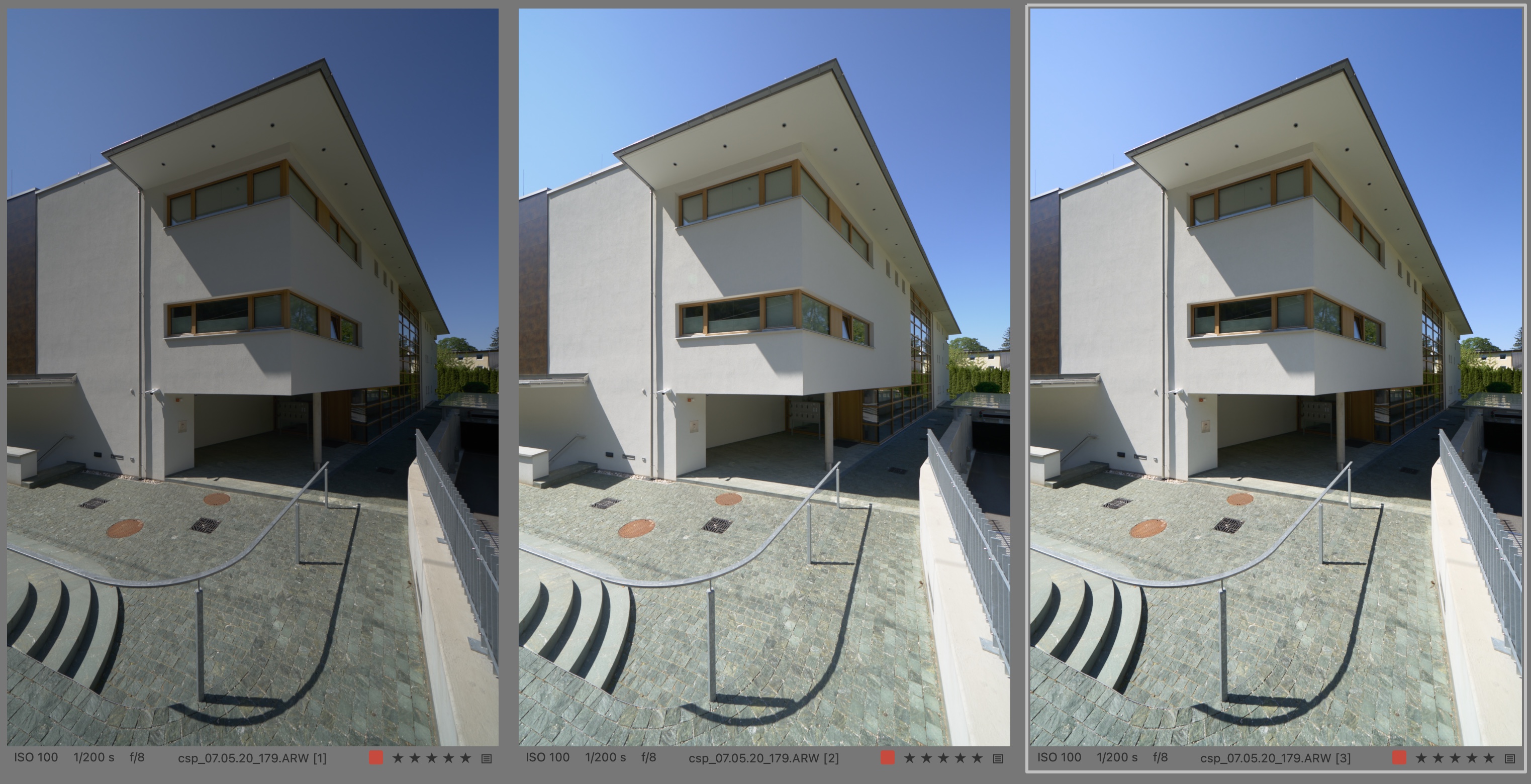
color profile pro std.
1. linear
2. +1.36 exposure adjustment
3. std. tone curve
0 -
CSP,
The best tonal distribution for the house is the C1 std. tone curve (image 3), but the sky looks unnatural.
DXO neutral and ACR custom linear profile have a much better sky.
If one would globally adjust the dxo or acr starting point to match the house with C1 std. tone curve, or similarly natural, I wonder what would happen with the sky, I guess it would suffer as well.
0 -
we cannot discus contrast without the effect on color and in case of c1 even simple exposure adjustments so a flat rendering option would need to take this into account. most other companies offer a variety of rendering option because this is such a common problem c1 is the only exception. from a technical standpoint this makes absolute no sense but I think this a leftover from the days when they wanted to keep an advantage for their hardware user.
the sample image is perfect exposed and you can get very similar and good results with all 3 but I prefer dxo because I can get my own local adapted rendering very fast with the help of some control points something I hope a smart software will do automatically in the future with the help of AI.
0 -
For me, the point of starting with a flat representation of the raw image is that it enables me to foster my creativity, instead of being presented a rather "common" representation. The latter is useful if I need quick results or to have something to compare my idea of an image with. AI, for what it is used today, is trained on finished and rather commonly accepted and developed images, i.e. a rather standardized view on aesthetics.
0 -
let me say it differently, a gamma correction does not completely mirror how our vision works as we can for example see, maintain contrast in shadow areas while in a gamma corrected high contrast scene they become flat. with an overall brightness and contrast correction it is also not possible to make the image I posted look as my eyes have seen it because an exposure adjustment to make the white wall look as white as perceived the shadows become to bright and color clipping in the sky occurs. when you counter this with curve adjustments things get only worse. so in my view a flat curve alone is not the solution to display the whole dynamic range of what cameras are able to capture today.
0 -

So, why P1 cannot just add a linear linear curve and corresponding profiles? As mentioned in the beginning post there every version adds contrast without any reason.
1 -
As Nikolai points out: I totally agree... None of the compromises suggested here is what this is actually about.
A camera records light. From absolute darkness to absolute lightness. RAW allow us to choose from a broader range and the range is recorded and there should be a midpoint in that range. If you recorded 6 stops in either direction the midpoint is 0. There should be no contrast, there should be no pushed colours. The image I posted was taken at 0.7 EV f1.2 on a bright day under a suncover. It doesn't seem intuitive that the midpoint would be as dark as C1 suggest and Adobe seems more what I expect from a brightness perspective. But Adobe isn't entirely flat iether!
People who request a true LINEAR file want something at neutral output. C1 doesn't provide such a neutral flat file output.
Someone mentioned that two temperature gauges will give you a different reading of the same temperature. The Petapixel Article also suggests there isn't exactly a starting point ...
Sure yes I get it - if one temperature gauge says it's 20 degrees and the other says it's 20,1 degrees that means it isn't the same...
But that's not what the issue is, it's not what we are talking about, is it? If the difference between Adobe and C1 was only minor I would at least agree that there's just a bit of interpretation going on.
But do I really have to add the two files again to illustrate how big the difference between Adobe and C1 is?
It clearly means either one of the two is terribly off, or, worse, both are very off!
They aren't even in the ballpark at all ... one is reading 20 degrees and the other 40 degrees!
Also to be clear the Adobe one isn't exactly flat either! There seems to be some colour correction and some contrast in Adobe too... I'm guessing both are terribly off and both are terribly different. It's a nightmare!
Adobe:
Capture
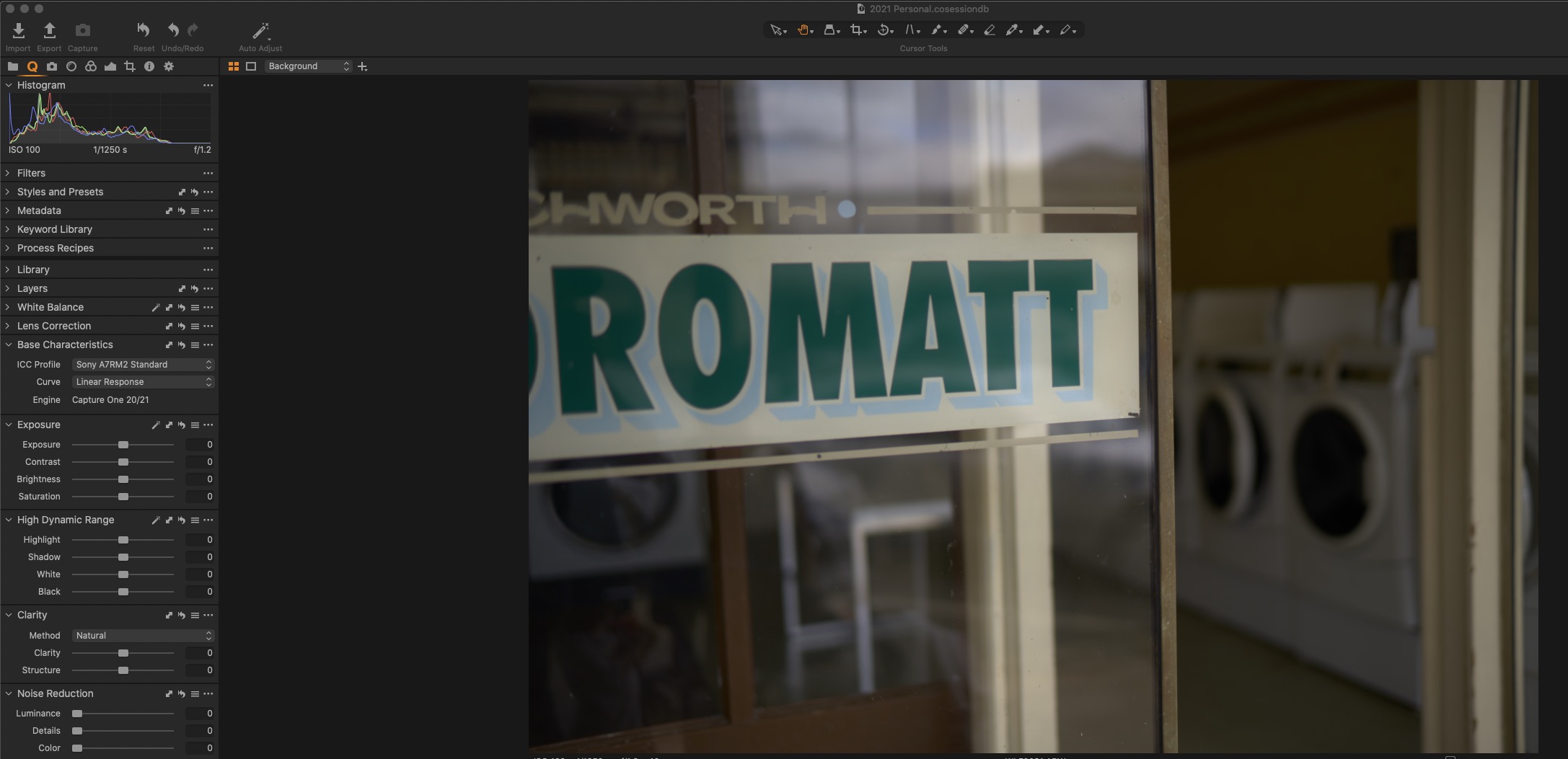
Basically what we Linear people want is C1 to tell us this is the most neutral file we can give you without too much interpretation from your engineers.
Actually this guy does sort of go into this direction of what I'm thinking ... at least form what I am reading I will have to give the profiles a try ... but that's the principle. (Unfortunately only for Adobe)
2 -
It looks like developers (or marketologists) wanted to provide a 'good' look for pictures i.e. wanted to be 'closer' to mass-market (similarly they added tons of instagramish 'presets') but C1 Pro is professional tool. For mass-market there is good enough JPEG output.
1 -
......this always was and is one major selling point but for their hardware customer they provide without surprise a lot of different profiles. they know very well that with icc profiles a one fit all solution is inferior but many user suck up the marketing BS they feed them like the carefully hand tuning.
0 -
If you recorded 6 stops in either direction the midpoint is 0. There should be no contrast, there should be no pushed colours.
fear this is not how things work, a raw file has no true or correct color either everything is a interpretation
Also to be clear the Adobe one isn't exactly flat either! There seems to be some colour correction and some contrast in Adobe too... I'm guessing both are terribly off and both are terribly different. It's a nightmare!
off to what ? maybe you should learn more about how digital capture works and start building your own profiles.
0

投稿コメントは受け付けていません。
コメント
53件のコメント