Can I share a session without having to share all the files?

I am working in an ecommerce environment where I shoot to one (drive "A") SSD drive while cloning it to another SSD (drive "B") using Chronosync Express. At the end of the day I take drive A and the client takes drive B.
What I would like to be able to do but haven't yet figured out how, is for the client to take their drive with them, make selects (rating and color tag) and crops and then for them to be able to send me their updated Capture Session with all the work they've done so that I can see their selects and edits. Since I have all the images on my drive already, what does the client need to send me for the images on my drive (drive A) to reflect the work done by the client on drive B. I'm not sure if I explained that well so let me know if you need additional clarification.
Thank you!
M
-
You need the .cos files for the rating, color tags and crops.
And if the client is putting some images into the selects folder (or trash), you need a filelist from him which you can paste into menu item Select>Select by>Filename list, which then selects from All images and you can put them in the respective Select or Trash folder too.
0 -

Marc,
Once you have the revised or client edits back do you then merge the edits with your own edits or are the client edits the final (at that point) result?
Is the client likely to use layers? If so you will need the comask files as well.
I presume that the more esoteric aspects of C1 - like LCC files - will not be part of the processing for this workflow?
0 -

As long as you do not work with eips you could send the "CaptureOne" settings folder for each raw folder and copy paste it in the respective raw folder. But make sure to work with the same versions of capture one and copy paste your original file in case something gets corrupted
0 -
Ok so the workflow is this: I shoot in Studio to drive A and make a clone to drive B. Client takes drive B home and makes selects by rating the images. They do not make any edits aside from changing the rating. Then they send the session file back to me via email or wetransfer. I download the session file and replace the old session file on drive A with the session file from drive B that has the rated images. When I open the updated session file, I see for a second that there are X amount of stared images but then they all revert back to being unrated. How can I work from the new session file and keep the ratings that the client has applied? Sorry I am finding it difficult to explain this clearly, hopefully someone understands!
0 -

Are you cloning the entire session hierarchy or only the images? Assuming the images are in the Capture folder you need to not only copy his images but also the contents of the CaptureOne folder also inside the Capture folder. However, if you do this you will lose any and all adjustments you may have made to the images.
If shooting raw telling Capture One to use EIP files would keep the images and ratings together. That would probably be my choice in a workflow such as you describe.
0 -
I would recommend to export jpgs for choice.
Much more handy for your client than forcing your client to work with the raw files. They can Lay-out straight from them too. You force them to have to work on a fast computer. You force them to have to have the exact same capture one version.An export of quick proof jpgs of a session with thousands of images takes a couple minutes only.
1 -
Marc,
You need the .cos files for the rating, color tags and crops. The sessiondb file is not necessary, and not sufficient either. The cos files are in the sub folder CaptureOne/Settingsx.y.z with x.y.z. the C1 version. As dps mentioned, it should be the same version as the customer.
The customer should not use the Select functionality because this would move images and cos file from the Capture Folder to the Selects folder.
If it is only for the rating you could alternatively think about letting the client to sync to xmp files and let him send the xmp files to you, which you have to place next to the images and load metadata.
0 -
The session file is irrelevant, all edits it might contain will be overwritten by the content of the .cos files. Which is your rating if you have your .cos files when you open the session.
0 -
Some facts about the other approaches mentioned in this thread:
- Each .eip file is a zip which contains the .cos file but also the original image file.
- And if you go via jpg, then the rating is on the jpg not the raw file.
0 -

I would recommend to export jpgs for choice.
Much more handy for your client than forcing your client to work with the raw files. They can Lay-out straight from them too. You force them to have to work on a fast computer. You force them to have to have the exact same capture one version.An export of quick proof jpgs of a session with thousands of images takes a couple minutes only.
very much agree, for me it would be too risky to give a client my only backup anyway.
after a shooting is completed and the client has left I prepare layout jpgs and send them via email / server / cloud. capture one live is for sure something to look into too but in my experience most customer prefer to have the layout files instead a website.
0 -
Thank you all for the prompt responses this is extremely helpful.
BeO, could you please describe the workflow of "letting the client to sync to xmp files and let him send the xmp files to you, which you have to place next to the images and load metadata" in a little more detail as this could be helpful for future jobs.
Let me clarify a few things about the "client". This is a weekly e-commerce shoot for a clothing store. So every week I bring my hard drive and the ecom manager from the store brings the backup that they do the selects from. As soon as I get home after the shoot, I back up my SSD to a larger capacity drive. If anything happens, ecom manager still has a copy. Keeping a copy of the images for my archives is not a priority as these aren't editorial or big ad campaigns, just boring bread and butter ecom images. Once the images are up on their site, the originals aren't really needed ever again. I don't delete them for a few months and I might archive a few images that stand out but generally they have a pretty short shelf life.
The benefit of giving the client a copy of the entire capture session is that if they need to do any crops or edits or look for files that weren't selected, they can do so without me (in case I'm busy or out of town). Since the number of selects tends to be around 200-500 images, being able to update the session to see which images they starred and thus that I need to work on saves A LOT of time compared to cross referencing their selects with the originals. Also, sometimes the ecom manager will crop an image as they are doing selects and doing it this way always me to preserve their edits if they make any. The ecom manager will never make any others adjustments to the image aside from cropping and starring.
Thanks again for all your helpful information. Next week I will try having the client send all the .cos files and see if that works for me.
0 -
@Marco, can you please tell me more regarding "If shooting raw telling Capture One to use EIP files would keep the images and ratings together. That would probably be my choice in a workflow such as you describe." I'm not familiar with EIP files or this workflow.
0 -
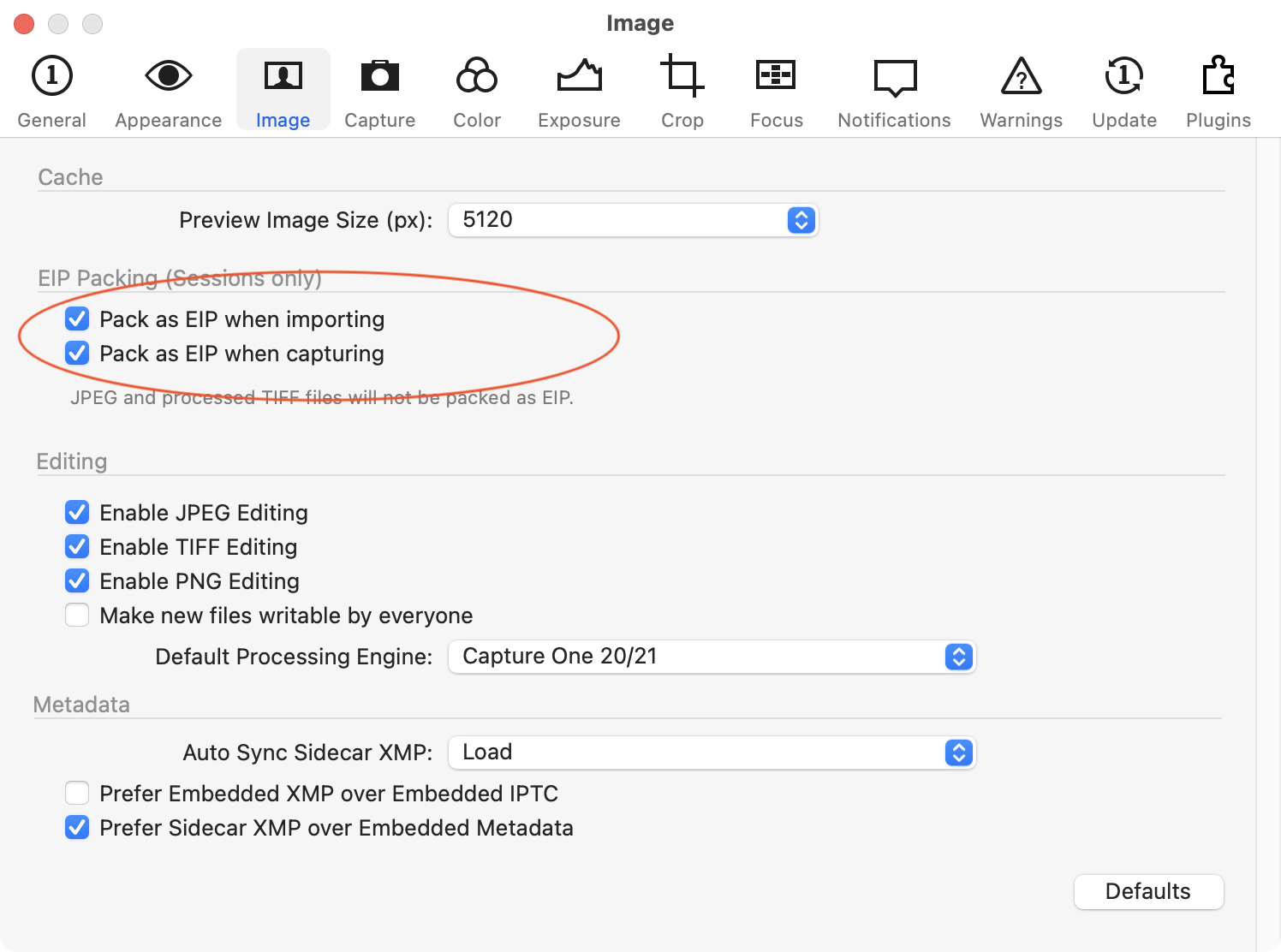 0
0 -
Hi Marc,
EIP packages have their place, but 500 raw images with 25 MB each will result in 500 EIP files 25 MB each = 12GB.
EDIT: 12GB, not 12TB
You can also pack selected raw images after import or capture in the main menu >Image >Pack as EIP.
---------------
XMP:
https://support.captureone.com/hc/de/articles/360002544898-Metadata-in-XMP-files
I generally suggest the search function, the online documentation is sometimes really good.
0 -
EIP
https://support.captureone.com/hc/de/articles/360002478617-Enhanced-Image-Package-EIP-overview
and following pages.
0 -
Sounds like the simplest and most effective solution would be to have the client simply send me the "CaptureOne" folder (in the Capture folder) that contains the "Cache" and "Settings141" folders and then replace the "CaptureOne" folder on my drive with the ones sent to me by the client. Thanks again.
0 -
Yep. And if size is a concern (e.g. email attachment), the client can zip the folder Settings141 and send just this.
0

投稿コメントは受け付けていません。
コメント
17件のコメント