TIFF/PSD Export - Color shifts with COP22

Just again as my earlier post, but now after updating to COP22: If I edit an image and open it in Photoshop via "edit with.." (a PSD copy will be created) colors look different in PS (more saturated). For the copy and display in PS both time AdobeRGB were selected. Why don't the look alike?
-

Some things to check if we're comparing apples to apples:
- Is your C1 proofing (View > proof profile) also set to AdobeRGB?
- Is PS configured to respect/use monitor calibration? (even if you haven't calibrated, installing monitor drivers can also install a colour profile for it. Not all of those are accurate and some -gaming monitors mostly- apply curves to bring out shadow details. C1 uses the profile as configured in Windows' Colour management menu.)
- Is the PSD file you export set to 16 bits?
- Do you choose to preserve the embedded colour profile of the PSD upon loading in PS? (do not convert to some other profile.)
- Is your PS RGB workspace set to AdobeRGB when viewing this? Your default might be sRGB 2.1
0 -
Thanks for your help...
- Is your C1 proofing (View > proof profile) also set to AdobeRGB? - Of course, yes
- Is PS configured to respect/use monitor calibration? (even if you haven't calibrated, installing monitor drivers can also install a colour profile for it. Not all of those are accurate and some -gaming monitors mostly- apply curves to bring out shadow details. C1 uses the profile as configured in Windows' Colour management menu.) - Am in a calibrated EIZO environment
- Is the PSD file you export set to 16 bits? YES
- Do you choose to preserve the embedded colour profile of the PSD upon loading in PS? (do not convert to some other profile.) I did neither attach nor converted to any other profile and used the one atached to the TIFF
- Is your PS RGB workspace set to AdobeRGB when viewing this? Your default might be sRGB 2.1- It is Adobe RGB
0 -
In this case I was not of much help. Could not make out from the info in your original post though. Colour management on Windows can be somewhat... finicky, hence my checks for some common issues.
The only thing I can think of now -besides a bug- to cause this is differences in rendering intent. e.g. both PS and C1 using different conversion engines for their 'perceptual' rendering. Or perhaps one is set to perceptual transform while the other is on relative colorimetric. (perceptual shifting all colours, relative only shifting out of gamut colours)
0 -

Martin,
You may already be well aware of this and controlling it to your satisfaction but I'll just mention it in case it prompts some ideas.
My year old Dell notebook running Windows 10 has a Dell application for screen colour management that not only allows for some dramatically different screen settings but also allows users to set values on a per application basis. I assume that other PC vendors offer something similar and that might be in addition to whatever one's Colour Management software is doing. It seems to be entirely possible to set up completely different screen settings to be applied to different applications.
I think the main purpose is for Video playback enhancement in different lighting conditions but I strongly suspect that "effect creep" comes into play unexpectedly.
I also notice things change slightly from time to time with no known input from me. Whether that might be related to, say, a Windows update or a Dell-advised software component update I don't know. It may even be something like a power-saving setting cutting in unexpectedly (I don't think I have any power-saving criteria set that would lead to that ... but with so many bits of code seemingly aimed at power savings who knows how they may end up interacting?)
It's probably not relevant to your situation but I thought I would mention it anyway - just in case. Application-specific settings have been known to relate to the .exe rather than the application name and updates - C1 V22 for example, may not have the same colour management attributes as previous releases. Maybe?
0 -

I have the same problem.
0 -
I have been fixed the problem.
It's about WCS dafault setting.
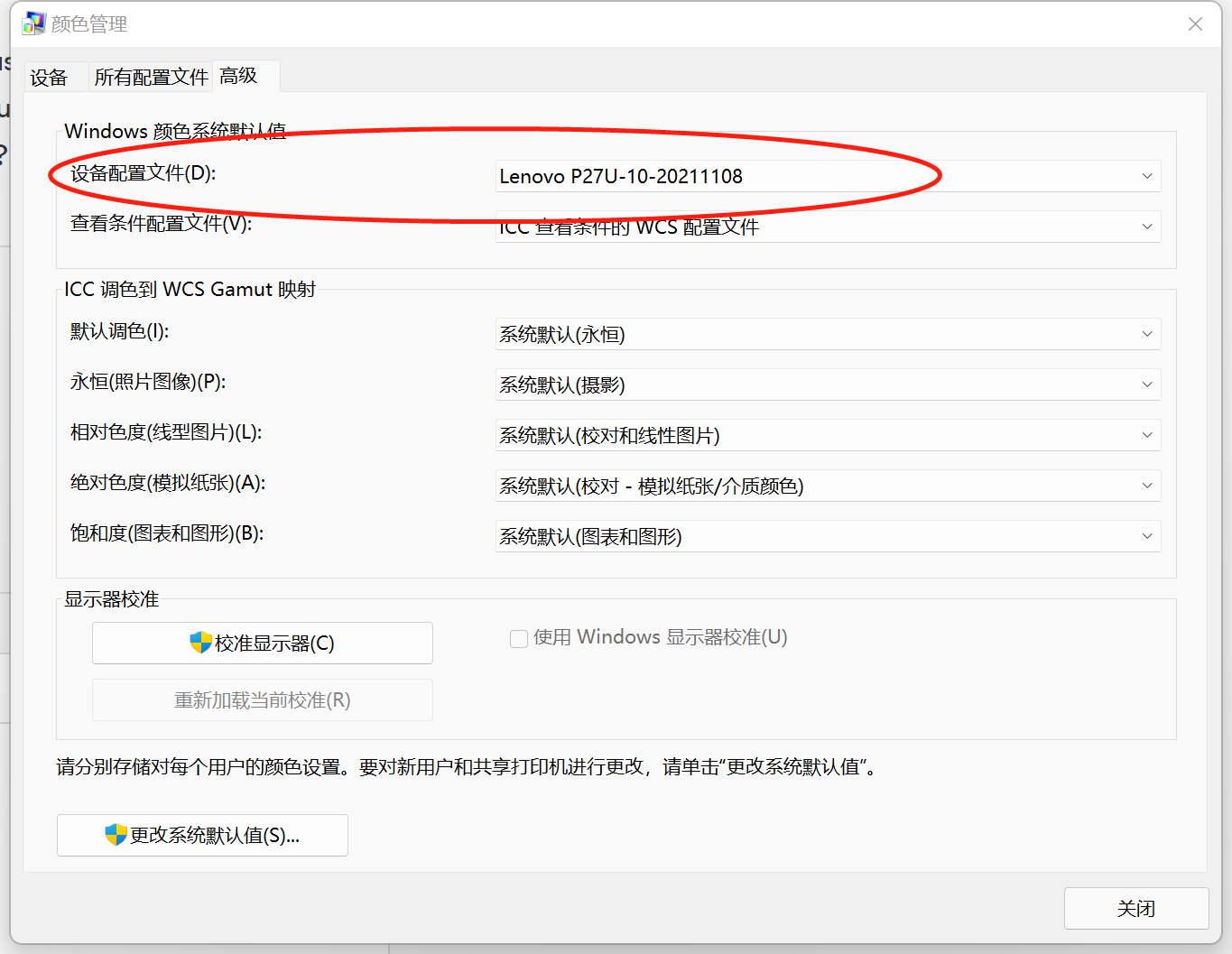 0
0 -

i use a mac mini m1 with the latest capture one and OS. Same problem here. RAW files look diffrent from the render out file tif file. what ever i open it in a other software or i render out directly from COP. Same COLOR and brightness shifts....how can i fix it?
0
投稿コメントは受け付けていません。
コメント
7件のコメント