No images showing

Hi
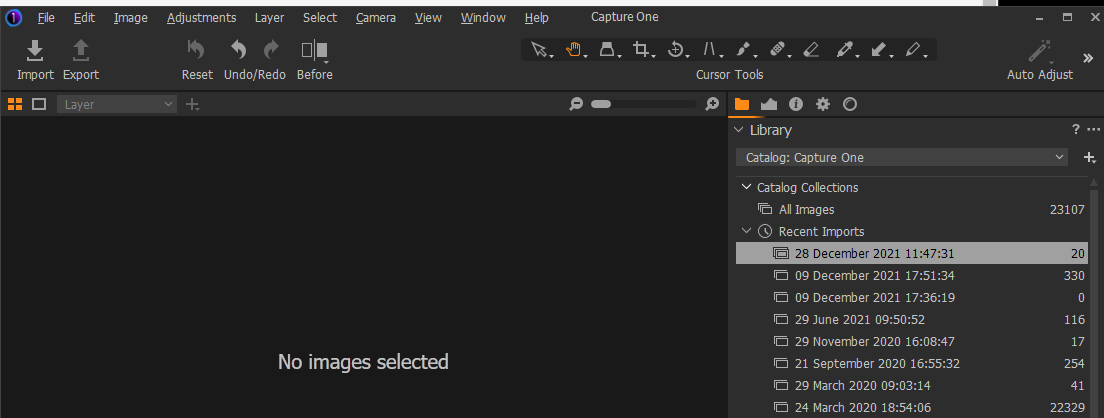
I have a folder with 20 imported images, but nothing showing in the viewer. I am very new to C1 so sorry if I've missed something obvious. Thanks.
-

It looks like you have the Browser hidden (or at least not visible in the screen shot) and the Viewer visible.
The Browser window needs to be used to select the image(s) you wish to work with. Once selected the viewer will display them.
0 -
You will find this in the View menu, or type G to hide the Viewer, then the Browser will take its place. Then select an image and type G again to show the image in the viewer, or just double click on an image.
0 -
Thanks both. Still getting used to the interface!
0 -

I'm shooting with my Sony A7III tethered to my computer. Everytime I take a shot, capture one saves three photos. As I need to stack the photos and don't want to fill up my hard drive I wanna resolve this matter so I can just have one picture. It seems like it just changes the white balance in each picture. Does anyone know how to deactivate this? Thanks in advance!
0 -

> Lizza Anne: It seems like it just changes the white balance in each picture
Is camera wb bracketing on? https://www.sonyalphaforum.com/topic/10694-a7lll-wb-bracketing/
0

投稿コメントは受け付けていません。
コメント
5件のコメント