New user question - lens correction, sliders default to zero

Hello, first post. Just trying out Capture One Express Fujifilm to see if it will work for me in which case I will buy the pro version.
Sorry if the answer is obvious, but I've looked at a few videos online and am still a bit bamboozled.
My question is about Lens correction. When I import a picture, Capture One recognises the lens (in this case Fuji GF32-64mm), and I gather that the default behaviour is to apply corrections automatically. However all the sliders are set to zero, which kind of suggests that no corrections are being applied.
If however I change the profile to "Manufacturer Profile" the "Distortion" slider moves to 100, and the other two stay at 0.
Is there any way to have the sliders set to 100 automatically? Otherwise I must be missing something. Why have an "apply corrections automatically" feature with the values at zero?
Looking forward to being enlightened, thanks in advance.
-

I had similar issue with my Sony camera (I use the Pro version). The camera has setting whether to apply the lens correction or not when you take the picture. If the setting is off, the default value of the Distortion slider was 0 and I had to manually move it to 100. When I enabled the setting in the camera, it became 100 by default. It seems to follow an information in the RAW file.
1 -
Thanks for the response - that's interesting.
There does not seem to be such an option anywhere in the many menus of the GFX 50r. But as I said above, the slider is set to 0 when Capture One recognises the lens and uses its own profile, and set to 100 when I select "manufacturer profile", which as I understand it is when Capture One uses the profile that is contained in the image file's metadata.
It would therefore appear that whatever flag Petr is referring to in the Sony metadata is permanently set in the Fuji metadata. But it has no effect when Capture One uses its own version of the Fuji lens profile.
So my question remains - is there any way to have Capture One set the default slider position to 100 when using its own profile?
Edit: in the Capture One knowledge base I find the following under "lens correction":
"When Capture One detects a lens model with a correction profile in the database, the profile is selected and, typically, chromatic aberration and distortion correction adjustments are automatically applied."
So one would expect the values as shown on the sliders to be non-zero, if adjustments have been automatically applied, would you not? Or have corrections been applied even though the values show as zero?
0 -
A few questions.
Does it make any difference what focal length the lens is set to? A zoom lens typically needs more distortion correction at the wide end of the range.
If you take an image of something with obvious geometry - such as a boring picture of a brick wall head on - is there visible distortion? And how does it look with Manufacturer Profile as compared with the Capture One lens profile (and as compared with the profile set to Generic)?
Ian
1 -
Thanks, interesting questions. I'm travelling at the moment so not able to answer all your questions - I have the camera with me so will try and find a good brick wall tomorrow. Will then compare photos taken at different zooms and different profiles, and report back.
Although whatever is happening, one would expect the software to behave in the same way with the manufacturer and Capture One profiles - either both set sliders to 100, or neither.
Meanwhile I have raised the same issue with Capture One tech support. Will advise their response if/when received.
0 -
If you can't find a brick wall, something else obviously rectangular would work - such as a window.
Ian
0 -
My late father, in the analogue 1970s, used to take photographs of graph paper.
0 -
You'd have to be quite close!
Ian
0 -
He was a civil engineer - used to bring very large sheets of it home from work.
0 -
Just got home armed with some new images, including some very fine shots of brick walls at different zooms and apertures. Looking at them I concluded that Capture One was not automatically applying lens correction when applying its built-in lens profile.
Then I noticed something really strange. When opening some of the other new pictures (ie, not the brick walls), the distortion slider WAS set to 100, and correction was being applied. WTF? I could see no obvious reason why.
I am now officially confused.
0 -
There are a few things to think about in that.
(1) It may vary with focal length, though it seems that you tried it at several focal lengths and it didn't apply it for any.
(2) There is an option to disable default lens correction. Perhaps that has been inadvertently checked? It doesn't change existing images, but it changes whether new images imported have default lens correction applied. You get to it by clicking the ... in the lens correction tool. Worth checking?
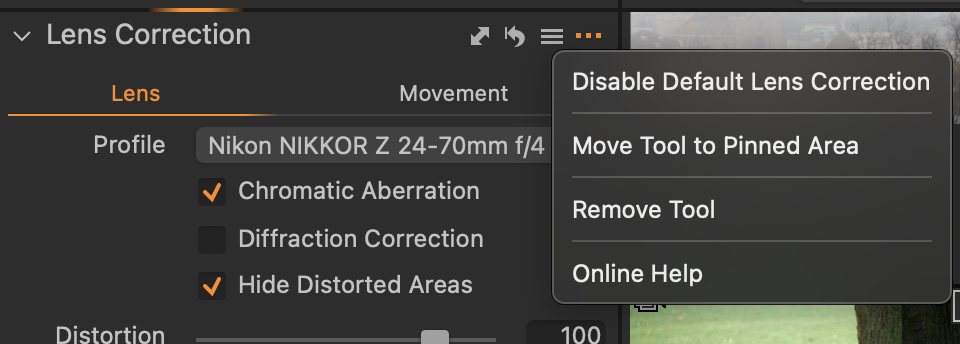
Ian
0 -
Hello.
No, "Disable Default Lens Correction" was not checked. I had found that setting earlier and made sure it was not.
I was looking at a series of four images. The first one had the distortion slider set to 0, the second 100, the third 0, the fourth 100. I did not manually change the position of the slider. I went and looked at something else for a bit, then came back to those same four images. This time the slider settings were 100, 100, 0 100.
I've done a bit more searching online and found that some people with earlier versions of CaptureOne were encountering this sort of unpredictable behaviour with this feature. Perhaps it is because I am using the Fujifilm Express version.
0

投稿コメントは受け付けていません。
コメント
11件のコメント