Colour & Star tags

After the new update (15.3.1) of Caspture One 22 Pro i have the following problem:
After i work on a raw file i open it in Photoshop using "Modify with...", i work on it, save and came back to CO. Now, normally (i use CO from about 4 years always in the same way) i put an orange colour tag to the raw and a green one to the psd: after the update, maybe for a bug, the first one take the tag of the second one (indipendently of wich i tag first).
It's a big problem for me because i work with a large numer of file every day.
Thanks
I have a Mac Pro.
-
When I use "Edit with" I get a dialog box where I can set a number of things to do with the file that goes to Photoshop (or whatever editor). See screenshot below.
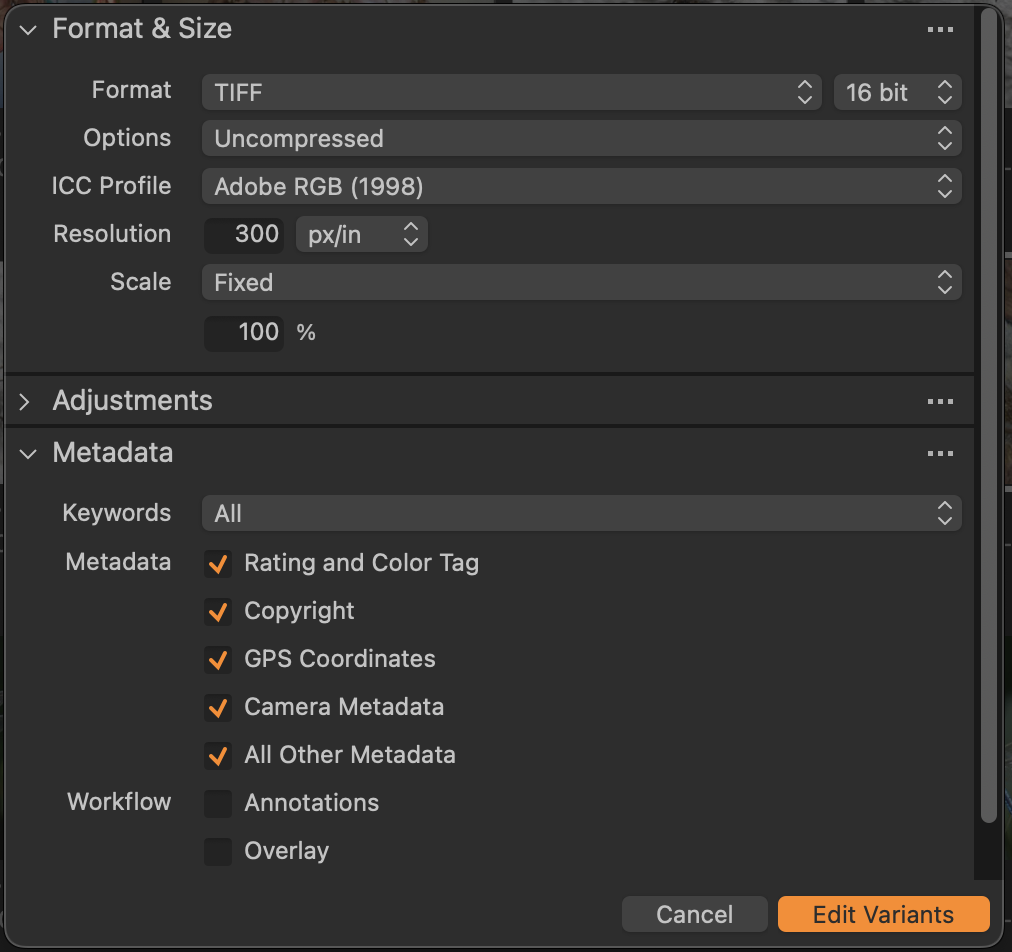
What have you checked in the Metadata section of this?
Ian
0 -
Hi Ian,
Yes, I’ve already tried to de-flag but the result is the same… that’s why I think that’s a problem of the last update…
0 -

> Davide Cecchini: ...the first one take the tag of the second one
C1 stores metadata in the database. If you somehow use C1's metadata sync function, by command or auto, metadata is copied to the XMP sidecar. The metadata load function loads metadata from file, copying metdata from XMP sidecar and/or image file(s) to the database. A "full sync" essentially dictates a sync-load sequence.
A possible scenario:
If files A.raw and A.psd have different tags set in the database, sync will copy to sidecar file A.xmp. The last tag sync'ed is in the A.xmp. If you have C1 execute its metadata load function, the tag for A.raw and A.psd will be updated in the database and presented on screen. Naturally, both reflect the last tag set and copied to the sidecar.
My guess is that you have the Preferences->Image field Auto Sync sidecar XMP set to Full Sync. If so, set it to None and try again.
-1 -
Thanks OddS, i tried to follow your advice and now it seems like before!
Best regards,
Davide
0

投稿コメントは受け付けていません。
コメント
4件のコメント