Crop tool no longer recalls previous aspect ratio on next image

After switching from 22 to 23 and cropping a large number of product images I'm noticing unusual new behavior. Previously, when a custom crop ratio was selected that setting would remain from image to image until it was changed. Now with 23, I'm noticing it reverts to "Original" when I advance to the next image. This is a major workflow hinderance. Is it intentional?
-

This is so incredibly frustrating. It is adding hours to editing and I can't believe it is a feature they actually removed. Between this and the terrible instability of the app I've gone back and installed 21 and I'll just wait until they fix this appalling release.
0 -
There is a choice in Preferences in the Crop section that you need to pay attention to. (Not a version 23 innovation - it came in at some stage of version 22.)
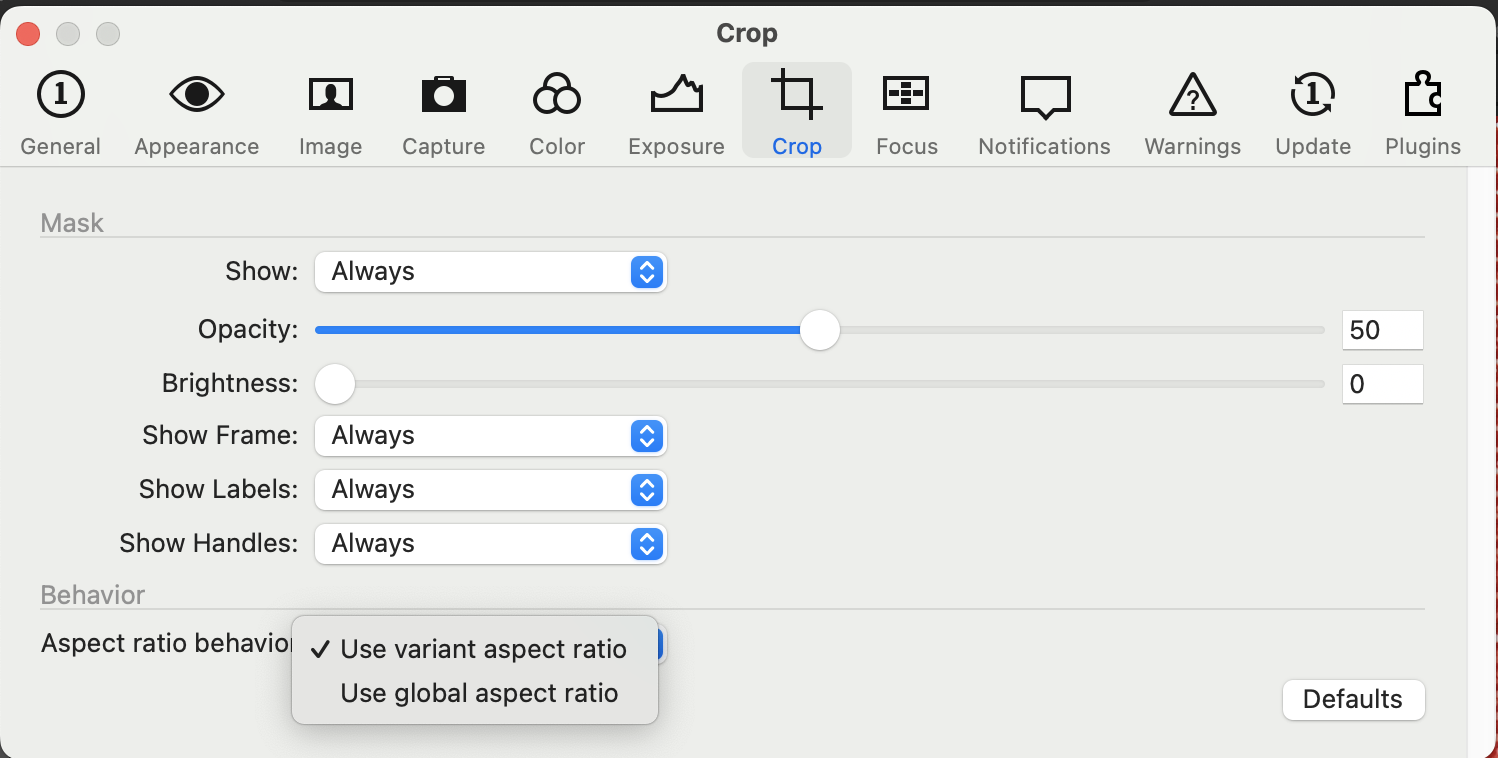 To get the behaviour you appear to prefer, make sure it is set to Use Global Aspect ratio. (Then it behaves the "old" way.)
 And before you ask why did they change it, the answer is that a lot of users asked for it.
Hope that helps.
Ian
2 -
What Ian Wilson said :)
0 -
Thank you! This saved a lot of grief. I can't imagine how I was supposed to guess that 'global aspect ratio' meant preserving the previously used one but I won't stare a gift horse in the mouth.
0

投稿コメントは受け付けていません。
コメント
4件のコメント