Can't get GFX 50 SII Raw files as sharp as SOOC Jpegs in V23

Hi there,
Just started using V23 going up from V9 to use Capture One with my GFX 50 SII files.
I've noticed a strange thing : when I compare the SOOC Jpegs to the RAF files side by side in Capture One, the raw files always look a bit smeared, as if its pixels were thicker than those of the Jpeg. No amount of sharpening can correct it.
It actually looks a bit like if the picture was copied and pasted onto itself with a slight shift to the side. Please look at the thickness difference of the characters on the screen capture below, Jpeg on left and RAF on right. This is with like structure at 15 on the raw. I've also tried with the sharpening tool and it's not better, I can't get it sharper without these letters getting thicker.
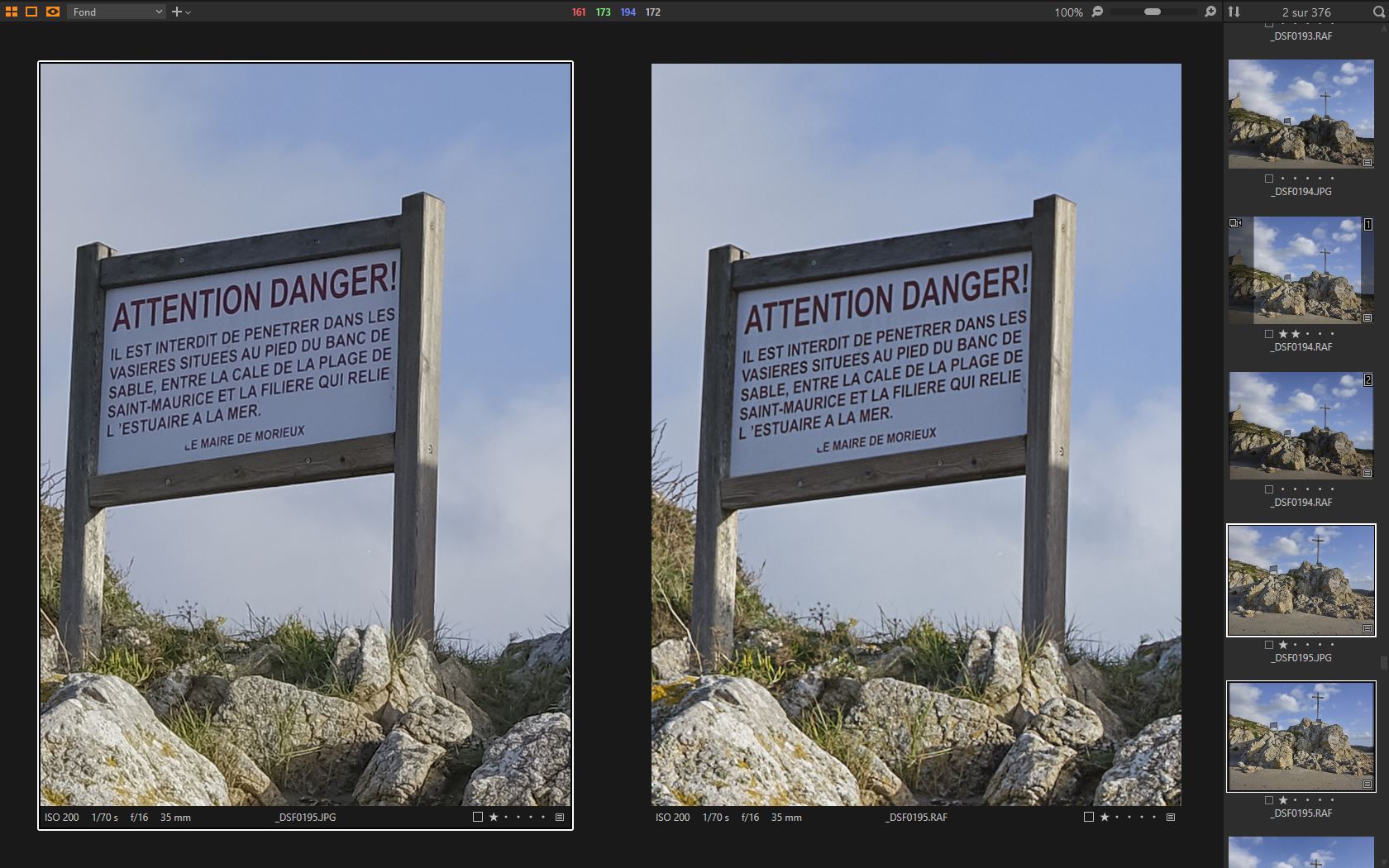
So does the GFX's processor have a better sharpening algorithm than Capture One, or am I just not doing things correctly ?
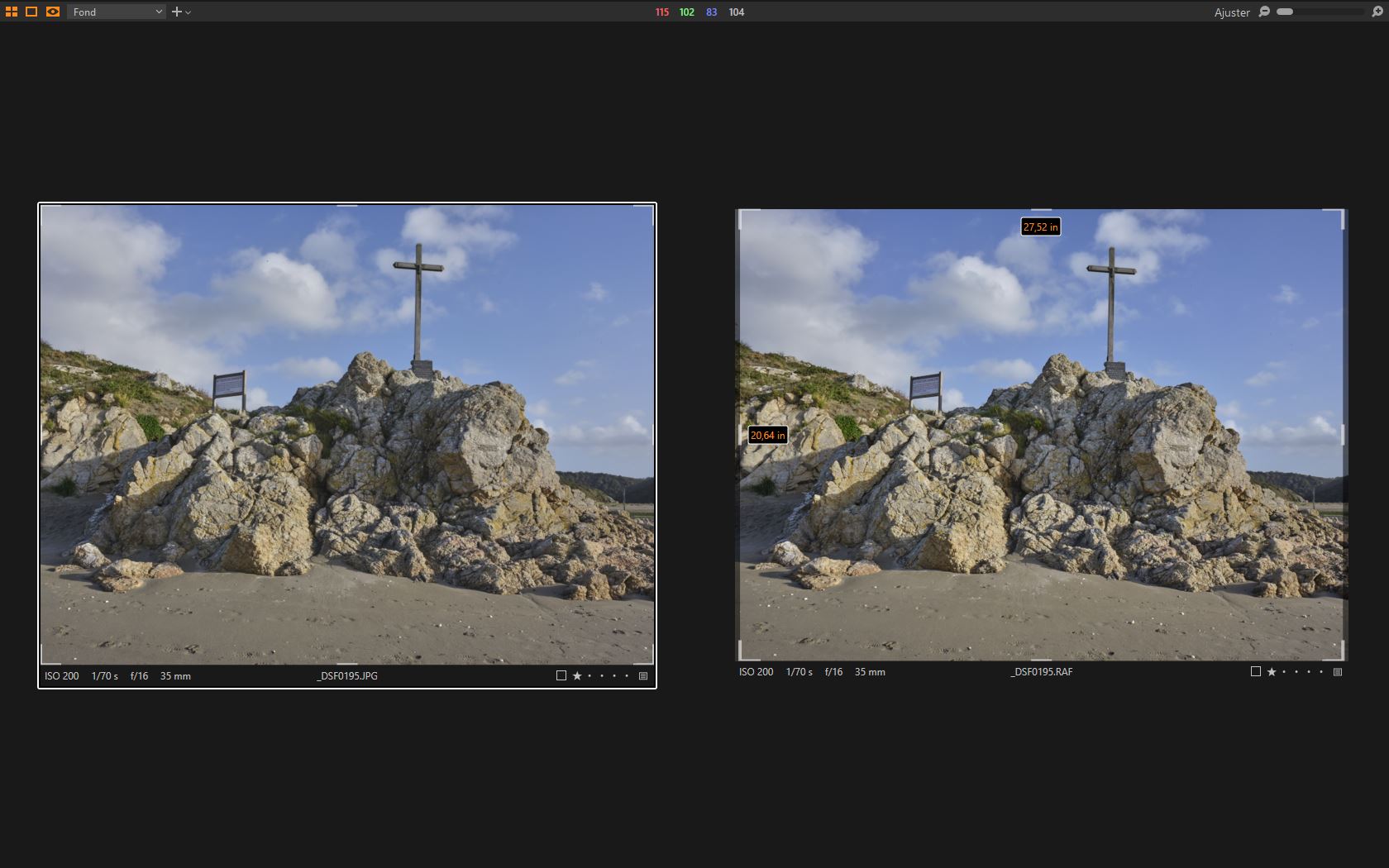
Also, when going into crop mode, I've noticed that there always seems to be a width difference between Jpegs and RAFs, with the RAFs looking wider than the original crop would allow. See the second screen capture. Does that mean that the GFX's processor applies a crop and reduces the width of the image ?
-
To me, the one on the right (your RAF with extra structure) looks sharper! (But I realise that I am not seeing it full size on your screen so that may be an illusion.)
The width difference is because Capture One has applied lens corrections. If you wanted to, you could extend the crop to the left and right edges to include a few pixels that the corrected version is not showing. You could turn off lens correction and you would not see this. But it is probably a good thing. Looking closely at the skyline at the extreme right of the image, or at the rocks on that side, I think that there are pixels showing outside the crop that have already been removed by the SOOC JPEG. So Capture One is correcting the image very much the same as the SOOC JPEG, but it can show you the pixels that have been excluded but were actually captured by the camera sensor. Generally it is best to accept the correction as it is. But sometimes in an emergency if your lens didn't quite manage to bring in the full width of the scene, you can bring back a small amount extra by pulling the crop over.
If you go to the lens correction tool you could pull the slider down to zero and observe the effect on the crop.
Ian
0 -
Hi Ian,
Thanks for these very interesting explanations !
Regarding the sharpness : have you tried to check the picture at full size (right click => open in new tab) ? To me in full size the crop on the left looks sharper, and the characters thinner than the crop in the right.
Cheers,
Michael
0 -
Thank you SFA for this additional information. :-)
All you state does indeed make sense.
However I think I can see the effect I'm talking about in pretty much every other shots, regardless of aperture or shutter speed (oh and BTW sensor stabilisation of the GFX 50 SII was active so 1/70th should be fine right ?).
So maybe it is just that Fuji's over sharpening makes for thinner looking details (albeit producing halos as you've rightly spotted) ?
Anyways I'll keep observing and see if I can understand it better.
Thanks to both of you for your input !
Cheers
Michael
0 -

I can see what you mean by the RAF looking smeared, almost over sharpened in a way.
The SOOC seems a tad softer but looks like it could handle a bit more sharpening and still look good.
What does a jpeg export of the RAF look like?0 -
https://www.photographyblog.com/previews/fujifilm_gfx_50s_ii_photos
I downloaded a few sample files from above link and cannot really replicate your problem.
If I crank clarity and structure up to 100 it starts to look like it a bit.
Would you have a link to your RAW for us to download?0 -
Hi gb and thanks for your answers.
Playing with CO's sharpenig tools I think those files just don't take "structure" boosts very well (in the screen capture the structure was at 20 in natural mode), as if I try to only boost the sharpening tool to about 240 (instead of the 140 base value), I can get pretty close to the SOOC Jpegs, with actually less halos. :-)
Not that this is how I'd like the files to look, but I founded it strange that I couldn't get at least close to them in CO.
Actually, those shots were taken at about mid-day, so even if it's autumn the light was not exactly soft.
0

投稿コメントは受け付けていません。
コメント
6件のコメント