CR3 RAW Files Not Opening!

I recently bought the new Canon R5 and I tried tethering onto Capture One like I regularly do. Usually, after I export the RAW file, I will click on it and it will open up in Photoshop but now when I click on it it, its a preview image and nothing happens when I click it. It's like its an empty file? I'm aware that the new Canon R5 uses CR3 instead of CR2 but I'm not sure why it doesn't work? It should be the same thing, no? I have attached a print screen for you to see what I'm talking about..
FYI, I use a MacBook Pro OS High Sierra and am using Capture One 21 14.3 if thats helpful!
-
You say "the new Canon R5" but my understanding is that the R5 was released in Summer 2020. It has been supported by Capture One from release 13.1.2 of version 20.
But since you say "new Canon R5" I wonder whether you meant the R5C - that was not supported until release 15.3.0 of version 22.
https://support.captureone.com/hc/en-us/community/posts/8037495885853
Ian
1 -
Apologies for the misunderstanding- I meant new because I recently purchased it. Yes, the 2020 Canon R5 is the one I'm referring to!
0 -
I'm not sure if its a Photoshop or C1 problem.. I'm thinking maybe C1? I have attached a screenshot here
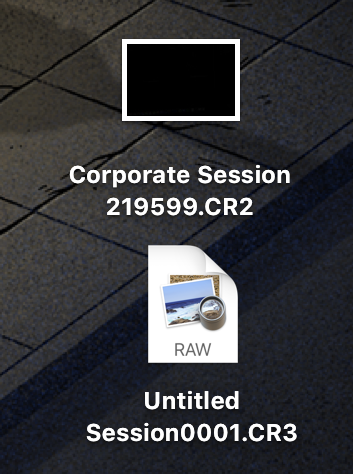
On top is how all my CR2 raw files usually are when they're exported to desktop.. Clickable and you can see the image preview of it. Whereas below the CR2, its how the CR3 raw photo is when exported to desktop.. An un clickable 'preview' file with no image preview.. So strange..
0 -
I'm thinking maybe I can't open the CR3 file because my photoshop is not up to date.. Does anyone know if this may be why? My Photoshop version is currently 21.01 2
0 -
I think it may be a MacOS problem. A bit of Googling reveals that MacOS can't preview CR3 files before Catalina, so that could be why High Sierra can't show you the preview.
Ian
0

投稿コメントは受け付けていません。
コメント
5件のコメント