Can't Import Files from Memory Card

I imported one of my memory cards to a gallery I'm creating, no issues. I put the 2nd card in, chose which files I wanted, clicked import and nothing. I tried over and over again. I then tried to bring them into other folders, changing the name, etc., nothing. Rebooted, still not working.
What is going on here? I need to get these files imported ASAP and it simply will not ingest anything off the card. When I click on it, absolutely nothing happens other than it closing the import window...
-
Is it possible for you to post a screenshot of the import dialog box, so that we can see exactly what is going on?
Also tell us whether you are on a session or a catalog, where you are trying to import the images to, and any other details that might shed light on it.
Also, I'm not sure what you meant by a a gallery - not a Capture One thing.
Ian
0 -
Thank you Ian,
The problem is there is zero import dialog when I clicked on import images because nothing happens. It's just like I cancelled the import when the intention was to import the selected pictures from my memory card. I tried importing them to my data drive like I've been doing for 3 years on Capture One. This is the first time this has happened to me but I've seen others have this issue.
I figured out a way to fix it. If I choose IMPORT ALL, it works fine but I obviously don't want to be importing 160 gigabytes of images. So I'm just going to use a memory card with 1 image on it, do an "import all" to fix the issue, then use my intended card as a workaround until this is fixed.
There is something going on with importing images with multiple memory cards. Sometimes it just doesn't import from the 2nd memory card used when creating a gallery.
Here is an image of my structure, again I'm not sure how this stuff is labelled but to me it's just a gallery lol
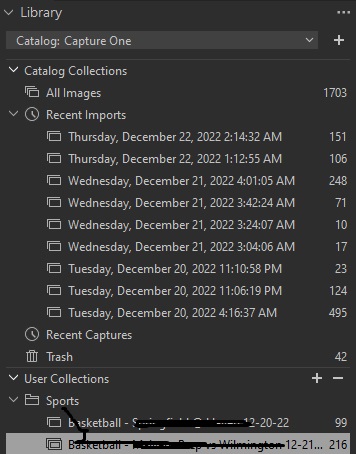 0
0 -
I still don't really follow what you are doing.
- I still don't know what you mean by a gallery.
- I don't understand how you can choose Import All if there is no import dialog box.
And have we had a discussion like this a few weeks ago?
Ian
0 -
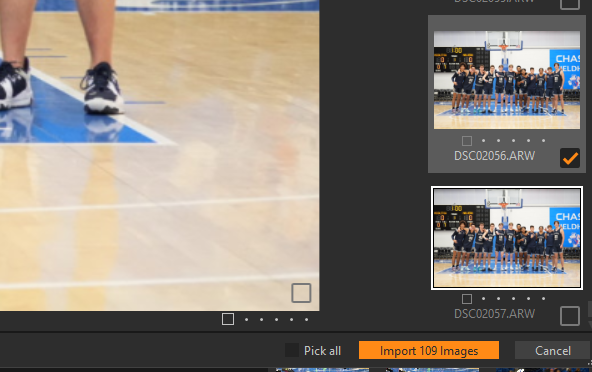
This is the import dialog box yes? This is what I clicked on and nothing happened, over and over again.
Here is another thread of someone who had the same problem, with his workaround
I select my images hit import 50 images and the importer goes away however the import never starts
And his solution
The Solution I have found is On the import drive / location. loses its place. even though all photo show in the importer and every thing looks find it has lost it's path. So I take and give it a different location then go back to the original Drive D in this case and whala it works. It has now not been able to import to my session three times and each time the above has worked to be able to use the importer.
I found a separate workaround which is to use another memory card with a single image and do "IMPORT ALL", by doing that is frees up whatever hangup capture one has
0 -
Yeah I'm trying to directly import from memory cards into capture one. I don't use any other programs like photo mechanic, adobe bridge, etc, before hand.
So now Capture One wouldn't even import files from my first card. My card reader has been and is always recognized as an F: drive, and I'm importing files to the same hard drive as before. Once again, if i choose IMPORT ALL, it frees it up and it will work when I follow up.
So from now on, until this is properly recognized and fixed, this is how I will import images in the future:
Insert card > Import All > Cancel > Choose Images to Import > Import XXX Images
I am using a single slot memory card reader, they are CF-Express Type A cards.
0 -

I found this problem and a solution last week. Here is a link to the thread and answer. https://support.captureone.com/hc/en-us/community/posts/8184881337373-Can-not-import-images-to-a-session-I-am-Begging-for-HELP-Answer-FOUND-Kinda
2 -

Thanks you so much, I'm a long Time C1 user and I've never had any issue importing until this morning. Drove me mad but your solution fixed it !
0 -
Yeah thanks for the tip, it works
So now you 100% have to choose the exact location where you're importing from , then check IMPORT ALL, then uncheck, select the files you want and it will actually import the files
Hopefully this bug gets fixed. Just earlier I forgot to do this workaround and it didn't import anything
Already lost hours to this bug lol
1 -

I submitted a support ticket for this. They got back to me last acknowledging the bug and said it would be fixed. No dates or anything.
0

投稿コメントは受け付けていません。
コメント
9件のコメント