Magenta tint in thumbnails where there are burned out highlights

Ok, it's more an annoyance than a problem... But am I the only one who sees magenta fillings in thumbnails in areas of burned out highlights, as in the attached screenshots?
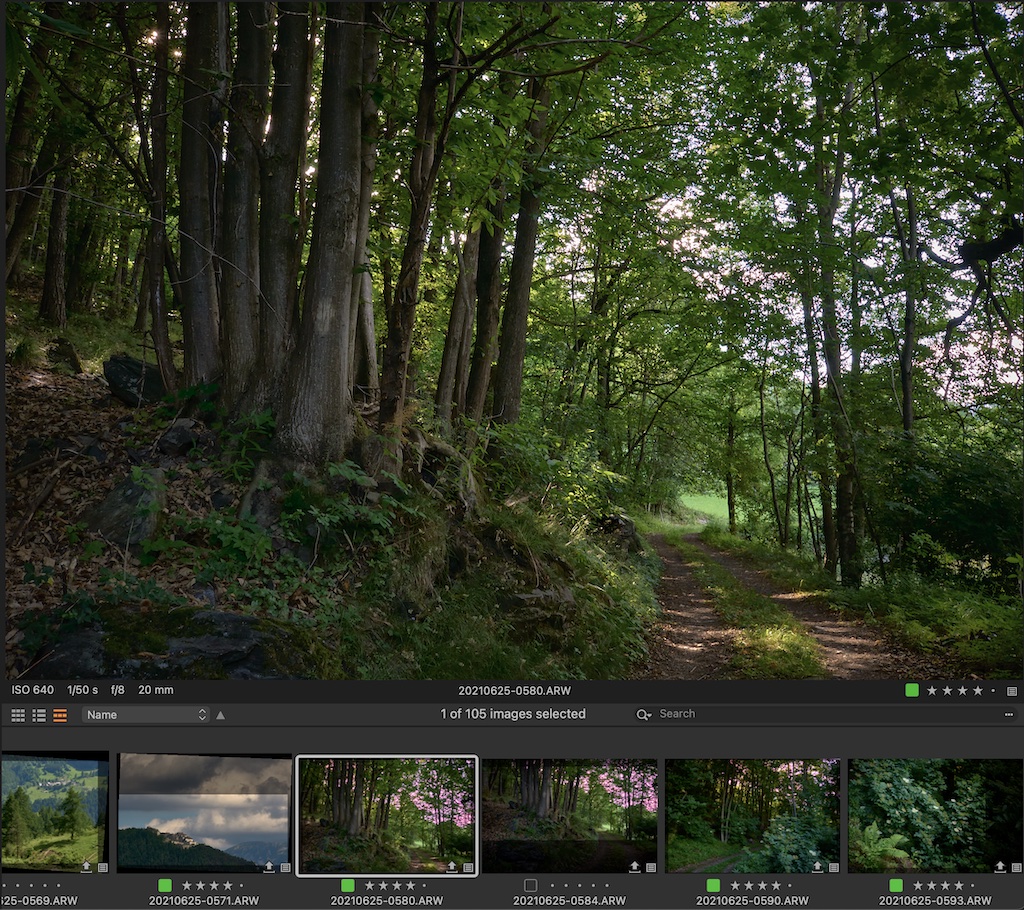
-
The problem is not my image — I'm perfectly fine with it — but the thumbnail that could be misleading: I mean, thumbnails are used often to quickly select an image among many others and thus they should look as close as possible to the original. Once that one is used to the problem in most cases he can ignore the magenta stuff, especially when he knows that magenta is an extraneous colour (for instance, in the case above I know that there are no sunsets in that session). But what about a session with sunsets, in which this phenomenon could be misleading? Of course when you open the image you are back to reality, but you might realise that the photo is not the one you were searching for and thus waste time.
Yes, I think it's related to compression (it probably happened with Lightroom too), still shouldn't it be considered as a bug and fixed?
0 -
I think that I've been quite clear: the IMAGE IS OK. The problem is the THUMBNAIL. C1 just needs to render the thumbnail just like the image.
0 -

> Fabrizio Giudici: C1 just needs to render the thumbnail just like the image
C1 may not have created the optimal thumbnail. If that is the case, the thumbnail colors for blown out highlights may be off-balance even if rendered correctly (exactly as as produced). Thumbnail production is affected by factors hinted to you by SFA.
0
投稿コメントは受け付けていません。
コメント
3件のコメント