What does this symbol mean?

I'm shooting tethered, and on some of the images this symbol appears on these images I can't make changes, such as moving the cropped area. On the other images where the the symbol doesen't appear, there is no problems. What's going on? Could someone please help? Thanks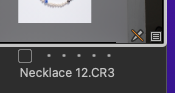
-
https://support.captureone.com/hc/en-us/articles/360002474238-Thumbnails-Icons
However, I think the documenation is not correct or outdated. e.g. I have never seen this Read Only icon for JPGs when editing JPGs in the preferences is disabled, instead I see the View Only icon (the eye).
C1 Windows version 22.
0 -

While I do not shoot tethered I do encounter the Read Only symbol on certain B&W files generated from scanning negatives. It has to do with the lack of a color space designation appended to the file. I can however open/process these images in 3rd party software such as the Nik Suite or Topaz products. Even if I make no changes the saved tif file is now fully editable in Capture One. Perhaps this can be a useful in an emergency?
0

投稿コメントは受け付けていません。
コメント
2件のコメント