Issues with “Open/Edit with” dialog

I am using some external apps to edit my images from within C1. For most apps, this works fine, but with two apps I struggle to get them configured properly in C1.
Both tools are assigned in the plugin configuration:

But when I the open the “Edit with” or “Open with” dialogue for an image, only one of the tools is shown below the separator line:
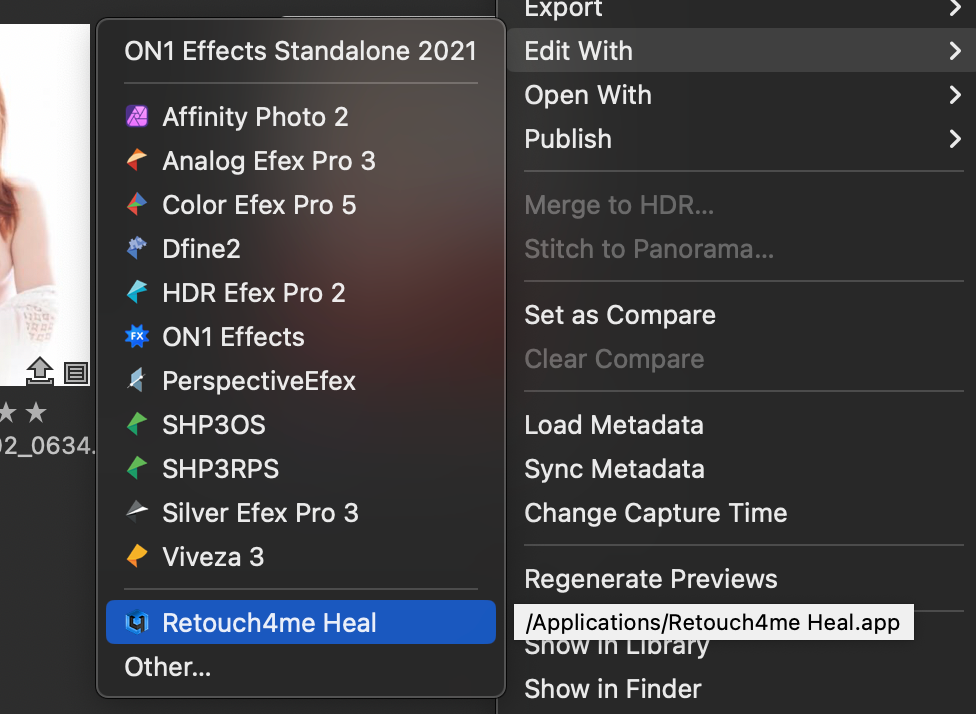
First question: Why below?
And if I then use “Other” and search via the Finder on my Mac, the selected tool replaces the previous, listed tool, so again I only have only one of the two tools
So second question: Why are both tools not added to the “normal” list?
Any ideas?
0
投稿コメントは受け付けていません。
コメント
0件のコメント