To use this version of Capture One, please sign-in

The message contained in the thread title has begun to appear recently. My choices are to sign in or delay for 30 days. This seems a wholly inappropriate and annoying behavior for a "perpetual" licensed installation. If I'm unable to connect to the internet for several weeks am I screwed? What happens when those you must phone home servers are taken off line at some point in the future (ala Adobe)? What exactly does perpetual mean in C1 speak?
-
Deprecations of services
We are constantly striving to provide the best possible experience for our customers. This sometimes requires us to deprecate aging functionality to replace them with a more secure and future proof solution. We are therefore removing the below activation methods:- Offline activation
source:
https://support.captureone.com/hc/en-us/articles/4404910726173-Capture-One-22-15-1-0-release-notes
see also
What exactly does perpetual mean in C1 speak?
perpetual in C1 speak means as long as we keep our activation server running, for your license. It is also a synonym fo pricey and comes with a customer-unfriendly (and unlawful, if you live in the EU) bug fix policy
0 -
perpetual in C1 speak means as long as we keep our activation server running, for your license. It is also a synonym fo pricey and comes with a customer-unfriendly (and unlawful, if you live in the EU) bug fix policy
BeO, thanks for confirming my suspicions.
So now I wonder... if I revert to a previous version that did not exhibit this behavior (v20), my understanding is I will have to use the most recent license key issued to activate. Will this periodic, irritating sign in requirement then attach itself to the older version?
0 -
Sorry, whether or not this depends on the version used I don't know for sure. All I can say is that with 15.2 on Windows I don't have this issue (unless I switch starting different versions forth and back, e.g. a new trial version and back to 15.2 etc.). But I am almost always online.
But you cannot open a catalog or session created with a newer version, or updated catalog, with an older version of the software.
0 -
But you cannot open a catalog or session created with a newer version, or updated catalog, with an older version of the software.
Understood. I backed up my v20 catalog manually before I upgraded. Not sure how or if my session will be affected since I use one generic session for everything.
0 -
The session database file contains e.g. the session folders, albums, smart albums etc., such data will be lost.
But the important tool adjustments and metadata edits reside in the settings folder in the .cos files, layer masks in the .comask files. And you can edit the .cos files.
Some versions write these files in the same settings folder, once in a while a higher version uses a new settings folder (they copy an old settings folder and upgrade the files content, if you look at them in the browser).
e.g.
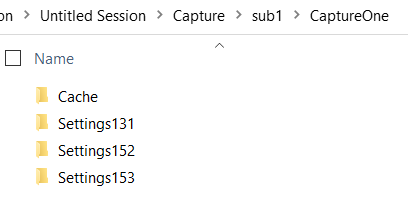
I think version 23 still uses folder Settings153 but you will see that in your file system.
I successfully downgraded my Settings files from version 15.4 (which uses Settings153) to 15.2 (which uses Settings152). You need to change the Settingsxxx folder name and also some tags in the .cos files, e.g. Author, Version, eventually "VAR Engine" (which is the Base Characteristics tool's Capture One Engine).
Not sure this list is complete, you should create a test session with v20, import and edit images with all tools, make a copy and upgrade to v23 and thoroughly compare example .cos files. Also import new images into v23 to see typical v23 settings (e.g. Base Characteristics Engine).
Some tags can occur multiple times in a .cos file (so modify them all, as appropriate), as all "variants" settings are stored in one .cos file, the same is true I think for layer settings of each variant.
The .comask files (your layer masks) are probably not an issue, leave them alone they likely work with the "downgraded" .cos files.
Theoretically, and maybe actually, some higher versions can add tags for new tools (e.g. for the new Dehaze tool which was introduced a few versions back, or for the Black and White slider which was not available in v8), if you used such new settings obviously you cannot downgrade to a lower version without a different look to your images. You probably should remove them, or maybe they are just ignored by the lower C1 version.
Maybe some tags are removed in a higher version (though I don't think it is the case), and some tag values can change their "meaning" or "impact" on an image. The latter could theoreticlly be a problem e.g. if brightness 6 in v23 would render an image as bright as brightness 5.78 in v20) but my gutt feeling is that same values mean the same impact to an image in all tools at least in the last 3 versions.As said I successfully downgraded from 15.4 to 15.2 which is not a big step, but it is probably possible that you can manage going back from v23 back to v20, no guarantee, test thoroughly a lot of edits, variants and layers with all tools to develop your own procedure.
Of course it is impracticable to mass migrate all .cos files one by one without the right tools. On Windows, I used Notepad++ as it can replace strings in all .cos files in all subfolders at once.
_________
Once you modified/downgraded the v23 .cos files and they have the values as original v20 .cos files would have you should be able to open and edit your images in a v20 generic or dedicated session, or import the images into a catalog "including adjustments".
1 -
Thanks for the detailed reply. I appreciate it.
0 -
You're welcome.
0

Post ist für Kommentare geschlossen.
Kommentare
7 Kommentare