Capture One 20

Hy there
I have just bought C1 20 and importet my LR-Catalog. So far Im getting along... For the moment, there is 3 questions, that I cant find an anweser in the net.
Keywords:
In LR, there was additional Infos to a keyword - for example the latin name to a wildlife-species. C1 makes 2 different keywords out of them, but doesnt asign the latin name to the image. It is a bit of a mess....
How do I fix this and is there a way of putting additional Info to a keyword?
How to give a Tiff or PSD a specific date? So the file shows up next to the master-Nef when sorting by date?
How do you compare 2 images at the same time for sharpens?
Thank you very much for your help.
Kind regards
Henry
-

Hi Henry,
I can't answer your question about the keywords, as I don't use them very much.
About the date of a TIFF/PSD, usually it is the same as the RAW (NEF) after having processed through any software, provided you asked the software to carry the EXIF when exporting. Otherwise, Capture One can't modify the EXIF, and you should then use a third-party software to do it.
To compare two images, you just have to select them after having clicked on the relevant icon (4 orange squares on the top). You can then zoom up simultaneously by maintaining the Maj key pressed.
Robert
 0
0 -
Additional info for a keyword is not possible I believe. Maybe you find some useful information here:
https://support.captureone.com/hc/en-us/articles/360002544338-Hierarchical-keywords
In Windows version of C1 it is the shift key for simultaneous zomming or panning, is it not in the Mac version?
You can choose the images to compare first, and then check the icon, or vice versa.
regards
0 -
I haven't used LR, so I am not sure how its keywords work. I use hierarchical keywords in C1 for wildlife images. So for instance I have bird>birds of prey>buzzard. I don't usually add the Latin name too, but I could have made the buzzard keyword buzzard (Buteo buteo)
So it looks something like this
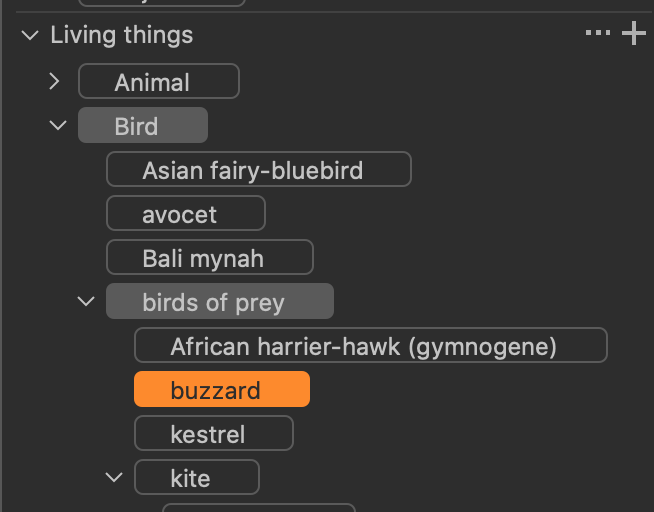
I could have a hierarchy of Latin names alongside common names, but that would get cumbersome and I'd have to remember all the time that for instance a mallard was Anas platyrhynchos which most of the time I have to look up! I don't know of an automated way of putting in Anas platyrhynchos whenever I add the keyword mallard unless I make the whole keyword at species level include the latin name as well as the common name.
You could put Latin names in something like the Description field in the IPTC metadata, but that gets cumbersome and it's not quick and easy to add it to more than one image at a time which it can be for keywords.
Ian
0


Post ist für Kommentare geschlossen.
Kommentare
3 Kommentare